

I’ve worked with enough SEO teams to know exactly where the bottleneck lives. It’s not a strategy. It’s not content. It’s data. Specifically, it’s the hours spent every week manually exporting spreadsheets from Google Search Console, copying rankings from one tool into another, and building the same reports from scratch, again and again. The teams pulling ahead in SEO right now aren’t working harder. They’re working programmatically. And the technology making that shift possible is the API in SEO. Understanding what APIs are, which ones matter, and how to use them is fast becoming one of the most important practical skills in modern search optimization.
APIs in SEO: TL;DR
An API in SEO is a programmatic interface that allows tools, platforms, and custom scripts to automatically exchange SEO data (such as keyword rankings, search performance metrics, backlink profiles, and indexing status) without any manual input, enabling automation, real-time analysis, and scalable workflows.
What Is an API, and Why Does It Matter for SEO?
Before I get into the SEO-specific applications, let me explain what an Application Programming Interface (API) actually is, because the jargon puts a lot of people off, and the concept itself is genuinely simple once you strip away the technical language.
Think of an API as a waiter in a restaurant. You’re the customer (your script or tool). The kitchen is the database or platform holding the data you want. The waiter (the API) takes your request, goes to the kitchen, retrieves exactly what you asked for, and brings it back in a structured, usable format. You never need to go into the kitchen yourself. You just place the order.

In SEO terms, an API in SEO allows your tools, dashboards, or custom scripts to request data directly from platforms like Google Search Console, Ahrefs, SEMrush, or DataForSEO, and receive it in a structured format (usually JSON) that can be processed, stored, or displayed automatically. No logging in. No clicking through menus. No manual exports. The data flows directly into whatever system you’ve built to receive it.
The Google Search Console API is an HTTP REST service that provides programmatic access to Search Console functionalities, allowing users to query search analytics data, check indexing status, manage sitemaps, and inspect URLs, all without a user interface. That single capability of removing the human from the data retrieval process is what unlocks an entirely different tier of SEO productivity.
A REST API (Representational State Transfer) is the most common type you’ll encounter in SEO workflows. It uses standard HTTP requests (the same kind your browser makes when you load a webpage) to communicate with a server and retrieve data. Most major SEO platforms, including Google’s own tools, use REST architecture precisely because it’s flexible, language-agnostic, and easy to integrate into any technical environment.
Why APIs Have Become Essential in SEO in 2026
For years, APIs were considered the domain of developers, something the engineering team handled while SEO professionals worked with dashboards and exports. That separation no longer makes sense in 2026. The scale, speed, and complexity of modern SEO have made API-driven workflows a competitive necessity, not a luxury.
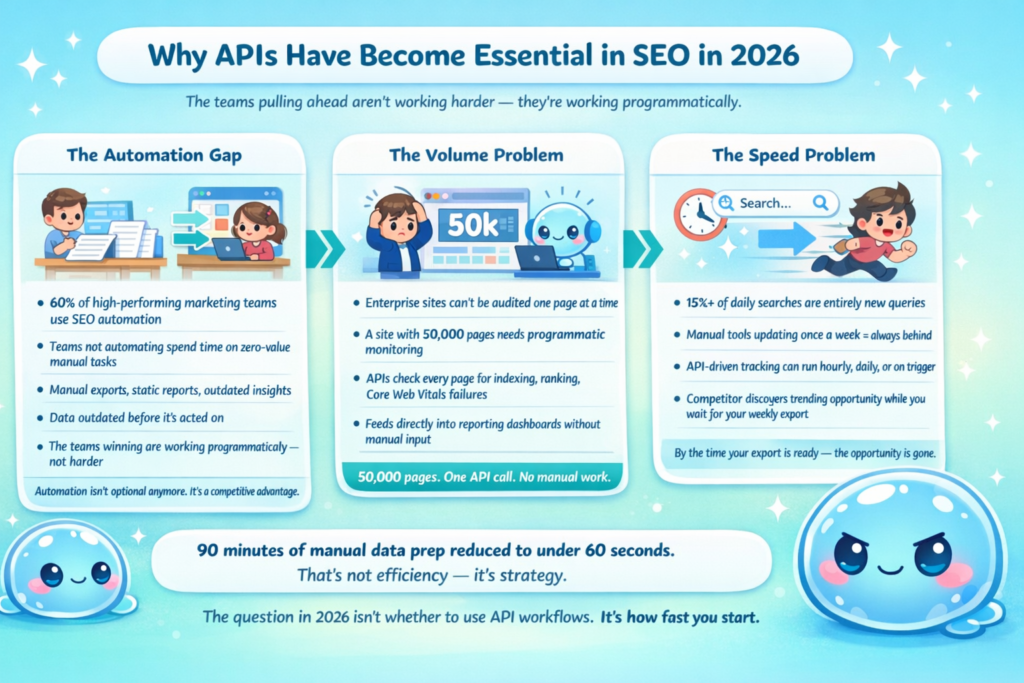
According to HubSpot’s 2024 State of Marketing report, 60% of high-performing marketing teams use automation in SEO and content operations, and that number continues rising in 2026. The teams not automating are spending time on tasks that produce nothing strategically valuable: manual data pulls, static reports, and delayed insights that are outdated before they’re acted on.
The volume problem alone justifies the shift. For enterprise teams managing vast sites, producing search-optimized pages at scale simply isn’t feasible when done manually. A site with 50,000 pages can’t be monitored, audited, or optimized one page at a time. An API-driven workflow can check every one of those pages for indexing issues, ranking changes, or Core Web Vitals failures, automatically, on a schedule, feeding directly into a reporting dashboard.
The speed problem is equally compelling. According to Google, over 15% of daily searches are entirely new queries, never searched before, and manual tools simply can’t keep pace with that rate of change. When your competitor discovers a trending search opportunity and your keyword tracking tool updates once a week, you’re already behind. API-driven data retrieval can be scheduled hourly, daily, or triggered by specific conditions, so your strategy moves at the speed of search.
I’ve seen this transition play out with my own clients. The ones who’ve integrated even basic API workflows, including just pulling Google Search Console data automatically into a dashboard, consistently make better decisions faster than those relying entirely on manual exports. Data that used to take 90 minutes to compile and format arrives in under 60 seconds. That’s not a marginal efficiency gain. It’s a fundamental shift in how SEO strategy gets made.
The Most Important SEO APIs You Should Know
Not every API carries equal value for SEO work. Here are the ones I use most, what they do, and the specific problems they solve.
Google Search Console API
This is the one I consider non-negotiable for any serious SEO workflow. The Google Search Console API is completely free to use, subject to usage quotas, and allows you to extract performance data, check indexability information, and manage sitemaps programmatically. It uses OAuth 2.0 authentication and returns data as structured JSON, making it accessible via Python, JavaScript, R, or virtually any programming language with an HTTP library.
What makes the Google Search Console API so powerful for SEO data extraction is the granularity it provides. The API combines dimensions such as query, page, country, device, and date with metrics including clicks, impressions, CTR, and average position. This means you can build queries like: “Show me the CTR for all pages targeting informational queries from mobile users in the US over the last 90 days,” and receive that exact dataset automatically, ready for analysis.
In practice, I use the Google Search Console API to build workflows that automatically detect pages with rising impressions but flat CTR (a title tag optimization signal), identify queries where rankings are hovering between positions 8 and 15 (the “almost ranking” opportunities worth targeting), and track week-over-week position changes across entire keyword clusters, all without touching the Search Console interface manually.
The URL Inspection API, part of the same ecosystem, allows you to programmatically check whether any given URL is indexed, how Google rendered it, and whether it has structured data errors. Organizations use this to audit structured data compliance at scale, running checks across thousands of URLs in the time it would take to manually inspect a handful.
Third-Party SEO Data APIs: Ahrefs, SEMrush, DataForSEO
Beyond Google’s own API ecosystem, several third-party platforms expose their databases via API, enabling automated access to backlink data, keyword metrics, competitor analysis, and SERP intelligence.
DataForSEO delivers raw SEO data via API at $0.0006 per query, with no dashboard markup, and serves over 750 enterprise clients with ISO/IEC 27001 certification and a 99.95% uptime SLA. For agencies running automated client reporting at scale, or SaaS companies embedding SEO data into their products, DataForSEO’s pricing model makes it dramatically more cost-effective than subscription tools, especially when query volume is high or variable.
The Ahrefs API provides programmatic access to their backlink database, keyword metrics, and organic traffic estimates. The SEMrush API opens their keyword research and competitive intelligence data to automated workflows. Both platforms allow you to build custom reporting pipelines, competitive monitoring systems, and content opportunity finders that operate entirely without manual input.
With a modern keyword research API, you can fetch keyword search volume, difficulty, SERP features, related queries, and trend data, with full control over when and how the data updates. That level of control is simply not available through a standard tool interface.
SERP APIs
SERP (Search Engine Results Page) APIs allow you to programmatically retrieve Google search results for any keyword, location, and device combination, without triggering Google’s terms of service concerns around scraping. The DataForSEO SERP API lets you retrieve organic search results, featured snippets, People Also Ask boxes, and local pack data for specific keywords, locations, and devices at scale.
I use SERP API data to build competitive monitoring systems, automatically checking how client rankings shift against specific competitors for target keyword sets and feeding those changes directly into Slack alerts or dashboard notifications. When a client’s main competitor moves from position 4 to position 1 for a high-value keyword, the system catches it instantly. No manual rank checks required.
How to Use APIs in SEO: Practical Workflows That Deliver Real Results
Understanding what APIs do is one thing. Knowing how to apply them to actual SEO challenges is where the value gets realized. Here are the five workflows I implement most consistently with clients.
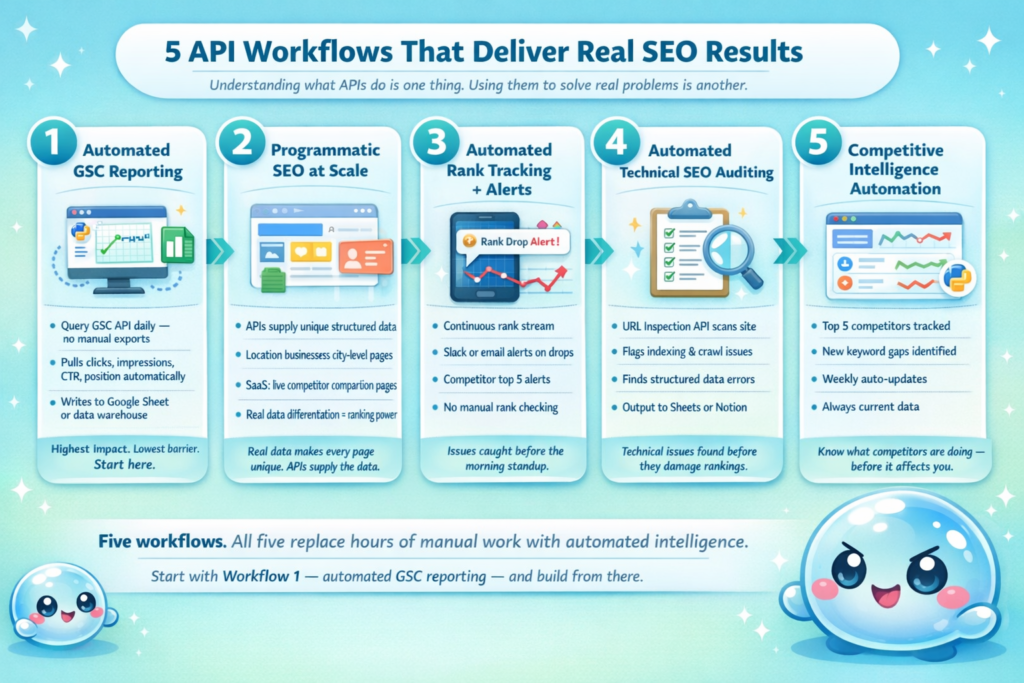
Workflow 1: Automated Google Search Console Reporting
This is the highest-impact, lowest-barrier entry point into API-driven SEO. The Google Search Console API allows you to industrialize recurring extracts of clicks, impressions, CTR, and average position, standardizing requests, storing snapshots, and feeding dashboards automatically instead of relying on manual exports.
In practice, this means writing a simple Python script (or using a no-code tool like Coupler.io) that queries your Google Search Console API daily, pulls the previous day’s performance data across all queries and pages, and writes it to a Google Sheet or data warehouse. The result is a live, auto-refreshing performance dashboard that gives you instant visibility into ranking changes, CTR shifts, and impressions trends, without touching Search Console manually.
The Google Search Console API is available in Python, JavaScript, .NET, PHP, and more, with Google providing official client libraries that handle authentication and request formatting. For non-developers, no-code integration platforms like Coupler.io, Zapier, and Make can connect your Google Search Console data to dashboards and spreadsheets in under five minutes, with no coding required.
Workflow 2: Programmatic SEO at Scale
Programmatic SEO is the process of using automation to generate large volumes of search-optimized web pages, typically driven by structured data and templates targeting long-tail keywords at scale. APIs are the backbone of every programmatic SEO system, feeding the structured data that powers dynamic page generation.
A location-based business might use a database of city and neighbourhood data, accessed via API, to automatically generate unique, locally relevant pages for every area they serve. A SaaS product might use a pricing or features API to build live comparison pages for every competitor combination. Each page is unique because the data behind it is unique, which is exactly what Google now requires for programmatic content to rank.
Post Google’s March 2026 core update, programmatic SEO built on genuine data differentiation continues to perform. Pages built on unique, structured data such as local business directories with verified listings, comparison tools with live pricing, and travel guides with real inventory data continue to rank. The API is what supplies that real, differentiated data. Without it, programmatic SEO is just template spam.
Workflow 3: Automated Rank Tracking and Alerting
Manual rank checking is one of the most time-consuming low-value activities in SEO. It produces a snapshot in time that’s outdated within hours in competitive markets. API-driven rank tracking replaces the snapshot with a continuous stream.
You can set up Slack or email alerts for ranking drops, technical issues, and competitor moves using SEO API data, creating an always-on monitoring system that surfaces issues the moment they happen. I build these systems for every client managing more than 100 target keywords. When a page drops more than 3 positions overnight, the alert fires before the morning standup. When a competitor’s new page enters the top 5 for a high-priority keyword, the team knows within hours.
This kind of real-time SEO alerting used to require expensive enterprise platforms. With the right API integrations (Google Search Console API for owned data, DataForSEO or SEMrush API for competitive data), it’s achievable with a few hundred lines of code or a well-configured no-code workflow.
Workflow 4: Automated Technical SEO Auditing
Technical SEO issues compound silently. A misconfigured redirect chain, a batch of accidentally noindexed pages, or a sudden spike in 404 errors can suppress rankings for weeks before anyone notices, if the only monitoring happens during quarterly manual audits.
The Google Search Console URL Inspection API enables automated auditing workflows that check indexing status, structured data validity, and crawlability for entire page inventories. Feed it a list of URLs, schedule it to run weekly, and pipe the output into a report that flags any pages that have moved from indexed to non-indexed, gained or lost structured data recognition, or developed crawl errors since the last run.
On-page SEO APIs can crawl a URL and extract structured on-page signals, detecting technical issues, metadata problems, and Core Web Vitals inputs, and output structured JSON reports to a Notion database or Google Sheet for client review. This turns technical auditing from a monthly manual project into a continuous automated process.
Workflow 5: Competitive Intelligence Automation
Understanding what your competitors are ranking for, how their backlink profiles are changing, and which content is driving their traffic growth at scale and in near real-time is one of the most powerful applications of the SEO automation API.
Domain Research APIs can query competitor data across domains at scale, while Ranking Data APIs feed competitive ranking data into cross-platform reporting systems. I build competitive dashboards for clients that automatically pull the top 5 competitors’ ranking changes weekly, flag new pages they’ve published that are gaining traction quickly, and identify keyword gaps (queries where competitors rank but the client doesn’t), without anyone spending hours in a tool interface.
Getting Started With APIs in SEO: A Non-Technical Entry Point
I hear one objection more than any other when I recommend API workflows to clients: “I’m not a developer.” I understand the concern, but the barrier to entry has dropped dramatically in 2026. Here’s the path I recommend for non-technical site owners and marketers.
Start with Google Search Console and a no-code connector: Tools like Coupler.io and Zapier offer pre-built connectors to the Google Search Console API that require zero coding. You authenticate with your Google account, select which data you want, choose a destination (Google Sheets, Looker Studio, Airtable), and set a refresh schedule. Within 10 minutes you have an automatically updating SEO performance feed. This single workflow replaces hours of weekly manual exports.
Explore Python if you’re comfortable with basic scripting: Python is the language of choice for SEO API work because it’s readable, well-documented, and has strong libraries for API interaction. The Google Search Console API is fully accessible via Python, with official client libraries that handle the authentication complexity. Resources like JC Chouinard’s comprehensive GSC API guide walk through every step, from authentication setup to running your first query, in plain language designed for SEOs rather than software engineers.
Use AI tools as coding assistants: In 2026, you don’t need to write API integration code from scratch. Tools like Claude and ChatGPT can generate working Python scripts for common SEO API workflows when you describe what you’re trying to accomplish. I regularly use this approach with clients: they describe the report they want, I help shape the prompt, and the resulting code handles the API calls, data parsing, and output formatting.
Once you’ve explored the DIY route, though, most website owners and teams hit the same wall. And that’s exactly the question worth asking honestly before you invest weeks building something from scratch.
Why sneo.ai Instead of Building Your Own API Stack?
This is the most important question in this entire article, and I want to answer it directly rather than dance around it. Building your own API stack is technically possible. I’ve shown you how above. But possible and worth it are two very different things. Here is every honest reason I’ve seen teams choose sneo.ai over a custom-built solution, and why it matters for your specific situation.
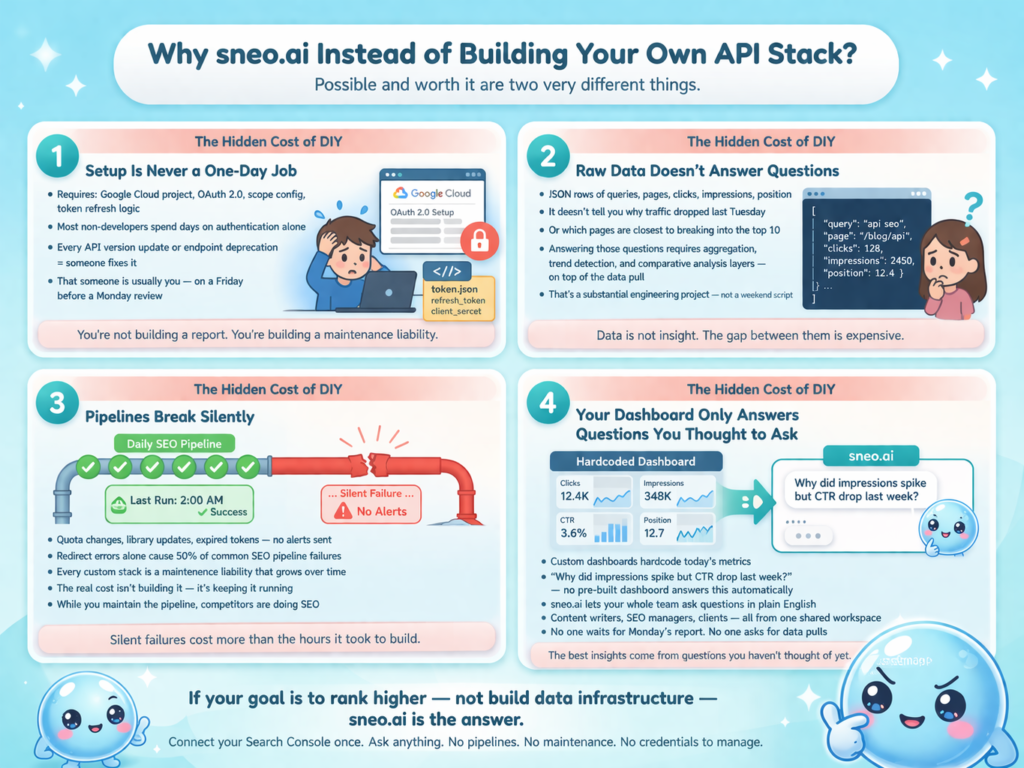
1) Setup is never a one-day job: Connecting to the Google Search Console API requires a Google Cloud project, OAuth 2.0 credentials, scope configuration, token refresh logic, and quota error handling, and that’s before you write a single line of analysis. Most non-developers spend days on authentication alone. Every time Google updates its API versioning or deprecates an endpoint, someone has to fix the pipeline. That someone is usually you, on a Friday evening before an important Monday review.
2) Raw data doesn’t answer questions: Pulling JSON from the Google Search Console API gives you rows of queries, pages, clicks, impressions, CTR, and position. But it doesn’t tell you why your traffic dropped last Tuesday, which pages are closest to breaking into the top 10, or which queries you’re almost ranking for but haven’t targeted yet. Turning raw API data into those answers requires building query logic, aggregation layers, trend detection, and comparative analysis on top of the initial data pull. That’s a substantial engineering project, not a weekend script.
3) Custom pipelines break silently and drift over time: A pipeline that works perfectly today silently fails next month because an API quota changed, a Python library updated, or an authentication token expired without sending any alert. Redirect errors alone account for 50% of common SEO pipeline failures during audits. Every custom tool stack is a maintenance liability. The real cost isn’t building it; it’s keeping it running while you’re trying to focus on SEO strategy.
4) Your dashboard only answers the questions you thought to ask: When you build a custom reporting setup, you hardcode the metrics you think matter today. sneo.ai connects to your live Google Search Console data and lets you ask questions you didn’t know to ask yet. “Why did impressions spike but CTR drop on this page last week?” is not a query for any pre-built dashboard answers automatically. It’s the kind of insight that only surfaces when you’re exploring your data conversationally, in real time.
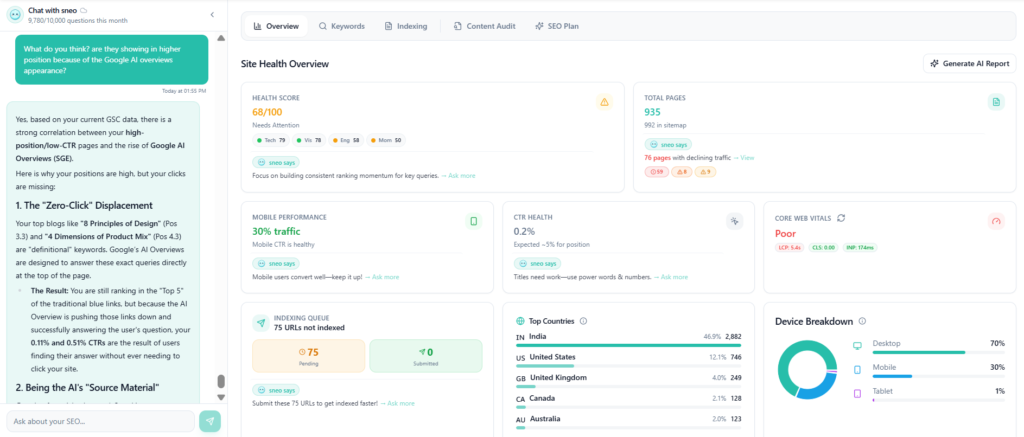
5) Your team can’t work from a spreadsheet the same way they can from a shared workspace: A custom pipeline produces a report. sneo.ai produces a shared environment. Your content writer, your SEO manager, your PPC lead, and your client can all log into the same dashboard, ask their own questions about their own areas of responsibility, and get answers without any one person having to pull data for everyone else. Nobody is waiting on a Monday morning report. Nobody is asking “can you pull the CTR data for the blog section for last month?” for the fourteenth time. The team works from one place, with one source of truth, in real time.
6) Your team members don’t need to own the Search Console property to get insights from it: This is one of the most underappreciated operational problems in SEO. In a custom pipeline, whoever owns the Google Cloud project and the OAuth credentials controls the data. When a team member joins or a client relationship starts, connecting them to your Search Console API setup requires sharing credentials, adjusting access scopes, or rebuilding authentication flows. With sneo.ai, you connect a property once and control exactly who on your team can query it, at what level of access, without touching a single line of code. A new content hire can start asking questions about site performance on their first day. A client can be given read access to their own data without being added as a Search Console property owner.
7) Agencies and consultants managing multiple clients face a property management nightmare with custom stacks: Managing five separate Google Cloud projects, five sets of OAuth credentials, five Python environments, and five reporting pipelines for five clients is not a scalable workflow. It’s five times the maintenance burden, five times the failure risk, and five times the time investment when something breaks. sneo.ai was built with multi-property management in its architecture. You add a new client property, connect it in one step, and the same conversational interface that works for your other clients works immediately for the new one. Onboarding a new client goes from a half-day technical setup to a five-minute property connection.
8) The engineering cost compounds faster than the insight value does: I’ve seen teams spend 40 or more hours building a custom GSC reporting pipeline, only to have it answer the same five questions every week. sneo.ai answers those same five questions in seconds, and then answers the fifty follow-up questions that actually drive decisions, without any additional engineering. The opportunity cost of building and maintaining your own stack is almost always better spent on the SEO work itself.
The honest summary is this: if your goal is to become an SEO data engineering team, build the stack. If your goal is to rank higher, drive more traffic, make better decisions faster, and give your entire team including people who have never touched an API a single place to understand what your site’s data is telling you, sneo.ai is the answer.
Conclusion
APIs in SEO represent a fundamental shift in how search optimization work gets done. The teams winning in organic search in 2026 aren’t necessarily the ones with the best strategy documents. They’re the ones who’ve turned their strategy into systems, building automated workflows that monitor, report, and surface opportunities continuously, without manual effort.
You don’t need to become a developer to benefit from this shift. The entry point can be as simple as connecting Google Search Console to sneo.ai and asking your first plain-English question about your site’s performance. From there, the possibilities scale as far as your ambition takes them, across your whole team, across all your properties, with no pipelines to maintain and no credentials to manage.
The data your site generates every single day is a strategic asset. APIs are what unlock it. Connect your Google Search Console to sneo.ai and let me show you what’s already sitting in your data, answered in plain English, ready to act on today.
Frequently Asked Questions (FAQ)
1) What is an API in SEO?
An API in SEO is a programmatic interface that enables tools, scripts, and platforms to automatically request and exchange SEO data (such as keyword rankings, search performance metrics, indexing status, and backlink information) without manual interaction with a user interface. APIs turn one-time manual data pulls into automated, repeatable, scalable data workflows.
2) What is the Google Search Console API and how do I access it?
The Google Search Console API is a free REST API provided by Google that allows programmatic access to your Search Console data, including search analytics (clicks, impressions, CTR, position), indexing status, sitemap management, and URL inspection. Access requires a Google Cloud project, OAuth 2.0 authentication, and appropriate permissions on your Search Console property. Client libraries are available in Python, JavaScript, PHP, and other major languages.
3) Do I need to be a developer to use SEO APIs?
Not necessarily. Many no-code tools (including Coupler.io, Zapier, and Make) offer pre-built connectors to the Google Search Console API and other SEO platforms that require zero coding. For more advanced workflows, basic Python knowledge is helpful, but AI coding assistants like Claude or ChatGPT can generate working API scripts from plain-language descriptions, significantly lowering the technical barrier.
4) What is the difference between an API and a regular SEO tool?
A standard SEO tool has a user interface: you log in, navigate menus, and manually export data. An API provides raw, programmatic access to the same underlying data, without a UI. Tools are built for human interaction; APIs are built for automated, machine-to-machine data exchange. APIs are faster, more flexible, and can be integrated into custom dashboards, workflows, and automated reporting systems that tools alone cannot replicate.
5) What is a REST API and why does it matter for SEO?
A REST API (Representational State Transfer) uses standard HTTP requests to communicate between systems, the same underlying protocol your browser uses to load webpages. It’s the most common API architecture used by SEO platforms, including Google’s Search Console API. REST APIs return data in structured formats like JSON, which can be processed by virtually any programming language or integrated into no-code tools.
6) What is programmatic SEO and how do APIs enable it?
Programmatic SEO is the practice of automatically generating large volumes of search-optimized pages using structured data and templates, rather than writing each page manually. APIs supply the real, unique data that powers each page: local business data, pricing information, product attributes, or geographic statistics. Without API-driven data differentiation, programmatic SEO risks producing near-identical pages that Google penalizes as scaled content abuse.
7) Which are the most useful SEO APIs for non-enterprise websites?
For most website owners and small businesses, the highest-value SEO APIs are the Google Search Console API (free, provides your site’s actual performance data directly from Google), DataForSEO (a cost-effective data extraction SEO API for keyword research, SERP data, and backlink analysis), and the SEMrush or Ahrefs APIs for competitive intelligence. Start with the Google Search Console API, which is free, directly tied to your site, and delivers the most immediately actionable insights.
8) How does sneo.ai use APIs to deliver SEO insights?
sneo.ai connects directly to your Google Search Console via Google’s official API, pulling live performance data including queries, pages, clicks, impressions, CTR, and ranking positions, and making it queryable in plain English. Your entire team can work from the same dashboard without needing individual property access or technical credentials. Add a new team member or a new client property in minutes, ask any question about your site’s performance conversationally, and get specific data-driven answers instantly, without writing a single line of code.