

If you’ve opened Google Search Console and stared at that “Average Position” column wondering what it actually tells you, you’re not alone. Understanding what average position means in Google Search Console is one of the first skills I coach every SEO client on, because it changes how you interpret everything else in the platform. It’s not just a ranking number — it’s a signal, a diagnostic tool, and a strategic compass. Let me break it down completely.
Average Position in Goggle Search Console: TL;DR
- Average position is the mean ranking of your URLs across all search queries in a given date range.
- Position 1 does not always mean the literal first blue link — featured snippets and ads affect numbering.
- Positions 1–10 are the goal; anything above 20 signals a content or authority gap.
- Use it alongside click-through rate and impressions, never in isolation.
What Does Average Position Mean in Google Search Console?
Average position in Google Search Console tells you the typical ranking your page or site holds for a given search query across all the times Google showed it. When I first explain this to clients, I frame it simply: it’s the average slot number your result occupied in the search result pages during the selected period.
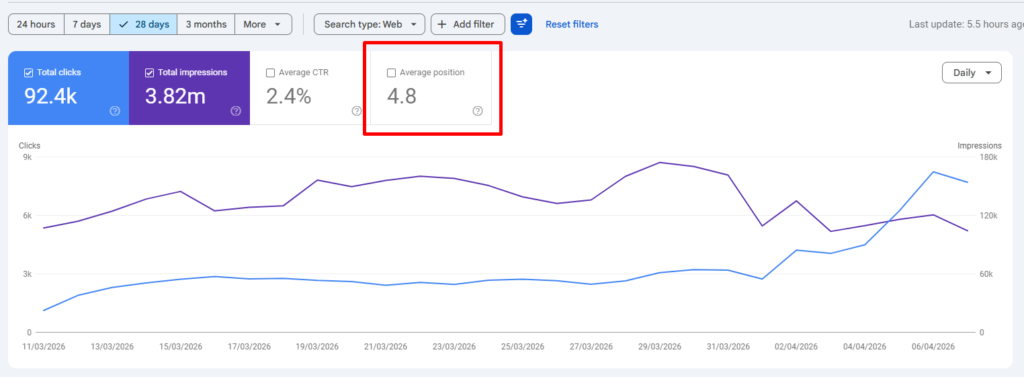
Here’s the exact mechanics. Google records the position every time your URL appears in search results for a query. If your page ranks at position 2 on Monday and position 4 on Wednesday for the same keyword, the average position reported is 3.
A few things make this more nuanced than it first appears:
- Positions count from 1 at the top of all organic results. Featured snippets, People Also Ask boxes, and image carousels each occupy a “slot,” which pushes standard blue-link rankings down numerically.
- Average position is aggregated across all impressions. A page that ranks at position 1 five times and position 20 once will have an average closer to 4, not 1.
- Site-level averages blend all your pages and queries. A site average of 18 might hide a cluster of pages sitting at position 2 and another cluster buried at position 60.
This is why I always push clients toward filtering by individual pages or queries inside the Search Analytics report rather than relying on the top-level dashboard number. The aggregate hides too much.
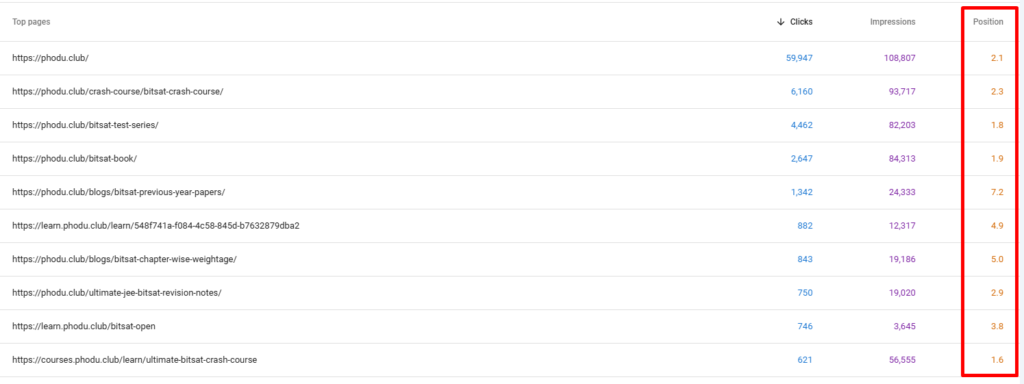
What does average position mean in Google Search Console when you filter it? It becomes genuinely actionable. Filter by a single URL and you see exactly where that page is competing. Filter by a query and you see how consistently Google ranks you for that term.
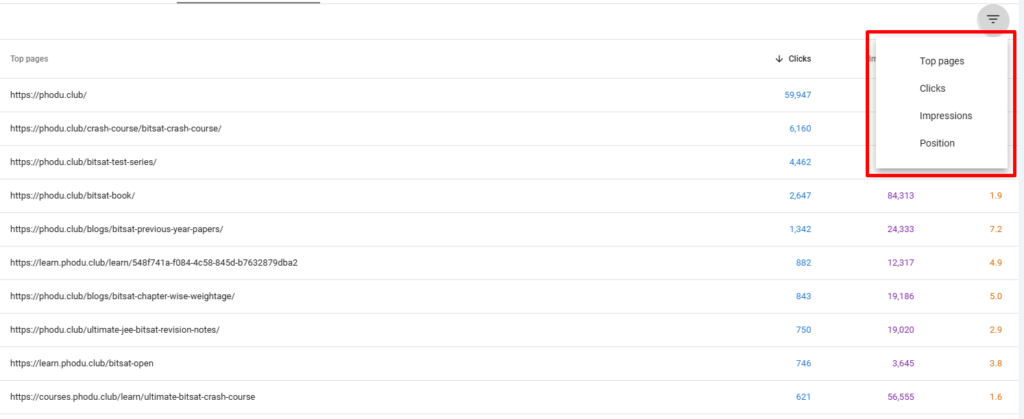
The metric lives inside Performance > Search results in Search Console, formerly known as Google Webmaster Tools. It’s one of four core metrics alongside clicks, impressions, and click-through rate — and understanding how they interact is the real skill.
How Is Average Position Calculated in Google Search Console?
Google’s calculation is a straight arithmetic mean, but the inputs are more complex than most people realize.
The calculation process:
- Google logs your URL’s position every time it appears in search results for a query.
- All recorded positions for that URL/query combination are summed.
- The sum is divided by the total number of impressions recorded.
- The result is the average position displayed in your Search Analytics report.
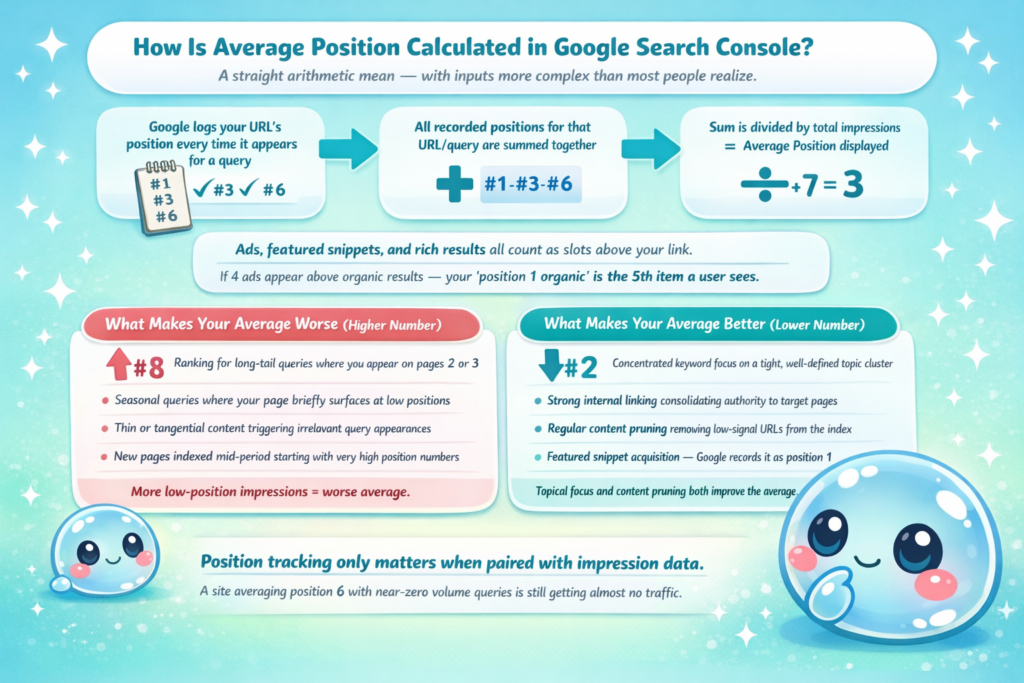
Important: Position counting includes all result types above your link — ads, featured snippets, and rich results all count as slots.
This has a practical consequence. If you hold a featured snippet for a query, Google records your position as 1 for that result — even though a featured snippet sits above the traditional organic results. Conversely, if four ads appear above organic results on desktop, a user sees your “position 1 organic ranking” as the fifth item on the page.
What inflates your average position number (makes it worse):
- Ranking for long-tail queries where you appear on page 2 or 3
- Seasonal queries where your page briefly surfaces at low positions
- Queries triggered by thin or tangential content on your site
What deflates your average position number (makes it better):
- A concentrated keyword focus on a tight topic cluster
- Strong internal linking that consolidates authority to target pages
- Regular content pruning to remove low-signal URLs from the index
I’ve seen sites with an average position of 6 driving almost no traffic because all their rankings cluster around position 6–9 for queries with near-zero search volume. Position tracking metrics only matter when paired with impression data. See also: what is an SEO score for how multiple metrics combine into a performance picture.
What Is a Good Average Position in Google Search Console?
This is the question I get most often, and the honest answer is: it depends on your goal, but there are clear thresholds.
| Position Range | What It Means | Priority Action |
| 1–3 | Top of first page, high visibility | Protect and defend |
| 4–10 | First page, lower CTR band | Optimize titles and meta descriptions |
| 11–20 | Page 2 territory | Content depth and link building |
| 21–50 | Low visibility, minimal traffic | Audit content relevance and authority |
| 50+ | Essentially invisible | Rebuild or consolidate |
Research consistently shows that the top three organic results capture the majority of clicks, with position 1 commanding significantly higher CTR than positions 4 and beyond.
For most commercial or informational pages, I consider anything in the top 10 as functional, but positions 1–5 as genuinely competitive. Positions 6–10 represent a real opportunity zone — you’re on page one, but likely missing a large share of available clicks.
A practical target framework I use with clients:
- New content (0–6 months): Expect positions 20–50. This is normal given how long SEO takes.
- Established content (6–18 months): Target positions 10–20, with top performers breaking into the top 10.
- Optimized, authoritative content: Target positions 1–5 for primary keywords.
For local SEO and SEO localization contexts, position benchmarks shift. A locally optimized page might rank at position 2 in one city and position 30 in another — site-level averages obscure this entirely.
Never chase a single average position number. Chase the distribution of rankings across your keyword set.
Why Is My Average Position Higher Than Expected? (And Does Position 1 Mean First on Google?)
I’ve had clients excitedly tell me they hit position 1 in Search Console, then feel confused when they can’t find themselves at the top of Google. Here’s what’s actually happening.
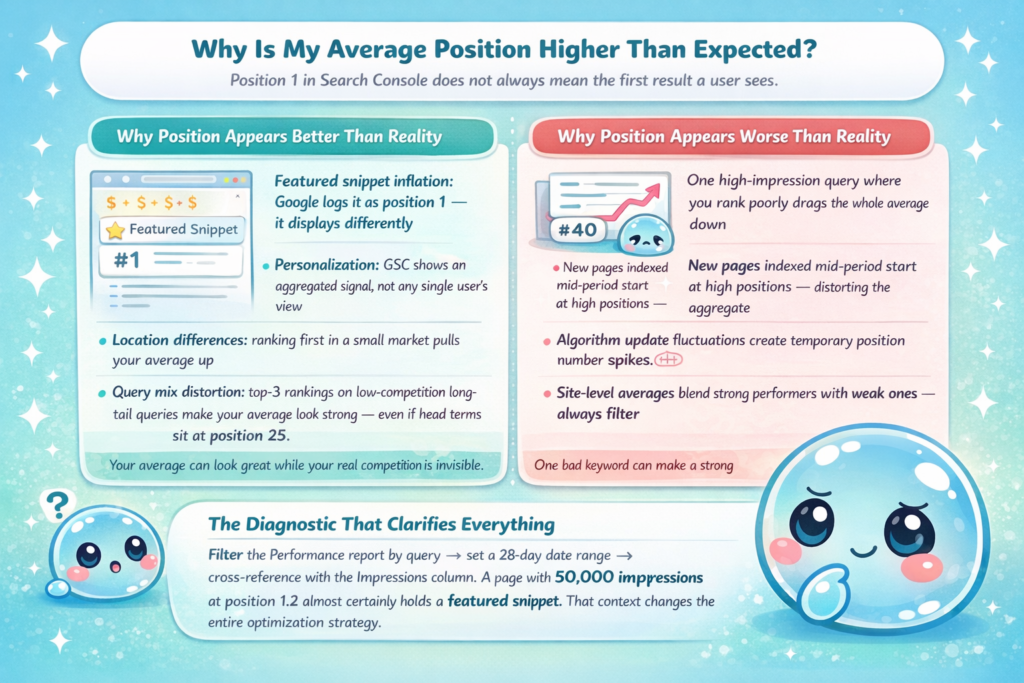
Reasons your average position may appear better than reality:
- Featured snippet inflation: If you hold a snippet, Google logs it as position 1 — but snippets display differently from standard blue links.
- Personalization and device variance: Google personalizes results. Your position in Search Console reflects an aggregated signal, not a single user’s view.
- Location differences: Ranking first in a smaller market pulls your average up even if you rank 15th in competitive metros.
- Query mix distortion: If most of your impressions come from low-competition long-tail queries where you rank top 3, your average looks strong even if your head terms sit at position 25.
Why average position appears worse than expected:
- A single high-impression query where you rank poorly drags the average down significantly.
- New pages indexed mid-period start with high position numbers, pulling averages up (worse numerically).
- Search ranking fluctuations caused by algorithm updates create temporary spikes in position numbers.
Position 1 in Search Console does not guarantee the first visible result a user sees. Paid ads, shopping carousels, and featured snippets all appear above standard organic position 1.
To diagnose this accurately, I filter the Performance report by query, set a 28-day date range, and then cross-reference with the impressions column. A page logging 50,000 impressions at position 1.2 almost certainly holds a featured snippet. That context changes the optimization strategy entirely. Pair this with a proper SEO audit to identify which pages need snippet-targeted optimization.
What Does It Mean When Average Position Drops? How to Improve It
A drop in average position is one of the most common distress signals I see in Search Console. It means Google has decided, at least temporarily, that your content deserves a lower slot for one or more queries. But the cause matters enormously before you react.
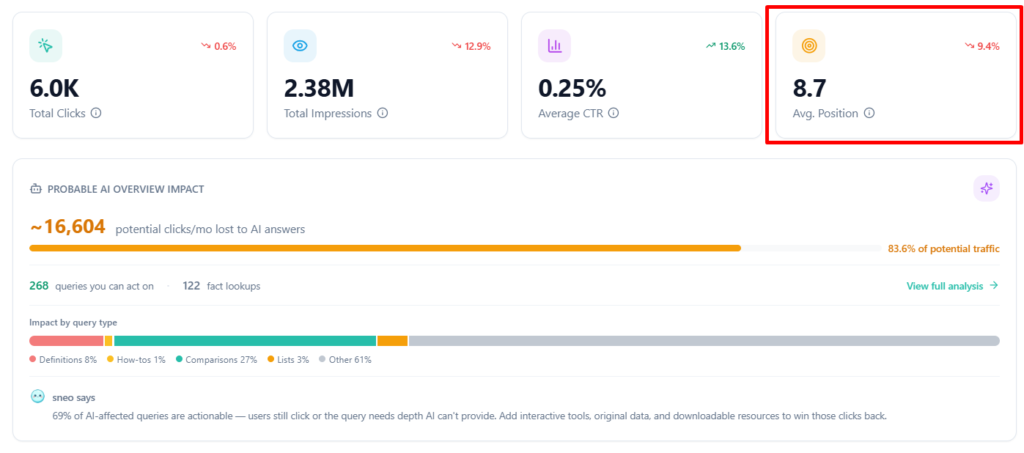
Common causes of average position drops:
- A Google Search algorithm update re-evaluated E-E-A-T signals on your content
- A competitor published stronger, more authoritative content for overlapping queries
- Technical issues reduced crawl frequency, allowing content freshness to degrade
- You acquired new keyword rankings at low positions, pulling the average down statistically
- Ranking fluctuations from index updates or data refreshes, which often self-correct within 2–4 weeks
How to diagnose a genuine drop vs. statistical noise:
- Compare the current 28-day period against the prior 28-day period using Search Console’s date comparison tool.
- Filter by page to isolate which specific URLs lost ground.
- Filter by query to identify which keywords drove the position change.
- Cross-reference with impressions — if impressions held steady but position dropped, it’s a ranking issue. If impressions also dropped, it may be a crawl or indexation issue.
How to improve average position in Google Search Console:
- Identify the 10–20 queries where you rank positions 8–15 — these are your fastest wins.
- Update the page content to better address search intent for those queries.
- Strengthen internal links pointing to the target URL from higher-authority pages.
- Improve title tags and meta descriptions to signal relevance more clearly to the Google Search algorithm.
- Build topical authority through related supporting content — a holistic SEO approach consistently outperforms single-page optimization.
Pages that rank between positions 8 and 15 often require content depth improvements more than new backlinks. Authority is usually sufficient at that range — intent alignment is typically the gap.
For ongoing SEO programs, I track position distribution changes monthly rather than the average itself. That distribution shift tells a more accurate story.
Average Position vs. Clicks in Google Search Console: Which Matters More?
This is the debate that comes up in almost every client review I run. My answer: clicks are the business metric; average position is the diagnostic metric. They serve different purposes and you need both.
| Metric | What It Measures | When to Prioritize |
| Average Position | Where you rank on average | Diagnosing ranking changes, identifying opportunities |
| Clicks | Actual traffic delivered | Measuring business impact, ROI analysis |
| Impressions | How often you appear | Gauging search visibility and keyword reach |
| CTR | Click rate relative to impressions | Evaluating title/meta description effectiveness |
Scenario where position matters more: You rank at position 3 for a high-volume query but get almost no clicks. That signals a title tag problem, a SERP feature stealing clicks, or a mismatch between your snippet and user intent. Fix the snippet, not the ranking.
Scenario where clicks matter more: Your average position “worsened” from 4.2 to 5.8 over a month, but clicks increased by 12%. This happens when you gain new rankings at lower positions for high-volume queries. The average looks worse; the business result is better.
I use this framework to prioritize work in SEO reporting:
- High impressions + low CTR + good position = fix the snippet.
- Good CTR + declining position = defend with content updates and links.
- Low impressions + good position = expand keyword targeting and internal linking.
- Low impressions + poor position = assess whether the page deserves to exist or should be consolidated.
Knowing what the average position means in Google Search Console only pays off when you connect it to clicks and impressions in this diagnostic way. Standalone, it’s a number. In context, it’s a decision framework.
Conclusion
- Average position is a mean ranking signal, not a real-time rank check — always interpret it with an impression and click data alongside it.
- Positions 1–10 are the competitive zone; the 8–15 range is your fastest optimization opportunity.
- Position drops require diagnosis before action — distinguish algorithm shifts from statistical noise.
- Clicks are the business metric; average position is the diagnostic tool that tells you why clicks are or aren’t happening.
Use what does average position mean in Google Search Console as your entry point into the data, not your final verdict on performance.
Frequently Asked Questions
Q1: What does average position mean in Google Search Console for a beginner?
It’s the average rank your page held across all its appearances in Google search results during a selected time period. A lower number means higher on the page. It’s calculated by averaging every recorded position across all impressions for a given URL or query.
Q2: Is average position 1 in Search Console the same as ranking first on Google?
Not necessarily. Position 1 can reflect a featured snippet, which displays differently from a standard organic result. Paid ads and SERP features also appear above organic position 1, so users may see your link further down the page even when Search Console reports position 1.
Q3: What is a good average position in Google Search Console?
Positions 1–10 place you on the first page of results. Positions 1–5 are considered strong. Anything between 11–20 represents page 2 and needs improvement. Positions above 50 typically generate negligible organic traffic regardless of keyword volume.
Q4: Why did my average position get worse after adding new content?
New pages often rank at positions 40–80 initially. Adding them to your site introduces many low-position data points that drag your site-wide average upward (a worse number). Filter by individual URLs to see whether existing pages actually declined or whether new pages are distorting the aggregate.
Q5: How often should I check the average position in Google Search Console?
Monthly reviews are sufficient for most sites. Use 28-day periods for cleaner comparison. Weekly checks make sense only during active link campaigns or post-algorithm-update windows when you need to track ranking fluctuations in real time.
Q6: Can the average position improve without any changes on my end?
Yes. Competitor pages can lose rankings due to their own updates, pushing your position up. Seasonal shifts in query volume also change the position mix. Algorithm refreshes sometimes restore pages that were temporarily suppressed. Monitoring search traffic analysis trends helps you distinguish earned improvements from circumstantial ones.