

If you’ve ever stared at the Search Console dashboard wondering what impressions mean on Google Search Console, you’re not alone. I’ve had this exact conversation with dozens of site owners who confuse impressions with actual visits. Impressions are not clicks, sessions, or pageviews. They measure something earlier in the journey: how often your URLs appeared in search results. Understanding this metric is the foundation of smarter SEO reporting and, ultimately, better traffic decisions.
TL;DR
- An impression is counted each time your URL appears in Google’s search results for a query.
- Impressions do not mean someone visited your site, only that your result was shown.
- High impressions with low clicks signal a title/meta description or ranking position problem.
- Track impressions in the Search Console Performance report filtered by query, page, and device.
How Does Google Search Console Define an Impression?
Knowing what impressions mean on Google Search Console starts with Google’s own definition. According to Google Search Central, an impression is recorded every time a link to your site appears in search results, regardless of whether the user scrolls down to see it or not, with one important exception: carousel and expandable results follow slightly different counting rules.
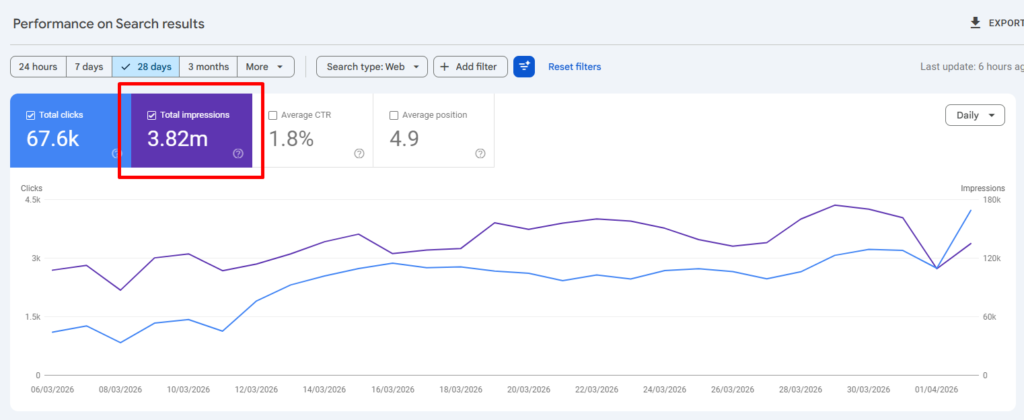
Here is exactly how Google counts impressions:
- Your URL appears somewhere on the search engine results page (SERP) for a given query.
- The user does not need to see, scroll to, or interact with your result.
- If your URL appears in a standard organic result, one impression is logged.
- For rich results and SERP features like image carousels, Google counts one impression per expanded item the user reveals.
- If the same URL appears twice on a results page (organic + Knowledge Graph, for example), only one impression is counted per query.
A few nuances worth knowing:
- Position matters for counting: A result on page two still logs an impression the moment the page loads.
- Structured data and rich results can trigger additional impression types (FAQ schema, product snippets) tracked separately under Search Appearance in the search performance report.
- Queries vs. pages: The same impression event is attributed to both the search query and the URL, so your totals in the Queries tab and Pages tab should reconcile when filtered correctly.
Understanding this counting logic tells me immediately why raw impression volume can feel misleading. A page ranking position 40 for a high-volume query will rack up thousands of impressions while delivering almost no clicks. That is organic search visibility without organic search value, and it is exactly the problem sneo AI is built to surface.
Impressions vs. Clicks in Google Search Console Explained
This comparison trips up even experienced SEO managers, so let me lay it out clearly.
| Metric | What It Measures | User Action Required | Affected by Position |
| Impressions | Your URL appeared in results | None | Yes (all positions count) |
| Clicks | User clicked your URL | Yes (intentional click) | Yes (higher = more clicks) |
| CTR | Clicks divided by impressions | N/A (derived) | Yes |
| Average Position | Mean rank across impressions | None | It IS position |
Key insight: A page at position 1 for a 10,000-impression query should pull a click-through rate of roughly 25–35% based on industry CTR curve data. Search Engine Journal, 2025 If yours is at 5%, your title tag or meta description is the bottleneck, not your ranking.
The click-through rate column is where impressions and clicks intersect into something actionable. I use this ratio constantly when diagnosing underperforming pages inside sneo AI. When a client asks “why is my traffic dropping?” The first thing I pull is pages where impressions held steady but clicks fell, because that pattern almost always points to a SERP feature stealing clicks (answer boxes, shopping ads, or featured snippets) rather than a Google algorithm change affecting rankings.
For a deeper look at how position correlates with both metrics, read my breakdown of what is average position in Google Search Console.
Why Are My Impressions High But Clicks Low in GSC?
This is the question I hear most often, and it has a short list of real causes:
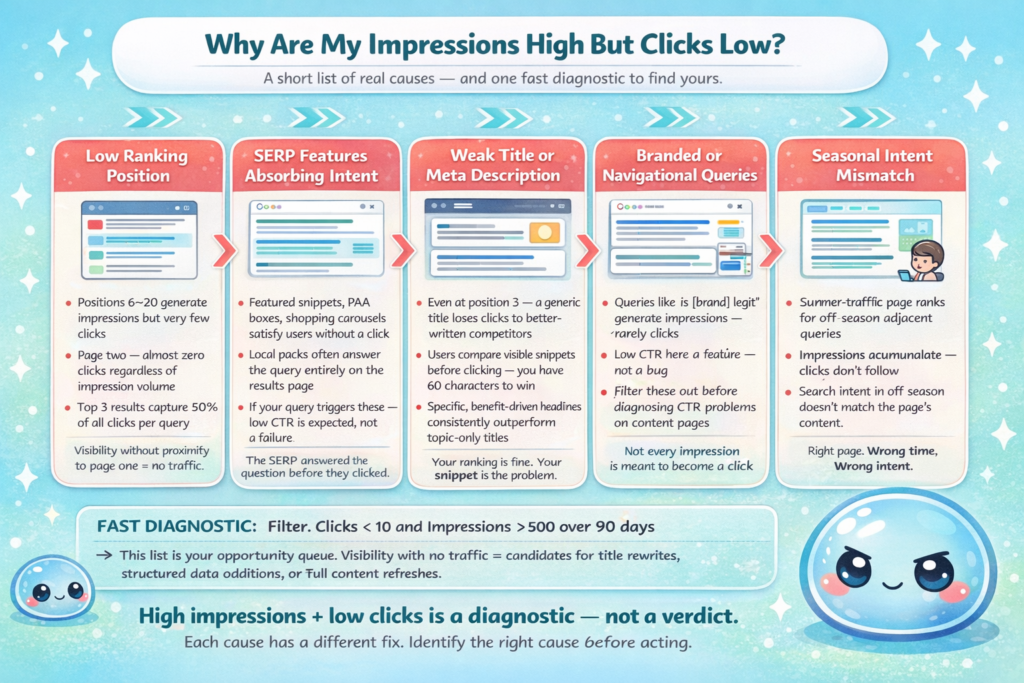
- Low ranking position: Positions 6 through 20 generate impressions but attract a fraction of the clicks that positions 1 through 3 earn. Ranking on page two means almost zero clicks regardless of impression volume.
- SERP features absorbing intent: Featured snippets, People Also Ask boxes, shopping carousels, and local packs satisfy the user’s need without a click. If your query triggers these, a low CTR is expected, not a failure.
- Weak title or meta description: Even at position 3, a generic title loses clicks to a competitor with a more specific, benefit-driven headline.
- Branded vs. navigational queries: Queries where users just want to confirm something (“is [brand] legit”) generate impressions but very few clickthroughs because the SERP itself answers the question.
- Seasonal intent mismatch: A page optimised for summer traffic will rack up off-season impressions from adjacent queries without converting them into clicks.
The fastest diagnostic I run: filter the search performance report by “Clicks < 10” and “Impressions > 500” over the past 90 days. That filtered list is your opportunity queue. Pages with search visibility but no traffic are candidates for title tag rewrites, structured data additions, or a full content refresh.
If you are evaluating whether an SEO audit is worth it, this impression-to-click gap analysis is one of the clearest ROI signals you can show a client or stakeholder before any work begins.
What Is a Good Number of Impressions in Google Search Console?
There is no universal benchmark, and anyone quoting you a magic number is oversimplifying. What matters is the relationship between impressions, position, and click-through rate within your specific niche.
That said, here are the reference points I actually use:
| Site Stage | Monthly Impressions Range | What It Suggests |
| New site (under 12 months) | Under 5,000 | Indexation or content volume issue |
| Growing site | 5,000 to 100,000 | Healthy; focus on CTR and position |
| Established site | 100,000 to 1M+ | Optimise for conversions and featured snippets |
| Authority site | 1M+ | Protect rankings; monitor cannibalisation |
Remember: 500,000 impressions at 0.2% CTR produces 1,000 clicks. 50,000 impressions at 8% CTR produces 4,000 clicks. Volume without relevance is noise.
A more useful question than “how many impressions is good?” is “are my impressions trending in the right direction for the keywords that matter?” I look at impression growth for target queries quarter over quarter. Flat impressions on a page I recently updated tell me there is an index status issue or a crawl coverage problem worth investigating via the URL inspection tool.
For context on how ongoing SEO compounds this kind of growth over time, the pattern is consistent: impressions climb first, position improves next, and clicks follow with a lag of several weeks.
How to Use Impressions Data to Actually Improve SEO
Knowing what impressions mean on Google Search Console is only useful if it changes what you do. Here is the workflow I follow inside sneo AI for any site connected via Google Search Console:
- Pull the Performance report filtered to the last 90 days, grouped by query.
- Sort by impressions descending to see where you have the most search visibility.
- Flag queries with impressions above 200 and CTR below 2% as underperforming.
- Check the average position for each flagged query. Position 1 to 5 with low CTR = content or snippet problem. Position 6 to 20 = ranking improvement opportunity.
- Segment by search appearance (Web, Image, Video, News) to identify which SERP features your content currently triggers.
- Cross-reference with Core Web Vitals data for the same URLs. A slow page ranking position 4 may be held back by experience signals.
- Write or rewrite title tags for the low-CTR, well-ranked group first since these deliver the fastest results.
- Add or fix structured data for pages where rich results would improve SERP appearance.
- Set a 30-day review and compare impression-to-click ratios before and after changes.
This nine-step loop is the core of what we automate at sneo.ai. Instead of manually pulling and cross-filtering search analytics data, you ask sneo a direct question, connect your GSC data, and get page-specific recommendations in seconds.
Conclusion
- Impressions measure how often your URL appeared in Google search results, not how often someone visited.
- High impressions with low clicks point to position, CTR, or SERP feature issues, not necessarily ranking failure.
- No single “good” impression number exists. Trend direction and CTR efficiency matter more than raw volume.
- Connect your Google Search Console data to sneo AI and ask directly which pages have the best impression-to-click opportunity so you can act on the data instead of just reading it.
Frequently Asked Questions
1) Do impressions count if my page is on the second page of Google results?
Yes. Any time your URL loads on a results page, whether page one or page seven, Google logs an impression. The user does not need to scroll to your result or even see it on screen.
2) Can my impressions be high even if my site is new?
Yes, if Google has indexed your pages and they rank for any queries, impressions accumulate immediately. High impressions on a new site are actually a positive signal that your content is being surfaced.
3) Does refreshing the search results page count as a new impression?
Generally no. Google’s counting methodology de-duplicates within a single session for most result types. Repeated refreshes by the same user for the same query do not typically inflate impression totals significantly.
4) Why do my impressions drop on weekends?
Search volume for most business and informational queries is lower on weekends. Fewer searches for your target keywords means fewer opportunities for your URL to appear, so impressions fall naturally without any ranking change.
5) Are impressions the same across mobile and desktop in Google Search Console?
Impressions are tracked separately by device. Use the Device filter in the Performance report to compare mobile versus desktop. It is common for mobile impressions to be significantly higher due to overall mobile search volume dominance.
6) Do impressions in Google Search Console include Google Discover or Google News?
Yes. GSC tracks impressions from Web Search, Discover, and Google News separately. Use the Search Type filter to isolate each source. Discover impressions behave differently since they are driven by interest signals, not keyword queries.