

Most SEO changes are educated guesses dressed up as strategy. I’ve seen teams spend months optimizing title tags, rewriting meta descriptions, and restructuring internal links, only to have no idea whether any of it actually moved the needle. SEO split testing changes that. By isolating variables and measuring outcomes against a control group, you can make data-driven SEO decisions instead of hoping for the best. This guide walks through exactly how I set up, run, and interpret SEO tests, and the mistakes I’ve learned to avoid.
TL;DR
- SEO split testing isolates a single change across matched page groups to attribute ranking shifts causally.
- Title tag experiments are the highest-ROI entry point for most sites.
- Tests need a minimum viable run time and statistical significance before any conclusion is valid.
- A consistent SEO test framework is non-negotiable for agencies managing multiple clients.
What Is SEO Split Testing and How Does It Work?
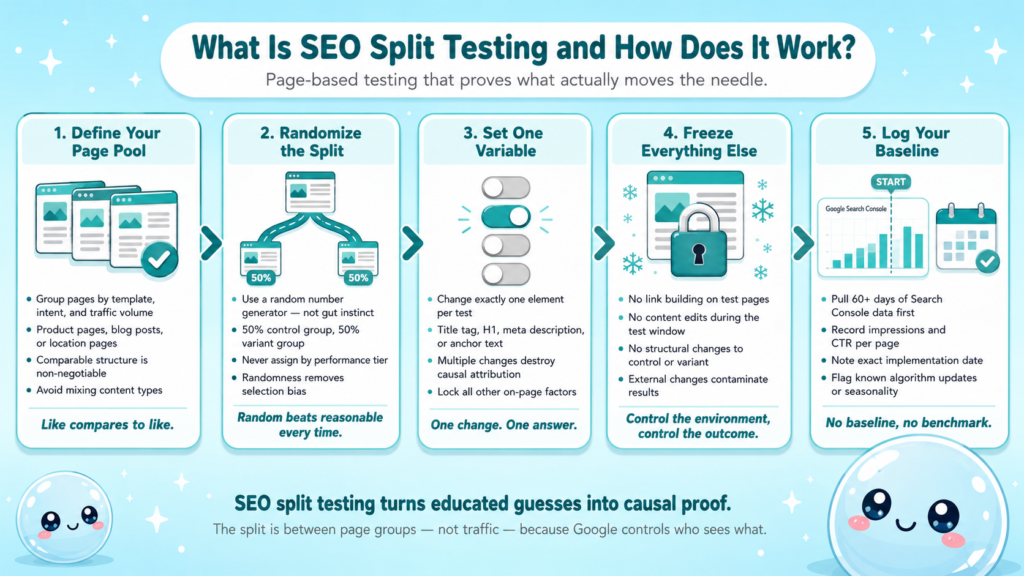
SEO split testing is not the same as landing page A/B testing. In a traditional A/B test, you split live traffic 50/50 between two page variants. In SEO, Google decides who sees what, you can’t redirect organic visitors. Instead, you split pages.
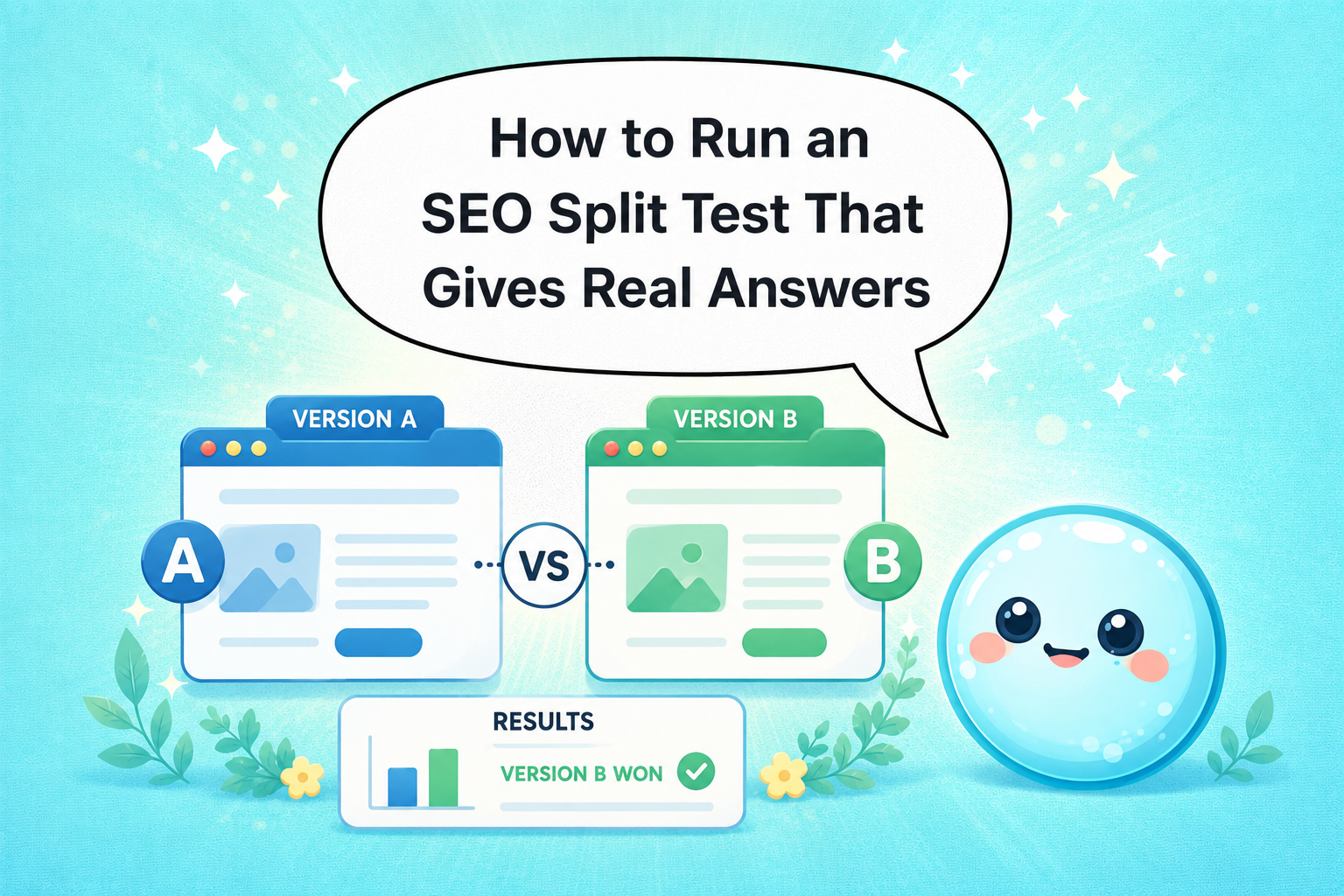
The core mechanic: take a set of structurally similar pages (product pages, blog posts, location pages), divide them into a control group and a variant group, apply your change to the variant group only, then measure the difference in organic performance over time.
What makes this valid is the assumption that similar pages would have trended similarly without intervention. That assumption breaks down when the page groups aren’t truly comparable, which is the number one reason SEO tests produce garbage results.
Here’s what a clean split test architecture looks like:
- Define your page pool: Identify pages with similar template, intent, and traffic volume.
- Randomize the split: Assign pages to control and variant randomly, not by performance tier.
- Set your single variable: Change exactly one element, title tag, H1, structured data, internal link anchor, meta description.
- Lock everything else: Freeze other on-page changes, link building, and content edits on test pages.
- Log the start date: Google Search Console impression and click data is your baseline.
The critical concept here is causal inference. Correlation is easy to find in SEO data. Causation is what you’re actually after. A proper SEO split test creates the conditions where you can reasonably claim that your change caused the outcome, not a Google algorithm update, not seasonal traffic shifts, not a competitor dropping off page one.
For a deeper look at how ongoing SEO compounds these wins over time, the principle is the same: controlled iteration beats random effort.
How to Run an SEO Split Test Properly: Step-by-Step
I run tests in four distinct phases. Skipping any phase produces unreliable results.
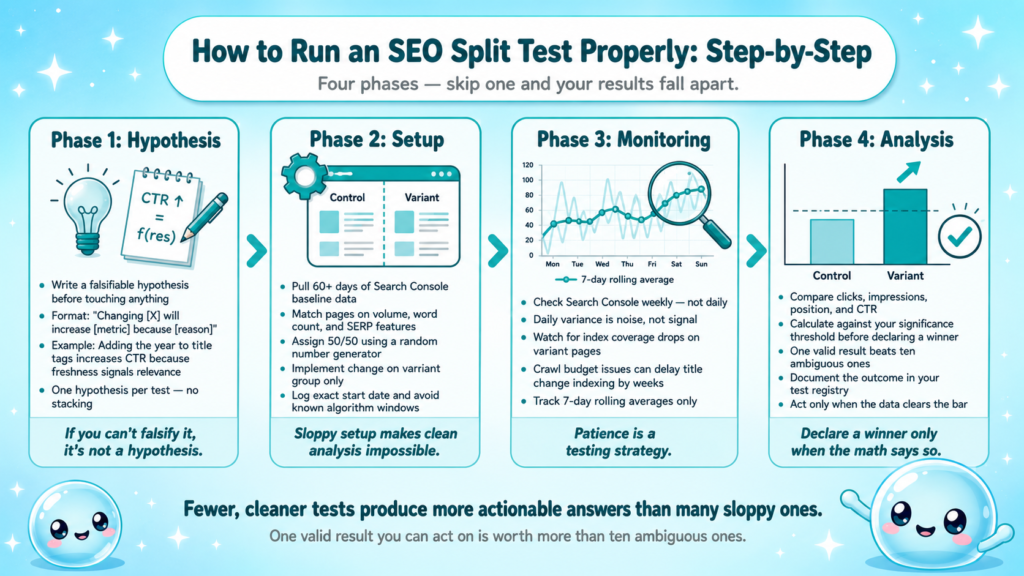
Phase 1: Hypothesis
Write a falsifiable hypothesis before touching anything. Format: “Changing [element] on [page group] will increase [metric] by [direction] because [reason].” Example: “Adding the current year to title tags on our evergreen guide pages will increase CTR because Google and users treat freshness as a relevance signal.”
Phase 2: Setup
- Pull 60+ days of Search Console data to establish baseline impressions and CTR per page.
- Match pages on search volume tier, word count range, and SERP feature exposure.
- Assign 50% to control, 50% to variant using a random number generator.
- Implement the variant change, title tags are the cleanest starting point for a title tag experiment because they’re quick to deploy and directly affect CTR.
- Log the exact implementation date and note any known algorithm updates or seasonality windows to avoid.
Phase 3: Monitoring
Check Search Console weekly, not daily. Daily variance in search impressions is noise. Look at 7-day rolling averages. Watch for index coverage drops that could contaminate results, if variant pages get crawled inconsistently, your data is compromised. Crawl budget constraints on large sites can delay indexing of title changes by days or weeks.
Phase 4: Analysis
Compare variant vs. control on: organic clicks, impressions, average position, and CTR. Calculate whether the difference clears your significance threshold before declaring a winner. More on that in the next section.
Running fewer, cleaner tests beats running many sloppy ones. One valid result you can act on is worth more than ten ambiguous ones.
How Do I Know If My SEO Test Results Are Statistically Significant?
This is where most SEO practitioners either overclaim or give up entirely. Statistical significance in SEO testing isn’t as clean as in e-commerce CRO, but it’s still achievable.
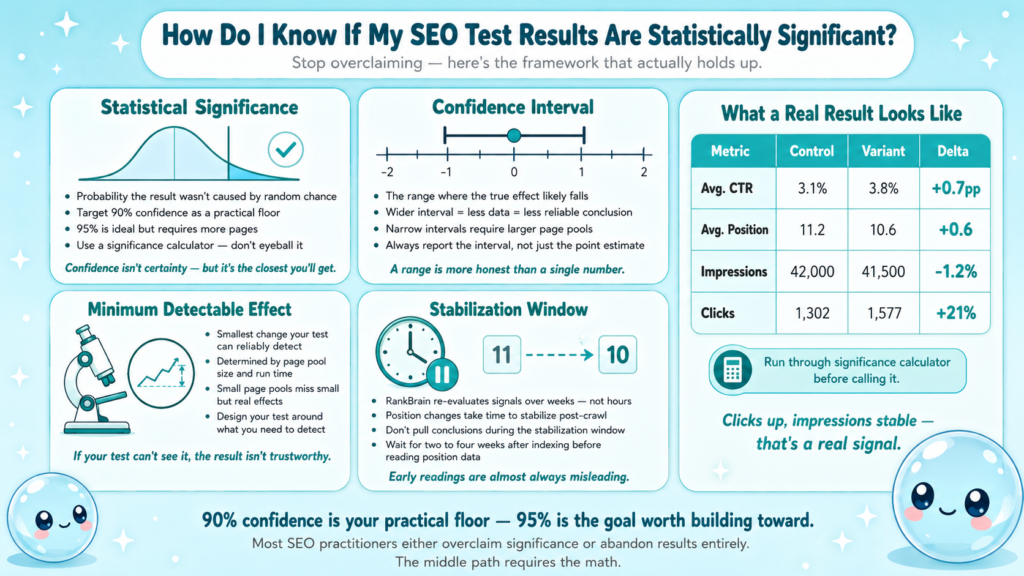
The core concepts:
- Statistical significance: The probability that your observed result wasn’t caused by random chance.
- Confidence interval: The range within which the true effect likely falls.
- Minimum detectable effect: The smallest change your test has enough data to reliably detect.
For SEO tests, I target 90% confidence as a practical threshold (95% is ideal but often requires more pages than most sites have). To hit 90% confidence, you generally need a large enough page pool and a long enough run time that the signal clears the noise from SERP feature volatility and normal ranking fluctuation.
A practical significance check:
| Metric | Control Group | Variant Group | Δ |
| Avg. CTR | 3.1% | 3.8% | +0.7pp |
| Avg. Position | 11.2 | 10.6 | +0.6 |
| Impressions | 42,000 | 41,500 | -1.2% |
| Clicks | 1,302 | 1,577 | +21% |
In this example, the click lift with stable impressions and improved position suggests the title tag experiment drove real uplift. But I wouldn’t call this until I’d run it through a significance calculator using actual click distributions.
Tools I use: VWO’s SEO A/B testing framework provides a solid primer on significance thresholds adapted for organic search. For hypothesis testing against Search Console data, I export page-level data and run calculations in a spreadsheet.
One important caveat: RankBrain and other machine learning layers in Google’s ranking systems mean that some position changes take weeks to stabilize after a change is crawled. Don’t pull conclusions during that stabilization window.
How Long Should an SEO Test Run Before Drawing Conclusions?
Short answer: longer than you want it to. The instinct to check results after two weeks is almost universal and almost always wrong.
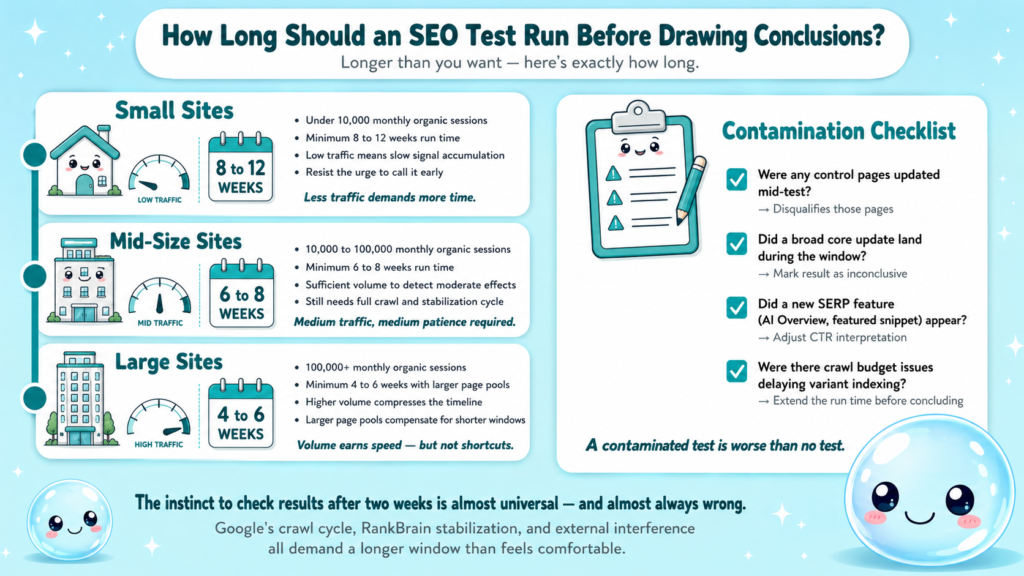
Minimum run time guidelines:
- Small sites (under 10k monthly organic sessions): 8 to 12 weeks minimum.
- Mid-size sites (10k to 100k sessions): 6 to 8 weeks.
- Large sites (100k+ sessions): 4 to 6 weeks, with larger page pools to compensate.
Why so long? Three reasons. First, Google’s crawl cycle means changes may not be indexed across all variant pages for one to two weeks. Second, ranking positions take time to stabilize as RankBrain re-evaluates signals including E-E-A-T, Information Gain, and user engagement data. Third, external interference, Google algorithm updates, competitors, seasonality, compounds over shorter windows and makes attribution nearly impossible.
I also build in a contamination checklist before finalizing results:
- Were any control pages updated during the test? (Disqualifies those pages.)
- Did a broad core update land during the test window? (Flag the result as inconclusive.)
- Did a new SERP feature (AI Overview, featured snippet) appear for key queries affecting the test pages? (Adjust interpretation, Search Generative Experience changes CTR baselines significantly.)
- Were there crawl budget issues that delayed indexing of variant changes?
The Search Quality Rater Guidelines don’t define test timelines, but understanding how quality signals are evaluated reinforces why stability periods matter. Google isn’t reacting to your title change in real time.
Best Way to A/B Test Title Tags Without Hurting Rankings
Title tag experiments are the highest-signal, lowest-risk SEO test type. Here’s why: title tags primarily influence CTR, not rankings directly, though improved CTR feeds engagement signals that can secondarily affect position. That means a bad title tag test is unlikely to tank your rankings, but a good one can compound clicks meaningfully.
Safe title tag testing protocol:
- Keep the primary keyword intact. Variants should test phrasing, framing, or format, not swap the core keyword out.
- Test one angle at a time: urgency framing (“2026 Guide”), question format (“What Is X?”), or benefit-first (“Get More Traffic With X”).
- Avoid changing slug or H1 in the same window, this introduces multiple variables.
- Monitor index coverage in Google Search Console after implementation. If variant pages drop from the index, something is wrong beyond the title.
- Set up Search Console filters by page group before launch so you can pull clean segmented data post-test.
What I’ve found works: adding specificity beats adding superlatives. “How to Fix Crawl Errors in 20 Minutes” outperforms “The Ultimate Guide to Fixing Crawl Errors” in my tests consistently. Users and Google’s systems both respond better to concrete, specific title constructions, which aligns with what Google Search Central documentation says about descriptive, non-clickbait titles.
For a related primer, understanding what’s included in a proper SEO report helps you set up the reporting structure before your test starts, not after.
SEO Test Framework for Agencies Managing Multiple Client Sites
Running data-driven SEO decisions across five or ten client sites simultaneously requires a system, not just a process. Without a framework, results don’t compound, they evaporate when team members change or clients get shuffled.
The agency SEO test framework I use has five components:
| Component | Purpose | Tool/Method |
| Test Registry | Central log of all active and completed tests | Notion or Sheets template |
| Hypothesis Bank | Reusable hypotheses by page type | Shared doc, updated per result |
| Control Group Archive | Frozen baseline data per test | GSC export, locked tab |
| Significance Calculator | Standardized stats check | Custom spreadsheet |
| Result Taxonomy | Tag wins, losses, inconclusives | Status field in registry |
Key agency-specific rules:
- Never run overlapping tests on the same site. If a client’s product pages are in a title tag experiment, their category pages are off-limits for any other test until results are concluded.
- Separate client test timelines. Stagger start dates so your team isn’t trying to read six sets of results at once.
- Document algorithm update windows. If a broad core update lands mid-test, mark the result as inconclusive rather than killing the test, you can resume with fresh data.
- Tie tests to client KPIs. A CTR lift that doesn’t translate to sessions or conversions is a partial win at best.
For agencies managing SEO at scale, what is SEO management actually requires systematic thinking exactly like this, not just tactical execution.
At sneo.ai, we’ve built the analysis layer that connects Search Console data to actionable test hypotheses, so you spend less time pulling reports and more time running tests that produce answers.
Conclusion
SEO split testing is how you stop guessing and start knowing.
- Define a falsifiable hypothesis before touching any page.
- Match your control and variant groups carefully, bad grouping kills test validity faster than anything else.
- Run tests long enough to clear noise: 6 to 12 weeks depending on site size.
- Require statistical significance before acting on any result, and flag inconclusive tests honestly rather than force-fitting a narrative.
The SEOs and agencies who build a repeatable SEO test framework are the ones whose recommendations hold up under scrutiny. That’s the standard worth aiming for.
Frequently Asked Questions
Q1: Can you A/B test SEO the same way you A/B test landing pages?
No. In landing page A/B testing, traffic is split between two live URLs. In SEO split testing, you split matched page groups, control and variant, and apply the change to one group. Google controls who sees what; you control which pages get the change.
Q2: What is the minimum number of pages needed for a valid SEO split test?
Most practitioners recommend at least 20 to 30 pages per group as a practical floor. Fewer pages mean you lack the sample size to reach statistical significance within a reasonable timeframe. Large-scale title tag experiments often use 50+ pages per group.
Q3: Does changing a title tag trigger a Google algorithm re-evaluation?
Not directly. Google will re-crawl and re-index the updated title, then reassess CTR signals over time. RankBrain and engagement-based signals update continuously, so position changes from a title tag experiment typically stabilize two to four weeks after the change is indexed.
Q4: How does a Google algorithm update affect a running SEO test?
A broad core update during your test window is a contamination event. It affects both control and variant groups unpredictably, making it impossible to isolate your change as the cause of any movement. Flag the result as inconclusive and restart with a clean baseline after the update settles.
Q5: What metrics should I track during an SEO split test?
Track organic clicks, impressions, CTR, and average position from Google Search Console, segmented by page group. Secondary metrics include index coverage status and crawl rate. Avoid using third-party rank trackers as your primary source, they introduce position sampling variance.
Q6: How does sneo.ai help with SEO testing?
sneo.ai connects directly to Google Search Console and lets you ask natural language questions about your test data, such as which pages in your variant group gained impressions or where CTR dropped. Instead of manually segmenting exports, you get test-ready answers built from your actual site data.