

I’ve audited dozens of Shopify stores, and the question I get more than any other is: is Shopify good for SEO? The honest answer is: yes, with caveats. Shopify gives you a solid foundation — auto-generated XML sitemaps, clean mobile-first indexing, and native structured data on product pages. But it also ships with real limitations that will quietly bleed your rankings if you don’t address them early.
Is Shopify Good for SEO: TL;DR
- Shopify is good for SEO out of the box, but duplicate content and URL structure constraints require deliberate fixes.
- Core Web Vitals performance depends heavily on theme choice and app load.
- WordPress/WooCommerce offers more flexibility; Shopify wins on speed-to-launch and built-in technical defaults.
- Most Shopify SEO problems are fixable — you just need to know where to look first.
Is Shopify Good for SEO in 2025?
Yes, and meaningfully more so than a few years ago. Shopify has invested heavily in its technical SEO defaults. Every store gets an auto-submitted XML sitemap, a robots.txt file you can now edit via the Robots.txt.liquid template, and canonical URLs applied to product pages automatically.
Where Shopify earns its stripes for SEO in 2025 is performance infrastructure. Shopify’s CDN serves assets globally, which directly supports Core Web Vitals scores — particularly Largest Contentful Paint. For stores on well-optimised themes, this is a genuine competitive advantage over self-hosted setups where server configuration is the merchant’s problem.
That said, is Shopify good for SEO in every context? Not unconditionally. The platform constrains your URL structure. Collection and product URLs follow fixed patterns (/collections/, /products/), and you cannot flatten them the way you can in WordPress. For stores targeting highly competitive informational queries alongside transactional ones, this hierarchy matters for crawl budget and internal linking depth.
Liquid templating also limits how aggressively you can customise schema markup. Out of the box, Shopify generates product schema — but FAQ schema, HowTo schema, and breadcrumb schema often require manual Liquid edits or app store integrations to implement correctly.
My experience: stores that treat Shopify’s defaults as a floor — not a ceiling — and layer on proper structured data and content strategy consistently achieve page-one rankings. Stores that assume the platform “handles SEO” without further input tend to plateau after initial indexation.
Three things Shopify gets right by default:
- Mobile-first indexing compatibility across all modern themes
- Auto-generated canonical URLs that prevent most basic duplicate content
- Sitemap auto-generation and Google Search Console verification support
These defaults save hours of setup compared to a raw CMS install.
How Does Shopify SEO Compare to WordPress for Ranking in Google?
This is the comparison I run through with almost every agency client before recommending a platform.
| Factor | Shopify | WordPress + WooCommerce |
| Technical defaults | Strong out of box | Requires plugins (Yoast, RankMath) |
| URL structure flexibility | Constrained | Fully customisable |
| Schema markup control | Limited via Liquid | Full control via plugins |
| Core Web Vitals baseline | Good (CDN-backed) | Varies by host |
| Content/blog capability | Basic | Extensive |
| Crawl budget management | Auto-handled mostly | Manual robots.txt control |
| hreflang tags for international | App-dependent | Plugin-supported |
WordPress wins on flexibility — period. If you’re building a content-heavy SEO strategy that relies on deep silo architecture, custom URL taxonomies, or aggressive hreflang tag implementation for international markets, WooCommerce gives you tools Shopify simply can’t match natively.
Shopify wins on reliability. The technical SEO baseline is consistent. You don’t inherit broken caching configs, conflicting plugin issues, or server-level robots.txt mistakes. For merchants who want to rank without becoming a technical SEO expert, that consistency has real value.
Is Shopify or WooCommerce better for SEO? For pure e-commerce with limited blog content, Shopify is competitive. For hybrid content-and-commerce sites, WooCommerce edges ahead. The gap has narrowed, but it hasn’t closed.
One thing I tell clients: ongoing SEO effort matters far more than platform choice. A disciplined content and link strategy on Shopify will beat a neglected WooCommerce store every time.
What Are the SEO Limitations of Shopify You Should Know Before Recommending It to a Client?
Three structural limitations consistently surface in my audits:
1) Duplicate content from faceted navigation: Shopify creates duplicate URLs when products appear in multiple collections. /collections/shirts/products/blue-tee and /collections/sale/products/blue-tee both index as separate pages. Shopify applies canonical tags pointing to /products/blue-tee, but Googlebot still crawls both variants, wasting crawl budget on large catalogues.
2) Rigid URL structure: You cannot remove /collections/ or /products/ from URLs. This is a hard platform constraint. For stores migrating from custom domains where flat URLs were ranking, this can cause ranking disruption that’s difficult to fully recover from via 301 redirects alone.
3) App-driven bloat on page experience signals: Shopify’s app store integrations are additive — every app you install potentially adds render-blocking scripts. I’ve audited stores where five or six apps had collectively added 400KB+ of JavaScript, tanking their site speed optimization efforts. Page experience signals directly feed into Google’s ranking systems, so this matters.
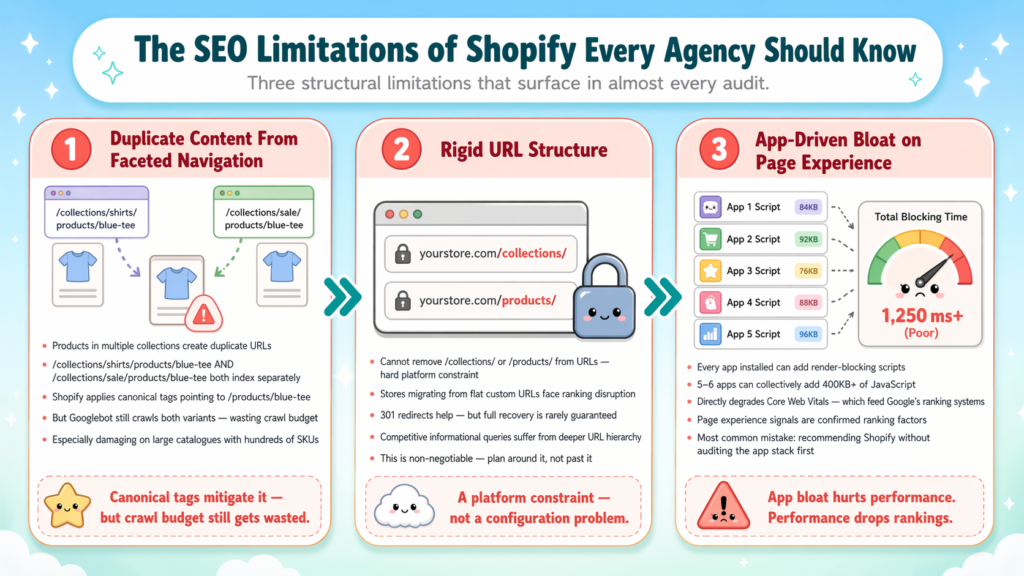
The most common mistake I see agencies make is recommending Shopify without auditing the client’s theme and app stack first. The platform defaults are clean; the real-world store often isn’t.
Two additional limitations worth flagging for international clients: native hreflang tag support requires either a custom Liquid implementation or a third-party app. Shopify Markets has improved this, but it still doesn’t match the control you’d get from a hand-configured WordPress setup.
For a thorough pre-launch view of these issues, I always recommend running a proper SEO audit before the store goes live.
What Shopify SEO Issues Should You Fix First for a New Store?
When I take on a new Shopify store, I triage in this order:
- Connect Google Search Console: Verify ownership via DNS or the meta tag method, then submit your sitemap.xml. This is non-negotiable — you need crawl data before you can diagnose anything.
- Audit canonical URLs: Check that collection-product URL variants are correctly canonicalised to /products/ URLs. Use Screaming Frog or sneo AI to pull this data at scale.
- Review robots.txt.liquid: Ensure you’re not accidentally blocking CSS, JS, or key collection pages. Shopify’s default robots.txt is sensible but worth verifying.
- Implement breadcrumb navigation schema: This improves how Google interprets your site hierarchy and enables breadcrumb rich results in SERPs.
- Optimise meta descriptions on high-priority pages: Shopify auto-populates these from product descriptions if left blank, which usually results in truncated, non-compelling snippets.
- Compress images and audit app scripts: Run a Lighthouse test on your homepage and top collection pages. If Total Blocking Time is high, trace it to specific app scripts.
- Set up structured data for products: Verify that price, availability, and review schema are rendering correctly using Google’s Rich Results Test.
For stores on Shopify good for SEO evaluations, getting Search Console connected and reading data within the first week is the single highest-leverage action you can take. Every other decision flows from real crawl and impression data.
Does Shopify Hurt SEO With Duplicate Content Problems?
This is one of the most-discussed concerns in SEO communities, and it deserves a direct answer: yes, Shopify generates duplicate content structurally — but it also applies canonical tags automatically to mitigate it.
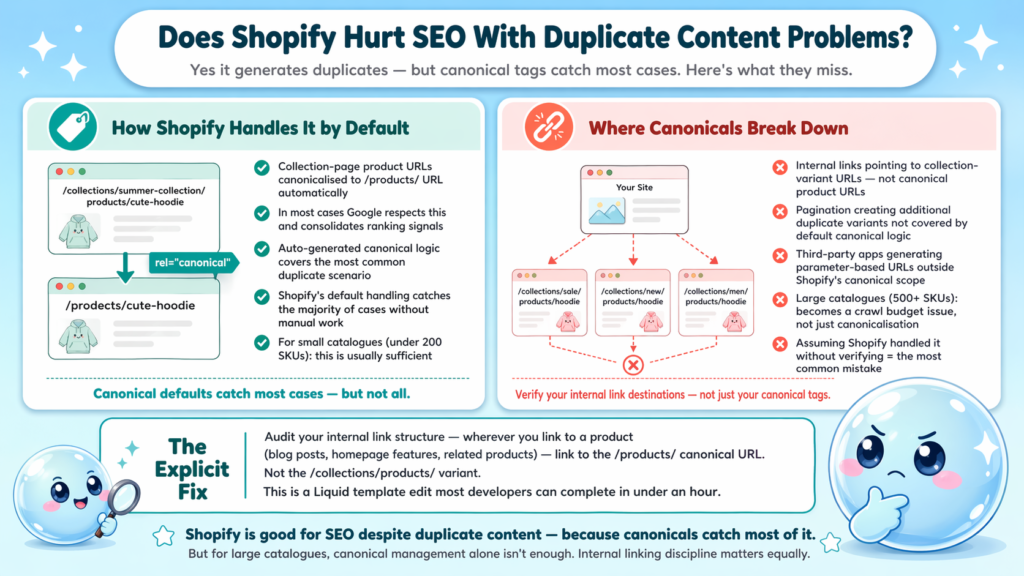
The canonical URL setup Shopify uses points collection-page product URLs back to the canonical /products/ URL. In most cases, Google respects this and consolidates ranking signals correctly. The problem arises when:
- Internal links point heavily to the collection-variant URLs rather than canonical product URLs
- Pagination creates additional duplicate variants that aren’t canonicalised correctly
- Third-party apps generate parameter-based URLs that aren’t covered by Shopify’s default canonical logic
My recommended fix is explicit: audit your internal link structure and ensure that wherever you link to a product — from blog posts, homepage features, related products — you’re linking to the /products/ canonical URL, not the /collections/products/ variant. This is a Liquid template edit that most developers can implement in under an hour.
For large catalogues (500+ SKUs), duplicate content from faceted navigation becomes a crawl budget issue, not just a canonicalisation issue. Shopify’s holistic SEO approach — combining canonical management, internal linking discipline, and selective noindex on low-value filtered pages — is the right framework here.
Is Shopify good for SEO despite this? Yes, because the canonical defaults catch most cases. But you need to verify, not assume.
Can You Rank a Shopify Store on Page One of Google?
Yes — I’ve done it, and I’ve helped clients do it across competitive niches. The question isn’t whether Shopify is good for SEO enough to rank page one; the question is whether you’re applying the right strategy.
What page-one Shopify stores have in common:
- Content depth on collection pages: Descriptive copy above and below the product grid, targeting head terms and semantic variants
- A functioning blog: Not just for links — for topical authority that lifts the entire domain
- Clean internal linking: Breadcrumb navigation wired correctly, product links pointing to canonical URLs, related content linking between blog and collection pages
- Earned backlinks: This is the factor most stores underinvest in. Technical SEO opens the door; links determine how far you walk through it
- Speed-optimised theme: Sub-3-second load on mobile is achievable on Shopify with the right theme and minimal app footprint
Understanding why SEO takes so long is especially important for Shopify store owners — new domains and new stores face an authority gap that content and links close gradually, not overnight.
A Shopify store with disciplined content, clean technical SEO, and a real link acquisition strategy will outrank a poorly managed WooCommerce store almost every time.
Is Shopify good for SEO when you put the work in? Absolutely.
Conclusion
- Shopify is a capable SEO platform with strong technical defaults, but structural limitations around URL flexibility and duplicate content require deliberate management.
- WordPress/WooCommerce offers more control; Shopify offers more consistency and faster setup.
- The biggest wins on Shopify come from fixing canonical URLs, optimising Core Web Vitals, implementing structured data, and building content depth on collection pages.
- Platform choice matters less than execution quality — focus your energy there.
Frequently Asked Questions
Q1: Is Shopify good for SEO compared to Squarespace or Wix?
Shopify outperforms both for e-commerce SEO. It offers better structured data defaults, more granular robots.txt control via Liquid, and a stronger CDN-backed performance baseline. Squarespace and Wix have improved, but neither matches Shopify’s technical depth for product-catalogue-heavy sites.
Q2: Does Shopify automatically create an XML sitemap?
Yes. Shopify auto-generates a sitemap.xml at yourstore.com/sitemap.xml that includes products, collections, blog posts, and pages. You cannot fully customise it, but it covers all indexable content types by default and updates automatically when new content is published.
Q3: Can I edit robots.txt on Shopify?
Yes, since Shopify introduced the Robots.txt.liquid template, you can add custom rules — allowing or blocking specific paths, crawlers, or parameters. This is a significant improvement over the previously locked robots.txt and gives you meaningful crawl budget management control.
Q4: Does adding many apps hurt Shopify SEO?
Yes. Each app you install can add render-blocking JavaScript that inflates Total Blocking Time and degrades Core Web Vitals scores. Audit your app scripts regularly with Google’s PageSpeed Insights and remove any app not delivering measurable commercial value.
Q5: How do I handle hreflang tags on Shopify for international SEO?
Shopify Markets provides some native hreflang support for multi-region stores. For more granular control — particularly for separate subdomains or ccTLDs — you’ll need a third-party app or a manual Liquid implementation. Always validate your hreflang output with a dedicated crawler after implementation.
Q6: What’s the fastest way to diagnose why a Shopify store lost traffic?
Connect the store to Google Search Console and check the Performance report for impression and click drops segmented by page and query. Then cross-reference with the Coverage report for new crawl errors or indexation drops. Tools like sneo AI let you ask these diagnostic questions directly against your Search Console data without manually pulling every report.