I’ve audited hundreds of websites over the years, and I keep seeing the same problem: pages that should be ranking simply aren’t showing up in Google. Nine times out of ten, the root cause isn’t weak content or missing keywords — it’s that Google never properly crawled the page in the first place. Understanding what is crawling in SEO is the foundation of every technical audit I run, and it should be the first thing you check before tweaking anything else on your site.
If you’ve ever wondered why a page you published months ago still isn’t indexed, or why your site seems to disappear after a redesign, this guide will walk you through exactly what’s happening — and what to do about it.
What Is Crawling in SEO — And Why Should You Care?
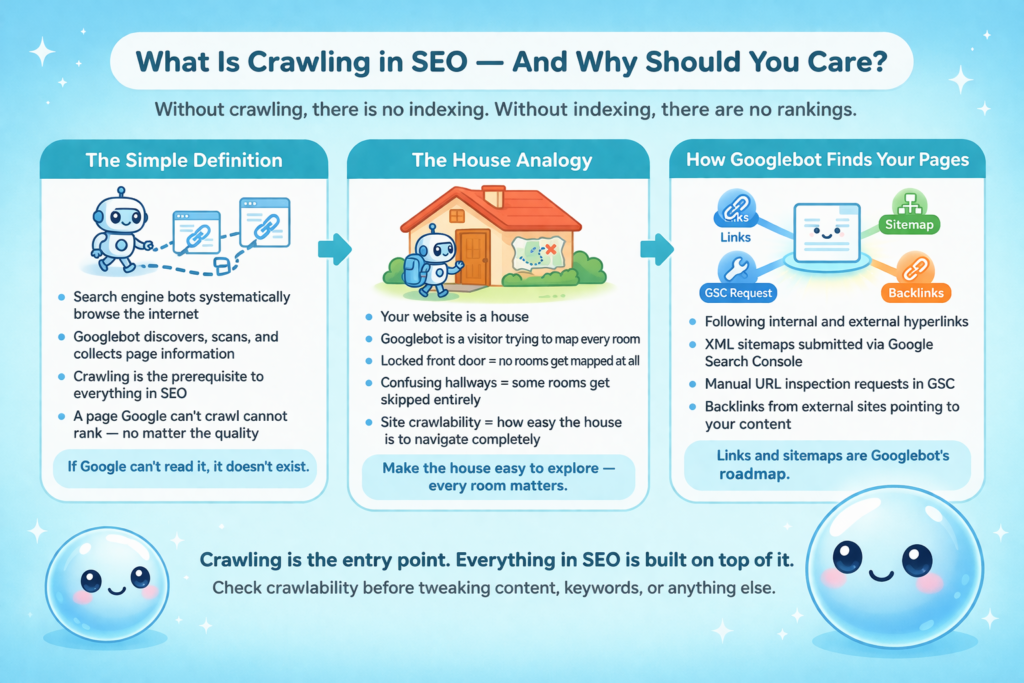
Crawling in Search Engine Optimization (SEO) is the process by which search engine bots — most importantly, Google’s bot called Googlebot — systematically browse the internet to discover, scan, and collect information about web pages. Think of it as a librarian reading every book in existence to decide what goes into the library catalog. Without crawling, there is no indexing. Without indexing, there are no rankings.
When I explain this to clients, I use a simple analogy: your website is a house, and Googlebot is a visitor trying to map every room. If the front door is locked, no rooms get mapped. If hallways are confusing, some rooms get skipped entirely. Site crawlability is essentially how easy it is for that visitor to navigate your house completely and accurately.
Crawling is the prerequisite to everything in SEO. If Googlebot cannot access and process a page, that page does not exist in Google’s world — no matter how well-written or optimized it is.
According to Google’s official Search Central documentation, Googlebot uses automated programs to discover URLs across the web, starting from a known set of URLs generated from previous crawls and supplemented by sitemap data.
How Googlebot Discovers Your Pages
Googlebot doesn’t just randomly browse the web. It follows a systematic, prioritized process. Here’s how page discovery typically happens:
Following links: Googlebot follows hyperlinks from already-crawled pages to new ones. This is why internal linking is so critical — it literally determines which pages the bot can find.
XML Sitemaps: Submitting an XML sitemap through Google Search Console gives Googlebot a direct map of URLs you want crawled and indexed.
URL inspection requests: You can manually request crawling for a specific URL using the URL Inspection Tool in Google Search Console.
Backlinks from other sites: When an external site links to one of your pages, Googlebot can follow that link and discover your content.
I always start my technical audits by checking whether a site’s sitemap is properly submitted and whether the internal link structure creates clear pathways to every important page. If those two elements are broken, everything downstream suffers.
How the Crawling Process Actually Works (Step by Step)
A lot of my clients assume that as soon as they hit “publish,” Google knows about their page. That’s rarely true. Here’s what actually happens between publication and appearing in search results.
From Discovery to the Index
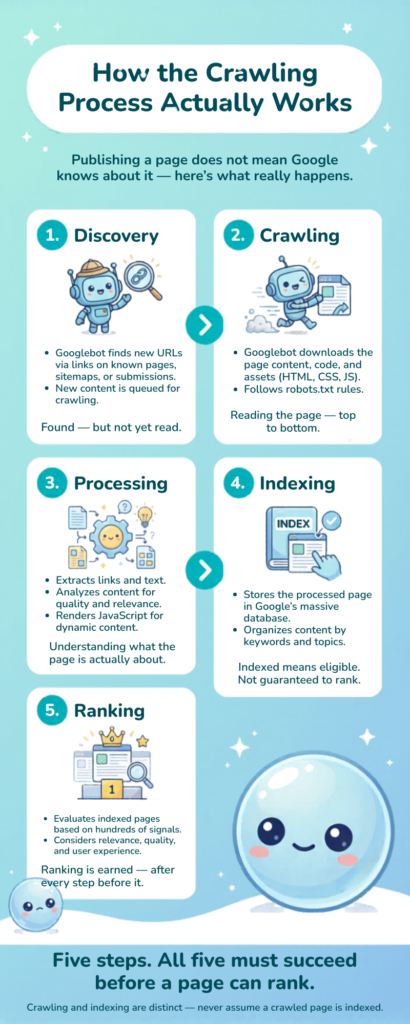
Discovery: Googlebot finds a URL, either via a link, sitemap, or prior crawl history.
Crawling: The bot fetches the page’s HTML, JavaScript, CSS, and other resources. This is where Googlebot crawling actually takes place — the bot reads the page content and follows outbound links.
Processing: Google processes the information it collected: the text, images, structured data, and links.
Indexing: If the page passes Google’s quality checks — no noindex tag, no canonical pointing elsewhere, no duplicate content issues — it gets added to Google’s index and becomes eligible to rank.
Ranking: Only after indexing does a page compete in search results based on all of Google’s ranking signals.
Crawling and indexing are often confused, but they are distinct steps. I’ve seen pages that were crawled but not indexed because of thin content or duplicate signals. Crawling is the entry point — indexing is the destination.
What Is Crawl Budget and Why Does It Matter?
Here’s a concept that surprises most site owners when I bring it up: Googlebot doesn’t have unlimited time to spend on your site. Every website is allocated a crawl budget — roughly, the number of pages Google will crawl from your domain within a given period. This number is influenced by your site’s authority, server speed, and how much Google thinks your content changes.
According to Google’s crawl budget management documentation, crawl budget matters most for sites with over 1 million unique pages, sites that add hundreds of pages daily, or sites with large numbers of low-quality URLs. That said, I’ve seen crawl budget issues seriously impact e-commerce sites with as few as 5,000 pages because so much of that budget was being wasted.
Signs You’re Wasting Your Crawl Budget
When I run a technical audit, one of the first things I check is whether crawl budget is being squandered. Common culprits include:
Faceted navigation generating thousands of near-duplicate URLs (e.g., filter combinations on e-commerce sites)
Paginated archives with no end (infinite scroll implementations done wrong)
Session IDs and tracking parameters being indexed as separate URLs
Staging or development environments accessible to bots
Redirect chains that consume extra crawl cycles
Pages returning soft 404 responses (showing “no results” with a 200 OK status code)
How to Optimize Your Crawl Budget
Crawl budget optimization is about directing Googlebot toward your most valuable pages. Here’s what I recommend to every client:
Block low-value URLs using your robots.txt file (more on this below)
Use canonical tags to consolidate duplicate or near-duplicate pages
Fix redirect chains — every redirect in a chain eats into your budget
Remove or noindex pages with no search value (tag pages, filtered pages, thin archive pages)
At sneo.ai, I built the platform specifically to surface these kinds of insights without requiring clients to become data analysts. When a client connects their Google Search Console data to sneo.ai and asks “why aren’t my new pages getting indexed?”, I can immediately see crawl frequency patterns, page discovery timelines, and which sections of their site Googlebot is ignoring. That kind of visibility used to require expensive enterprise tools — now it’s a conversation.
How robots.txt Shapes Googlebot Crawling
The robots.txt file sits at the root of your domain (e.g., yoursite.com/robots.txt) and acts as a set of instructions for search engine bots. It tells Googlebot which parts of your site it is and is not allowed to crawl. Robots.txt SEO is one of the most misunderstood aspects of technical SEO, and I’ve seen it cause catastrophic ranking drops when configured incorrectly.
I worked with an e-commerce client last year who had accidentally blocked their entire /products/ directory in robots.txt after a site migration. Their product pages dropped out of Google’s index within weeks. The fix was simple once we found it — but the damage took months to fully recover from.
The Difference Between Blocking and Noindexing
This distinction matters enormously and is something I clarify in almost every client onboarding call:
Method
Blocks Crawling?
Blocks Indexing?
Best Use Case
robots.txt Disallow
Yes
No (Google can still index if linked)
Preventing crawl of admin pages, staging areas, low-value parameters
noindex meta tag
No
Yes
Pages you want Google to crawl but not show in results
Password protection
Yes
Yes
Truly private content
The key insight: if you block a URL in robots.txt but don’t add a noindex tag, Google can still learn about that URL from external links and potentially index it with limited information. If you truly don’t want a page indexed, the noindex meta tag is the right tool — not robots.txt alone.
Robots.txt controls crawl access; noindex controls index inclusion. Confusing the two is one of the most costly technical SEO mistakes a site owner can make.
Common Crawl Errors (and How I Fix Them)
Crawl errors are signals from Google that something went wrong when it tried to access your pages. Left unaddressed, they can silently drain your crawl budget and prevent good content from getting indexed. Every week, I check Search Console data for my clients specifically looking for these patterns.
The most common crawl errors I encounter are:
404 Not Found: The page doesn’t exist. Usually caused by deleted pages or broken internal links. Fix: Set up a 301 redirect to a relevant live page, or update internal links pointing to the broken URL.
5xx Server Errors: Your server is failing to respond to Googlebot. This can tank crawl frequency quickly. Fix: Investigate server capacity issues and check error logs.
Redirect errors: Redirect chains (A B C) or redirect loops (A B A) confuse bots and users. Fix: Ensure all redirects go directly to the final destination URL.
Blocked by robots.txt: Pages you actually want indexed are being blocked. Fix: Review your robots.txt file carefully after every site migration.
Soft 404s: Pages returning a 200 status code but displaying “no results” or empty content. Fix: Return a proper 404 or 410 status, or redirect to a relevant page.
Reading Your Crawl Data in Google Search Console
If you’re not already using Google Search Console to monitor crawl health, start today. Here’s where to look:
Navigate to Indexing Pages to see which pages are indexed and which are excluded, with reasons.
Check Settings Crawl Stats for a breakdown of how often Googlebot visits your site, response times, and file types crawled.
Use the URL Inspection Tool on individual pages to see the last crawl date, rendered version, and any indexing issues.
I built sneo.ai to make this data even more accessible. Instead of manually navigating through Search Console menus, my clients can simply connect their account to sneo.ai and ask natural-language questions like “Which of my pages have crawl errors?” or “Why is my homepage being crawled less frequently this month?” The AI pulls directly from their Search Console data and gives them clear, actionable answers.
Site Architecture and Its Role in Site Crawlability
One of the most powerful levers for improving site crawlability is your site’s architecture — the way pages are connected and organized. A flat, logical site architecture ensures that Googlebot can reach every important page in as few clicks as possible from the homepage.
The rule of thumb I use with clients: no important page should be more than 3 clicks from the homepage. Pages buried 6 or 7 levels deep in your navigation rarely get crawled consistently, even on high-authority domains. According to research from Moz on site architecture and SEO, internal link depth has a direct relationship with crawl frequency — the deeper a page is buried, the less crawl priority it receives.
Practical steps to improve site architecture for crawl optimization:
Create a clean, hierarchical navigation menu that links to all major content categories
Build topical clusters: link related articles to each other and to a central “pillar” page
Use breadcrumbs — they add both user clarity and additional internal links for Googlebot to follow
Audit your internal links regularly; broken internal links bleed crawl budget and strand pages
Submit and maintain an up-to-date XML sitemap, and make sure it only includes URLs you want indexed
Understanding what is crawling in SEO at a structural level means recognizing that your website’s link graph is essentially a map for Googlebot. The cleaner and more logical that map, the more efficiently Googlebot can do its job — and the more of your valuable content ends up in the index.
I’ve seen dramatic improvements in indexation rates simply by fixing internal linking structures. One SaaS client I worked with had a blog with 400 posts, but over 200 of them had zero internal links pointing to them. After a structured internal linking sprint — connecting related posts and adding links from high-traffic pages — Search Console showed a 40% increase in the number of blog pages being actively crawled within 8 weeks.
Frequently Asked Questions About Crawling in SEO
1) What is crawling in SEO?
Crawling in SEO is the process by which search engine bots like Googlebot discover and scan web pages by following links across the internet. The data collected during crawling is used to build a search engine’s index, which determines which pages can appear in search results. Without crawling, no page can rank — it’s the first and most essential step in the entire SEO pipeline.
2) How does Googlebot decide which pages to crawl?
Googlebot prioritizes pages based on signals like link authority, page freshness, historical crawl data, and your crawl budget. Pages with more backlinks and frequent content updates tend to get crawled more often. Your site’s server response time also plays a role — slow servers prompt Googlebot to crawl less aggressively.
3) What is crawl budget and why does it matter?
Crawl budget is the number of pages Googlebot will crawl on your site within a given timeframe. If your site has thousands of pages, Google won’t crawl all of them at once. Wasting crawl budget on low-value pages — like duplicate filter URLs or empty pagination — means your most important pages may not get indexed promptly or consistently.
4) How do I fix crawl errors in Google Search Console?
Go to Google Search Console, navigate to Pages under Indexing, and filter by “Not indexed.” Common fixes include setting up proper 301 redirects for 404 errors, resolving server errors (5xx) with your hosting provider, and updating internal links to point to correct, live URLs. Regularly checking crawl stats helps you catch new errors before they compound.
5) Does robots.txt block pages from being indexed?
Not reliably. Robots.txt tells Googlebot which pages not to crawl, but it does not guarantee a page won’t be indexed. If other sites link to a blocked page, Google may still index it — just without full content details. To truly prevent indexing, use a noindex meta tag on the page itself, which can be crawled but explicitly tells Google not to add it to the index.
Start Treating Crawlability as a Revenue Issue
I’ve spent years helping website owners understand their SEO performance, and here’s the truth I come back to again and again: every page Google can’t crawl is a page that can never earn you traffic, leads, or revenue. Understanding what is crawling in SEO isn’t an academic exercise — it’s one of the most practical things you can do for your site’s growth.
Start by auditing your robots.txt file, submitting a clean XML sitemap, and pulling up your crawl stats in Google Search Console. Look for pages that should be indexed but aren’t. Check for crawl errors that are quietly draining your budget. Trace the internal link paths from your homepage to your most valuable content.
And if navigating all of that Search Console data feels overwhelming, that’s exactly why I built sneo.ai. Connect your Google Search Console account and ask me directly: “Which pages aren’t being crawled?” or “What’s hurting my crawl budget?” I’ll walk you through exactly what the data says and what to fix first. You don’t need to become a technical SEO expert — you just need the right tool asking the right questions with your own data as the foundation.
Crawlability is the bedrock. Everything else you do in SEO is built on top of it.
Written by Rahul Marthak
As an SEO consultant, I’ve helped hundreds of websites turn search data into actionable growth strategies. After watching too many site owners struggle with analytics paralysis, I founded sneo.ai to make SEO insights simple and immediately useful.
Get your SEO action plan
Stop guessing. Let sneo analyze your site and show you exactly what to fix.