

I’ve analyzed hundreds of websites over the last few years, and I see the same pattern over and over: a business owner stares at a dashboard full of up-and-down arrows, looking totally lost. They see thousands of impressions in Google search results, but their click-through rates are stuck at 1%. They have the data, but they don’t have a clue what to do with it.
The answer to why their traffic isn’t converting is always buried somewhere in that data—usually in Google Search Console—but finding it feels like searching for a needle in a haystack.
This frustration is exactly why SEO reporting has become such a complicated topic. It shouldn’t be about generating a fifty-page PDF that no one reads. It should be about answering simple questions: Are we winning? If not, why? And what do we do next?
That is why I built sneo.ai—to bridge the gap between having raw numbers and actually knowing what they mean. But before we talk about tools, we need to strip away the confusion around reporting itself.
What Is SEO Reporting?
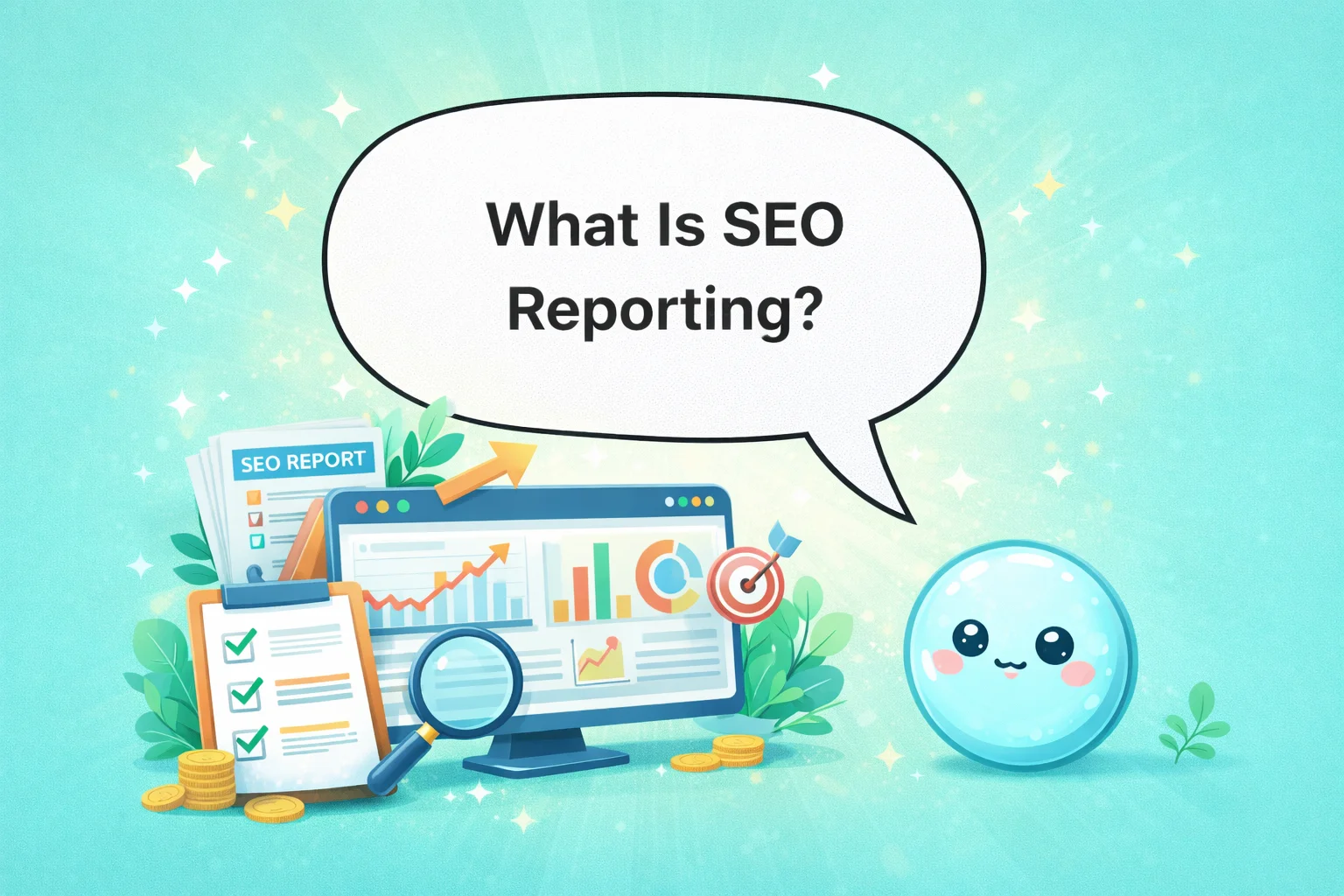
SEO reporting is the practice of tracking search performance and translating raw metrics—like traffic, rankings, and backlinks—into actionable insights that improve visibility and revenue.
It is not just sending a screenshot of Google Analytics. It is not dumping a spreadsheet of keyword rankings on a client’s desk.
Real SEO reporting tells a story. It connects the work being done (writing articles, fixing technical bugs, building links) to the results you want (more traffic, more leads, more sales).
In my experience, a good report answers three specific questions:
- Is my site getting more visibility? (Are people seeing us?)
- Is traffic improving? (Are people clicking on us?)
- Are rankings and conversions moving in the right direction? (Is this making us money?)
If you have a report that doesn’t answer those three things clearly, you don’t have a report. You have a distraction.
The difference between “having data” and “having insight”
I see this confusion daily. A client will tell me, “Rahul, I have plenty of reports.” Then they show me a dashboard with fifty different widgets.
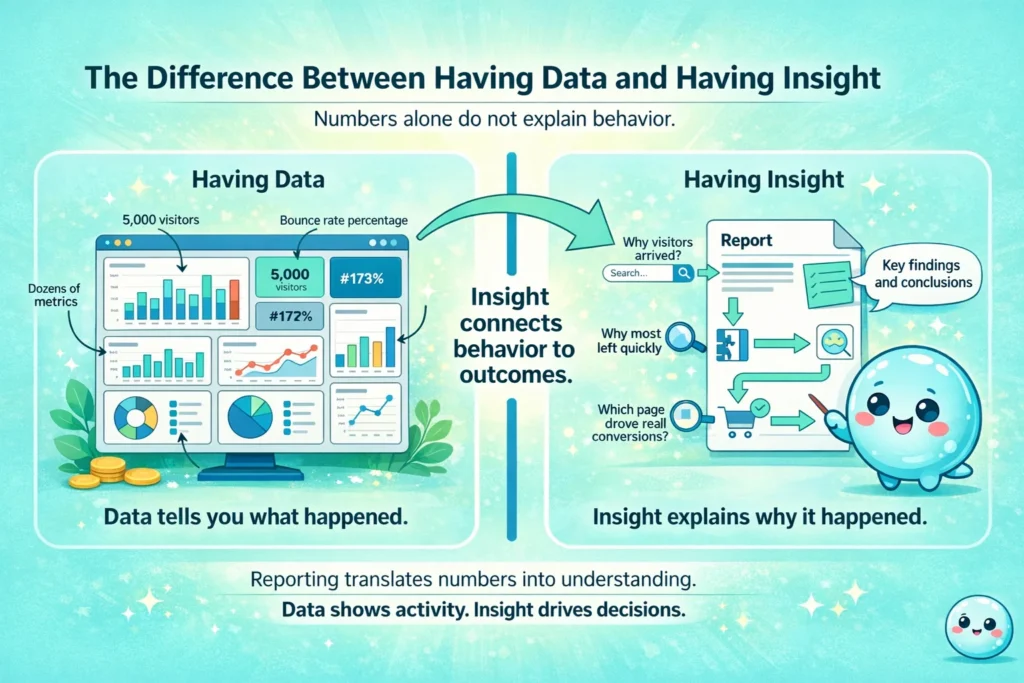
Having data means you know that 5,000 people visited your site. Having insight means you know why they visited, why 4,000 of them left immediately, and which specific blog post brought in the 50 people who actually bought something.
SEO reporting exists to bridge that gap. It forces you to look at the “what” (the data) and explain the “so what?” (the insight).
Why SEO Reporting Matters for Website Owners and Marketers
You might think reporting is just administrative work—something you do at the end of the month to check a box. But I’ve learned that reporting is actually where the strategy happens.
Without reporting, you are flying blind. I once worked with a client who spent six months writing content for keywords that had zero search volume. They were working hard, but they weren’t looking at the right signals. A simple monthly report would have caught that error in week four.
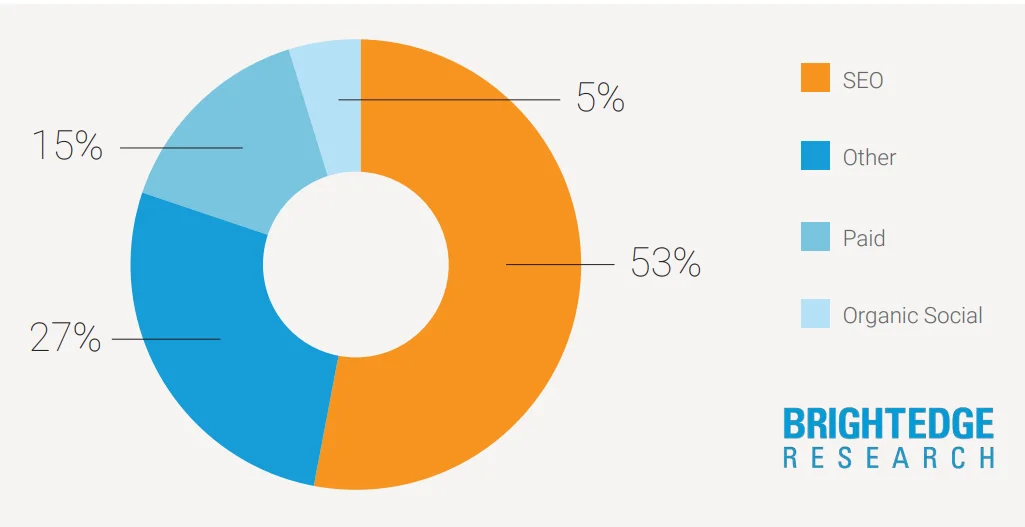
Considering that organic search drives 53% of all website traffic on average, ignoring these reports is a massive financial risk.
Reporting connects SEO tasks to real business outcomes. It becomes critical in situations like:
- Site redesigns: When you change how your site looks, you risk losing traffic. Reporting acts as your safety net to catch drops early.
- Content changes: If you rewrite your service pages, you need to know if Google prefers the new version or the old one.
- Technical fixes: Did fixing those 404 errors actually bring traffic back? Only a report will tell you.
- Link building campaigns: Are those new backlinks actually pushing your rankings up?
Justifying budget and time
If you are a marketer or an agency, you know the pressure of proving your worth. SEO is a long game. It can take months to see major results.
Reporting is how you buy patience. By showing leading indicators—like an increase in impressions or improved average position—you can prove that the strategy is working even before the traffic floodgates open. It helps you decide what to fix next and avoids the dangerous game of guessing.
What Data Is Used in SEO Reporting?
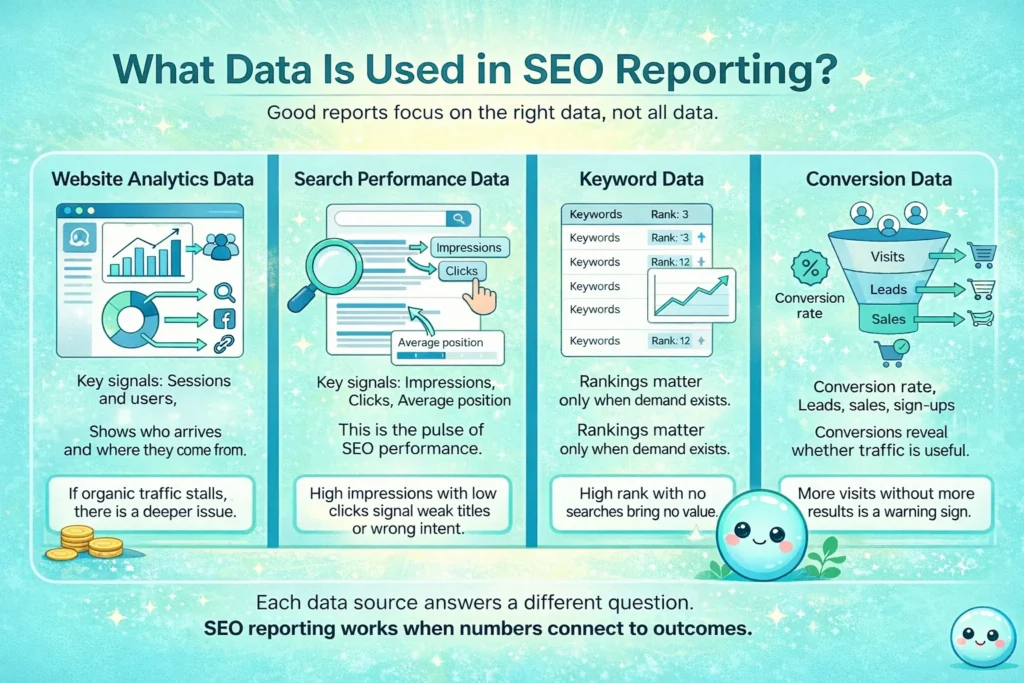
When I build a report, I don’t throw everything in. I focus on four main buckets of data. If you are trying to understand what SEO reporting is, you need to understand these four pillars.
Website analytics data
This is usually pulled from Google Analytics 4 (GA4). It tells us about behavior.
- Sessions and Users: How many people are actually showing up?
- Traffic Sources: I always check the split between Organic Search (free traffic from Google) versus Direct, Social, or Paid. If Organic isn’t growing, we have a problem.
Search performance data
This is my favorite part, and it comes directly from Google Search Console. This is the heartbeat of your SEO.
- Impressions: How many times a user saw your link in the search results.
- Clicks: How many times they actually clicked it.
- Average Position: Where you generally rank.
I spend 80% of my time here. High impressions with low clicks usually means your title tags are boring, or you are ranking for the wrong intent.
Keyword data
Keywords are the terms people type into Google. Tracking them is standard practice, but be careful.
- Keyword tracking basics: You need to know if you are #1 or #100 for your main terms.
- Context matters: Ranking #1 for a keyword that nobody searches for is a vanity metric. I see reports all the time bragging about #1 rankings for obscure phrases that bring zero business. Don’t fall for that.
Conversion data
Traffic is vanity; conversion is sanity.
- What conversion rate means: It is the percentage of visitors who do what you want them to do.
- Common actions: Sign-ups, purchases, or filling out a contact form.
If your traffic goes up 50% but your leads stay flat, your report should scream that something is wrong. Maybe you are attracting the wrong people, or maybe your landing page is broken.
Core SEO Performance Metrics You Should Always Track
If I had to pick just a few numbers to check every week, it would be these. These metrics are the vital signs of your website.
- Organic Traffic: The raw number of visitors coming from search engines. If this line is flat or going down, nothing else matters.
- Search Visibility: This measures how visible you are across a set of keywords. It’s a good big-picture metric.
- Average Rankings: Are you moving from page 2 to page 1?
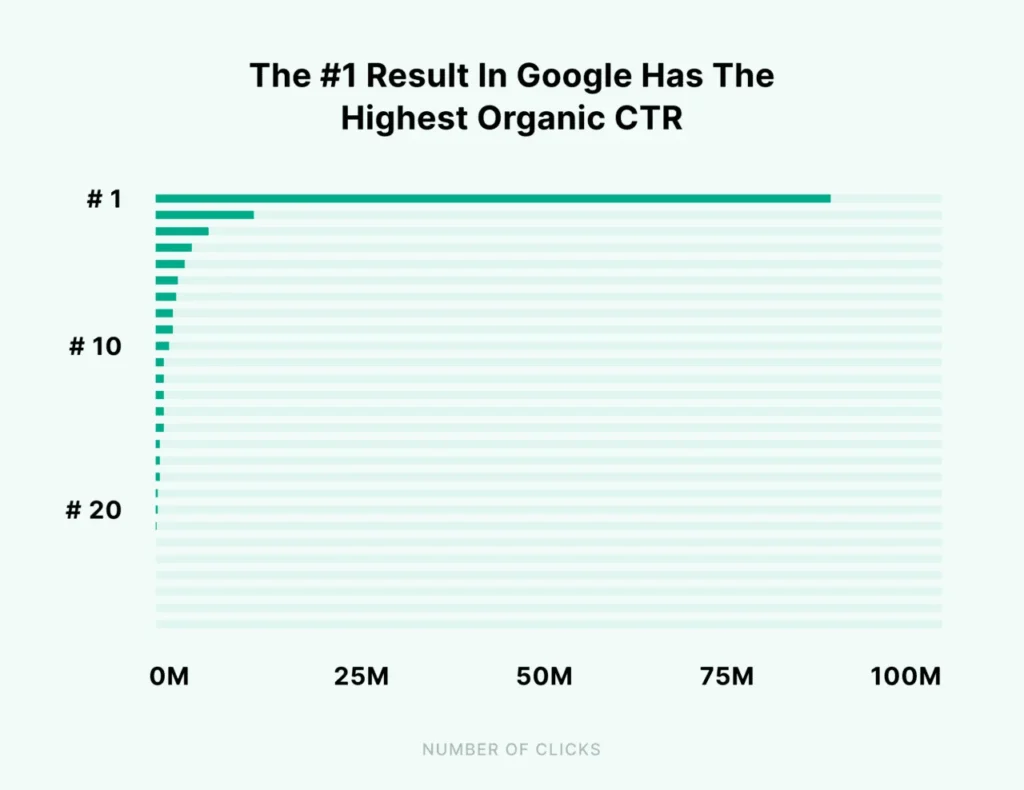
- Click-Through Rate (CTR): This is the percentage of people seeing your link who actually click it. According to Backlinko, the #1 result in Google gets 27.6% of all clicks, so even small improvements here matter.
- Conversion Rate: Are search visitors buying?
- Indexed Pages: Is Google actually filing your pages in its library? If your pages aren’t indexed, they don’t exist in search.
- Crawl and Coverage Issues: Are there technical errors preventing Google from reading your site?
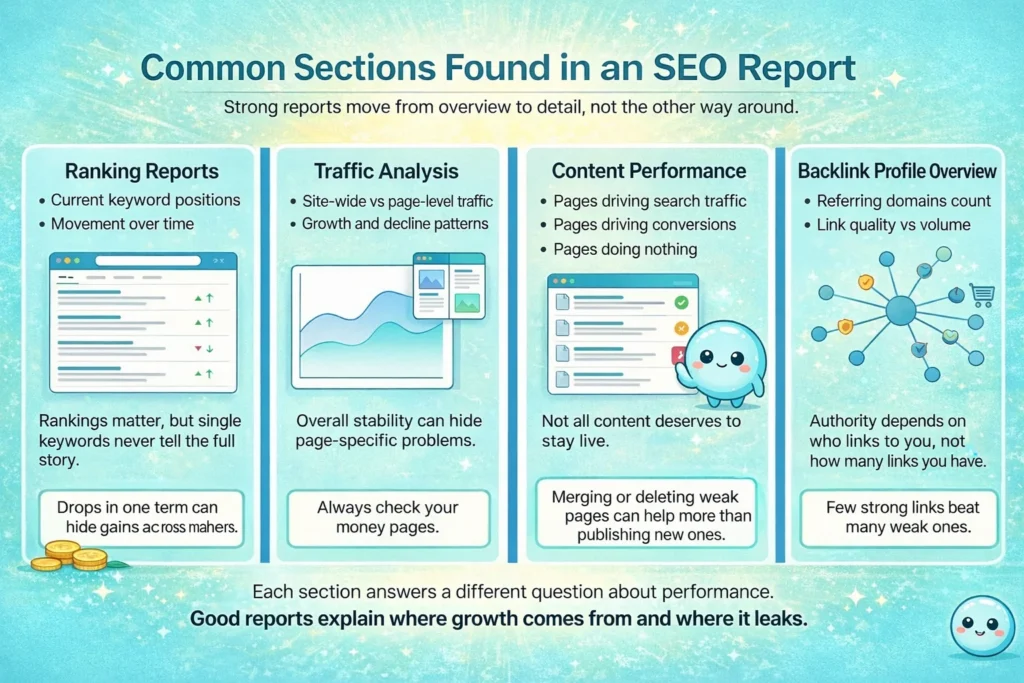
Common Sections Found in an SEO Report
When I structure a report for a client or for my own projects, I usually follow this flow. It moves from the big picture down to the specific details.
Ranking reports
This is usually the first thing people want to see. “Where do I rank for ‘best running shoes’?” Rankings are important, but I always warn people that single-keyword focus can be misleading. You might drop for one keyword but gain traffic from fifty long-tail keywords you didn’t even know about.
Traffic analysis
Here we look at the trends.
- Page-level vs. Site-wide: Site-wide traffic might be stable, but maybe your best-selling product page lost 50% of its visitors while a random blog post gained 50%. You need to see that detail.
- Growth and Drop Patterns: Is traffic dropping on weekends? Did it spike after a newsletter?
Content performance
This section answers: “What content is actually pulling its weight?” I identify which pages bring search traffic and which ones convert. I also look for “zombie pages”—content that gets zero traffic and zero links. Often, the best SEO move is to delete or merge these pages, not write new ones.

Backlink profile overview
Backlinks (links from other sites to yours) are still a major factor. Recent studies by Ahrefs confirm a strong correlation between the number of referring domains and search traffic.
- Number of referring domains: How many unique sites link to you?
- Quality vs. Volume: One link from a reputable news site is worth more than 1,000 links from spammy directories.
How SEO Tools Power SEO Reporting
To build these reports, we rely on a stack of tools.
- Analytics platforms (Google Analytics)
- Rank tracking tools (SEMrush, Ahrefs, Moz)
- Crawling tools (Screaming Frog)
- Link analysis tools (Majestic)
The problem is that most of these tools leave users with dashboards instead of answers. They give you a chart that goes down and say, “Traffic dropped.” Thanks, I can see that. But why?
This is where the industry is shifting. We are moving away from static charts toward question-driven reporting.
Using Google Search Console for SEO Reporting
Google Search Console (GSC) is the source of truth. It comes straight from Google. It tells you exactly how the search engine sees your site.
It provides data on:
- Search queries: The exact words people typed to find you.
- Page performance: How specific URLs are doing.
- Indexing and coverage: Why Google is ignoring certain pages.
But here is the catch: GSC is terrible at explaining itself. It gives you raw data. It will tell you that you have “an issue with LCP longer than 2.5s on mobile,” but it won’t tell you to resize your hero image. It creates a barrier. You have the info, but you can’t access the meaning.
How sneo.ai Changes the Way SEO Reporting Works
This is exactly why I built sneo.ai. I wanted to fix the disconnect between the data in Google Search Console and the person trying to read it.
The problem sneo.ai solves
The Search Console already shows what is working and what is broken. The data is there. The real challenge is asking the right questions. Most people don’t know how to filter by regex or compare date ranges to isolate a specific page drop.
What sneo.ai does differently
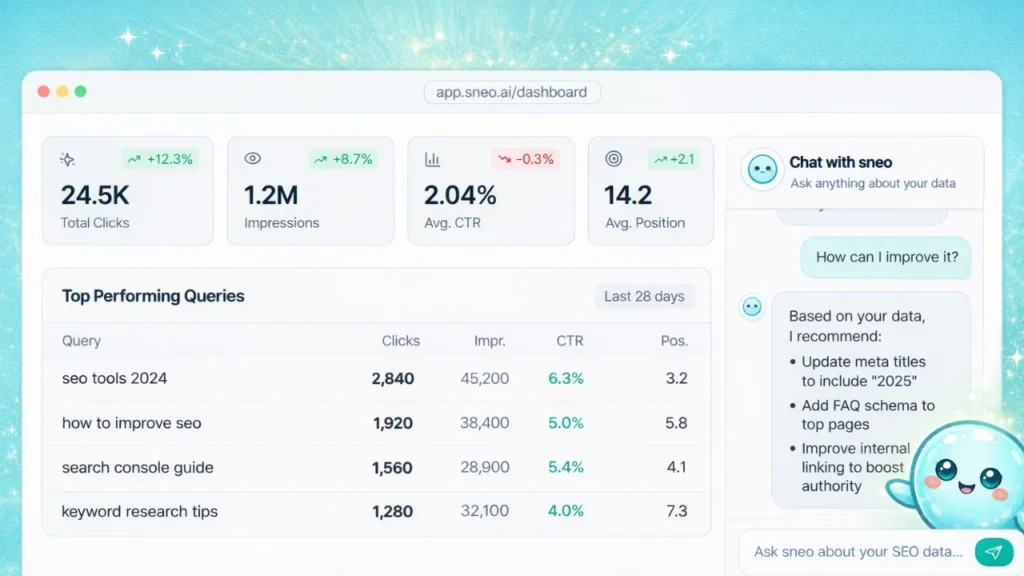
We took a different approach. Instead of giving you another dashboard to stare at, sneo.ai connects to your real site data and lets you talk to it.
- Real Data: It works with your actual GSC numbers, not generic benchmarks.
- Plain English: You can ask, “Why did my traffic drop last week?” or “Which pages are close to ranking on page 1?”
- Predictions: It gives you next-step suggestions, not just historical charts.
- Conversation: It turns long analysis sessions into short chats.
Who sneo.ai is built for
I designed this for a few specific groups:
- SEO Agencies: If you handle twenty client sites, you don’t have time to manually dig through GSC for every monthly report.
- Solo SEO Professionals: You need deep insight, but you don’t have a team of analysts.
- Established Businesses: If you have a large site with years of history, spotting trends manually is impossible.
- Frustrated Users: Anyone who feels there must be a better way to use Search Console.
Where sneo.ai fits inside an SEO reporting workflow
Think of it as a layer on top of your data. You use it for spotting hidden opportunities that you would miss with the naked eye. You use it for finding the specific causes of traffic drops instantly.
It supports faster decision-making. Instead of spending three hours compiling data, you spend ten minutes asking questions and thirty minutes taking action.
How to Build an Effective SEO Report: Step by Step
If you want to build a report that people actually value—whether it’s for yourself or a client—follow this process.
Step 1. Define what you want the report to answer
Don’t start with data; start with goals. Are you reporting on traffic growth, lead generation, or brand visibility? If the business goal is “sell more shoes,” reporting on “impressions for blog posts about shoe history” might not be the priority.
Step 2. Choose the right performance metrics
Avoid reporting everything. I call this “data puking.” Pick the 4-5 metrics that actually prove you are hitting the goals defined in Step 1.
Step 3. Group data into clear sections
Organize the chaos.
- Rankings: Are we visible?
- Traffic: Are they visiting?
- Content: What are they reading?
- Technical Health: Is the site broken?
Step 4. Add interpretation, not just charts
This is the most important step. A chart showing traffic going up is nice. A note saying, “Traffic is up 20% because our new guide on ‘SEO basics’ was picked up by Google Discover,” is valuable. Always explain why something changed and point out the risks and opportunities.
Step 5. Use tools like sneo.ai to surface insights faster
Instead of manually building filters to find that insight, use tools that do the heavy lifting. Asking questions instead of clicking through endless menus lets the system point you toward unusual trends you might have missed.
SEO Reporting vs. SEO Audits
People often confuse these two.
SEO Reporting is a movie. It tracks performance over time. It answers, “How are we doing compared to last month?”
SEO Audits are a photograph. They are a snapshot of your site’s health at a specific moment. An audit answers, “What is broken right now?”
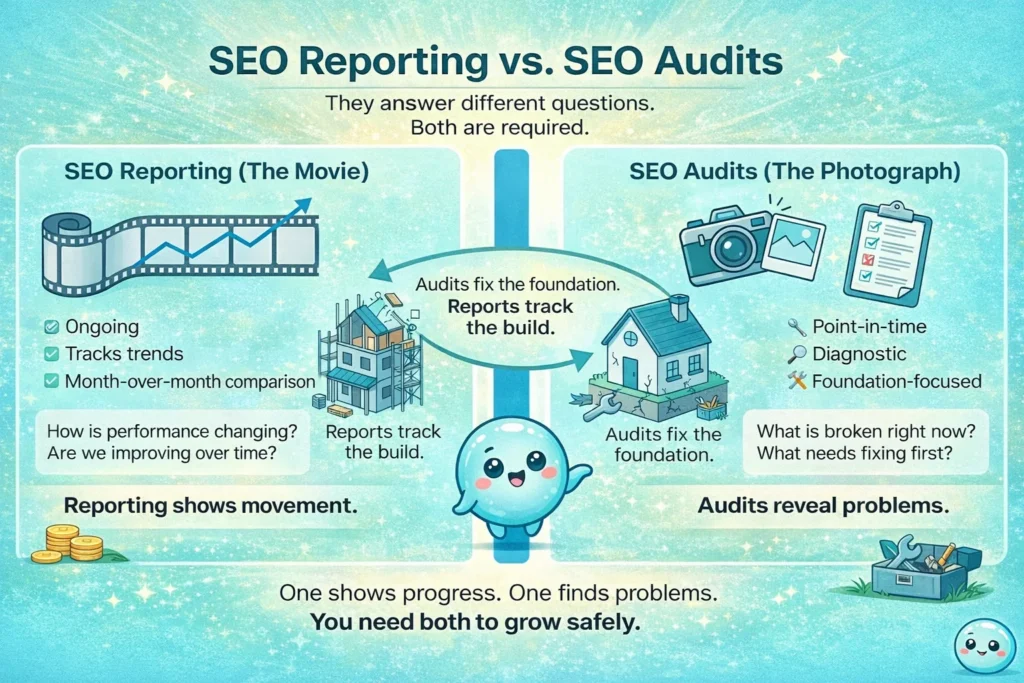
You need both. The audit fixes the foundation; the report tracks the progress of the house being built.
How Algorithm Updates Affect SEO Reporting
Google updates its algorithm constantly. In 2025 alone, we have seen major shifts in how content is ranked.
When an update hits, your rankings and traffic might change suddenly. This can be terrifying. A good SEO report helps you stay calm. It helps you confirm whether a drop is due to a technical error you made (fixable) or an algorithm update (requires strategy shift).
Trend analysis is vital here. If you only check your data once a month, a drop looks like a disaster. If you track trends, you might see that it’s just a seasonal dip that happens every year. For the latest status on ranking systems, I always refer to the Google Search Status Dashboard.
Using SEO Reports for Competitor Analysis
You don’t exist in a vacuum. Your competitors are trying to rank for the same terms.
Understanding what SEO reporting is also means looking outward. Good reporting includes a view of the market.
- Visibility Comparison: Are you closing the gap on the market leader?
- Content Gaps: What topics are they covering that you aren’t?
This helps you set realistic targets. You can’t expect to overtake a competitor with ten times your budget in a month, but your report can show if you are chipping away at their lead.
Common SEO Reporting Mistakes to Avoid
I’ve made plenty of mistakes in my career. Here are the ones to avoid:
- Reporting only rankings: Rankings fluctuate daily. They are not money in the bank.
- Ignoring conversion rate: Getting traffic is useless if it doesn’t convert.
- Looking at averages: “Average position 25” tells you nothing. You could have five keywords at #1 and five hundred at #100. Look at the distribution, not the average.
- Creating reports without conclusions: Never send data without a “Next Steps” section.
- Waiting too long: If you only look at data once a quarter, you are too slow to react.
How Often Should You Create SEO Reports?
For most sites, monthly reporting is the sweet spot. It gives enough time for data to accumulate and trends to form.
However, during major campaigns or site launches, you should check weekly. If you launch a new product line on Monday, you don’t want to wait until the end of the month to realize the pages aren’t indexed.
Shorter review cycles make sense when you are actively testing new strategies.
Conclusion
So, what is SEO reporting really? It is the bridge between your website’s data and your business decisions. It’s the difference between guessing and knowing.
Good reporting doesn’t overwhelm you with charts; it empowers you with answers. It tells you what is working, what isn’t, and exactly where to focus your limited time.
We are moving away from the era of static PDF dashboards and toward insight-driven tools. That is the future I see, and that is why we built sneo.ai—to help you ask the right questions and get answers you can actually use.
Your data is trying to tell you something. You just need to listen.
FAQ: What Is SEO Reporting?
1) What is SEO reporting in simple terms?
It is the process of tracking how your website performs in search engines like Google. It takes complex data—like rankings, traffic, and clicks—and turns it into simple summaries that help you understand if your SEO efforts are working.
2) What should an SEO report include?
A solid report should cover rankings (where you show up), traffic analysis (how many people visit), website analytics (what they do on site), content performance (which pages work), backlink profiles (who links to you), and conversions (sales or leads).
3) How is SEO reporting different from website analytics?
SEO reporting focuses specifically on organic search results—how people find you via Google. Analytics covers all traffic sources, including social media, direct visits, and paid ads. SEO reporting is a specific slice of the bigger analytics pie.
4) Do small businesses really need SEO reporting?
Absolutely. Small businesses usually have limited budgets and time. Reporting helps you decide exactly where to spend that time for the biggest return, rather than guessing and wasting resources on things that don’t move the needle.
5) Can SEO reporting help improve conversion rate?
Yes. By analyzing user intent and page-level data, you can see which pages get traffic but don’t sell. This highlights exactly where you need to improve your content or calls-to-action to turn more visitors into customers.
6) Is Google Search Console enough for SEO reporting?
It is excellent for raw search data, but it lacks context on conversions and competitor data. While it covers search queries and indexing well, additional tools or systems like sneo.ai help fill the gaps by interpreting that raw data and connecting it to actionable insights.
7) How does sneo.ai help with SEO reporting?
sneo.ai turns the raw data from Google Search Console into direct answers. Instead of filtering spreadsheets, you ask plain English questions, and it provides suggestions, predictions, and insights. It reduces manual analysis time significantly.
8) How long does it take to build an SEO report?
Using traditional manual tools, a deep analysis can take 3-5 hours per month. Conversation-based systems like sneo.ai reduce that effort to minutes by instantly surfacing the insights you need.