

I’ve set up dozens of websites across different platforms, and the question I get asked most is: is WordPress good for SEO? After running sites on Webflow, Wix, Squarespace, and WordPress, my answer is consistently the same. WordPress remains the strongest foundation for search engine optimization when used correctly. But “when used correctly” is doing a lot of heavy lifting there. Let me break down exactly what WordPress gets right, where it falls short, and whether it’s still the right choice for your situation in 2025.
Is WordPress Good for SEO: TL;DR
- WordPress is good for SEO but requires deliberate setup; it isn’t optimised out of the box.
- Plugins like Yoast SEO and Rank Math close most on-page SEO gaps quickly.
- For technical SEO at scale, WordPress outperforms most competing CMS platforms.
- Agencies and freelancers benefit most; solo bloggers on simpler platforms may not need it.
Is WordPress Good for SEO in 2026?
Yes, and the market reflects that. WordPress powers roughly 43% of all websites on the internet as of 2025-26, a dominance that persists in part because SEO professionals keep recommending it to clients.
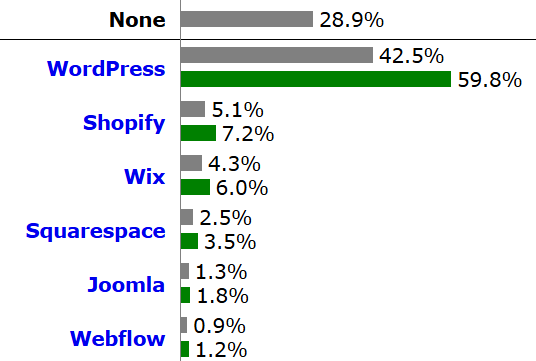
Automattic maintains the platform, led by co-founder Matt Mullenweg, and the open-source ecosystem surrounding it has matured into one of the most SEO-capable environments available. The Gutenberg Editor introduced structured content blocks that output cleaner HTML than the old classic editor, improving crawlability by default.
WordPress’s open-source architecture means you control every technical SEO variable, from canonical tags to structured data, without being locked into a vendor’s roadmap.
That matters because Google’s ranking systems have grown more sophisticated. Core Web Vitals are now a confirmed ranking signal, and platforms that abstract away server-side control, such as hosted website builders, make it harder to optimise Largest Contentful Paint or Cumulative Layout Shift. WordPress, self-hosted on quality infrastructure, gives you full control.
The REST API also allows headless WordPress setups where the front end is decoupled entirely, delivering exceptional performance scores in PageSpeed Insights while still using WordPress as the content management system on the back end.
Where WordPress requires attention in 2026 is Mobile-First Indexing. Google now indexes the mobile version of your site first, and a poorly chosen theme can tank your mobile performance. That’s not a WordPress problem specifically; it’s a configuration problem. Choose a lightweight, block-based theme and you’re in a strong position.
For managing ongoing SEO work at scale, WordPress gives you the flexibility that closed platforms simply do not.
What Makes WordPress SEO-Friendly Compared to Other CMS Platforms
The honest answer is that WordPress isn’t automatically SEO-friendly; it’s SEO-capable. The distinction matters.
Out of the box, WordPress generates readable URLs, auto-creates an XML Sitemap (since WordPress 5.5), and supports Open Graph Protocol through plugins. But default themes can be bloated, default image handling isn’t optimised, and without a plugin, you have no control over meta descriptions or Schema Markup.
Here’s how WordPress stacks up against common alternatives:
| Feature | WordPress | Webflow | Squarespace | Wix |
| XML Sitemap | Auto-generated | Auto-generated | Auto-generated | Auto-generated |
| Schema Markup control | Full (via plugins) | Limited | Limited | Limited |
| Canonical Tags | Full control | Full control | Limited | Limited |
| Core Web Vitals | Theme-dependent | Generally good | Average | Average |
| Technical SEO ceiling | Very high | Medium | Low | Low |
| Plugin ecosystem | Vast | Minimal | Minimal | Small |
What makes WordPress genuinely different is the depth of the plugin ecosystem. Yoast SEO and Rank Math both provide control over title tags, meta descriptions, Open Graph Protocol tags, canonical tags, and Structured Data, all from a single interface. Competitors to these plugins are covered in detail in my Yoast vs All in One SEO comparison.
WooCommerce, the e-commerce layer built on WordPress, also has strong SEO defaults and supports product schema out of the box, giving online retailers a search engine optimization advantage that hosted solutions like Shopify require expensive apps to match.
WordPress vs Webflow for SEO: Which Is Better?
This is a comparison I get asked about constantly, especially from freelancers pitching new clients. The short answer: WordPress wins on technical SEO ceiling; Webflow wins on performance defaults.
Webflow generates clean, minimal code and typically scores higher on PageSpeed Insights without any additional configuration. Its hosting is fast by default. For a small brochure site where a designer wants control without touching a server, Webflow is genuinely competitive.
But Webflow has real limitations that matter to SEO professionals:
- No native plugin ecosystem, so advanced Schema Markup requires custom code.
- Limited control over crawl budget and log file access.
- Harder to implement programmatic SEO at scale.
- Content Editor access for clients is more restrictive, leading to SEO tasks being deferred.
WordPress, by contrast, allows full crawl customisation through robots.txt editing, .htaccess rules, and dedicated technical SEO plugins. When I’m running a technical SEO audit for a client, the depth of access WordPress provides is simply unmatched.
For sites targeting competitive keywords with large content libraries, WordPress’s technical SEO ceiling gives it a decisive edge over Webflow.
One nuance worth flagging: if a Webflow site is headless or combined with a fast CDN setup, the performance gap closes considerably. But for most agency use cases managing client sites with regular content publishing, WordPress remains the more practical choice.
Is WordPress Good for Technical SEO? Plugins, Performance and Control
Is WordPress good for SEO at the technical level? Yes, more than almost any other content management system. Here’s why.
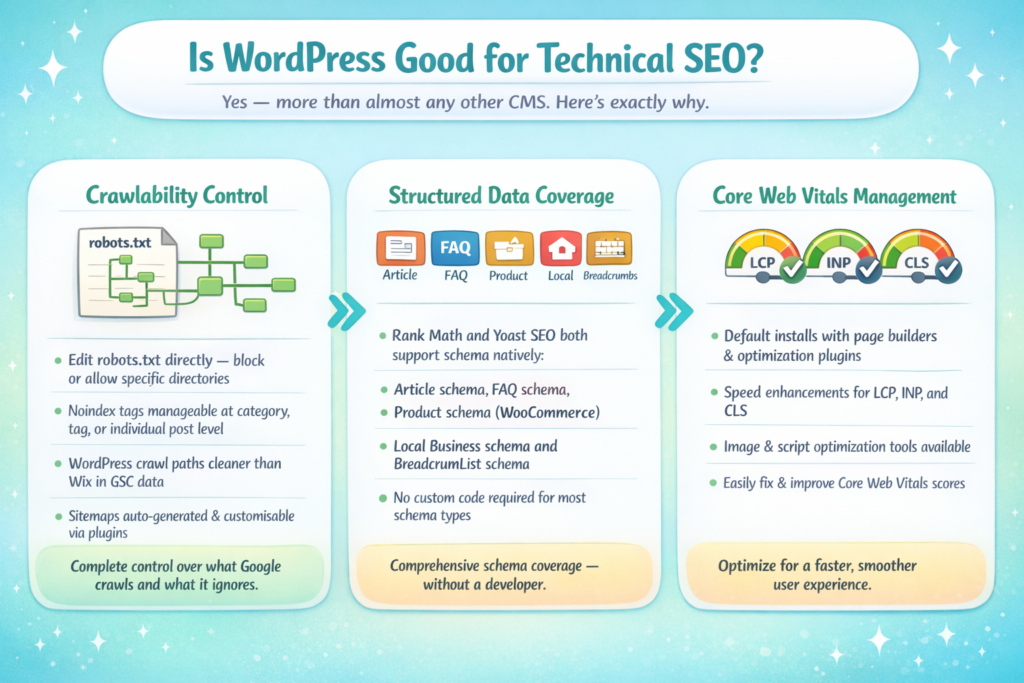
Crawlability is straightforward to manage. You can edit robots.txt directly, block or allow specific directories, and use plugins to handle noindex tags at category, tag, or individual post level. When I look at crawl data in Google Search Console for WordPress sites versus Wix sites, the WordPress sites almost always have cleaner crawl paths.
Structured Data coverage is thorough. Rank Math and Yoast SEO both support:
- Article schema
- FAQ schema
- Product schema (via WooCommerce integration)
- Local Business schema
- BreadcrumbList schema
For a deeper look at what crawling actually means for your rankings, see my guide on what crawling in SEO means.
Core Web Vitals management is where WordPress requires the most attention. A default WordPress install with a popular page builder can score poorly on Interaction to Next Paint (INP) and Largest Contentful Paint. The fix is usually:
- Switch to a lightweight block theme (GeneratePress, Kadence, Blocksy).
- Implement a caching plugin (WP Rocket or W3 Total Cache).
- Serve images in WebP format via a plugin like ShortPixel.
- Use a CDN, Cloudflare being the most accessible free option.
- Audit third-party scripts regularly via PageSpeed Insights.
The REST API also opens doors for headless implementations, which can achieve near-perfect Core Web Vitals while keeping WordPress as the editorial backend. That’s a setup I increasingly recommend for high-traffic media and e-commerce clients.
WordPress SEO Pros and Cons for Freelancers and Agencies
I work with both freelancers and agencies, and the WordPress calculus is slightly different depending on which camp you’re in.
For freelancers, is WordPress good for SEO client delivery? The pros are compelling:
- Low platform cost means better margin on retainers.
- Familiarity across the industry means easier client handoffs.
- Plugin ecosystem handles most on-page SEO tasks without custom development.
- Google Search Console integration is straightforward through Yoast or Rank Math.
The cons are real, though. Freelancers often inherit poorly maintained WordPress sites with plugin conflicts, outdated themes, and accumulated technical debt. Cleaning up someone else’s WordPress install before you can do meaningful SEO work is a genuine time cost.
For agencies managing multiple client sites, WordPress scales well when you use a multisite or standardised site template. The ability to apply the same SEO configuration across 20 client sites through a shared plugin setup is a significant operational advantage.
Agencies report that WordPress sites, when templated correctly, reduce per-client SEO setup time by a meaningful margin compared to mixed CMS environments.
The main agency-level con is security overhead. WordPress sites require active maintenance: core updates, plugin updates, and vulnerability monitoring. That’s either billable time or the cost of delivery. Webflow and Squarespace handle this at the platform level.
For holistic SEO strategy that goes beyond the CMS choice, I recommend reading my piece on holistic SEO to understand how platform decisions connect to broader search performance.
Best WordPress SEO Plugins Recommended by SEO Managers
The plugin choice is where most of the practical SEO work happens on WordPress. Here are the tools I recommend and use:
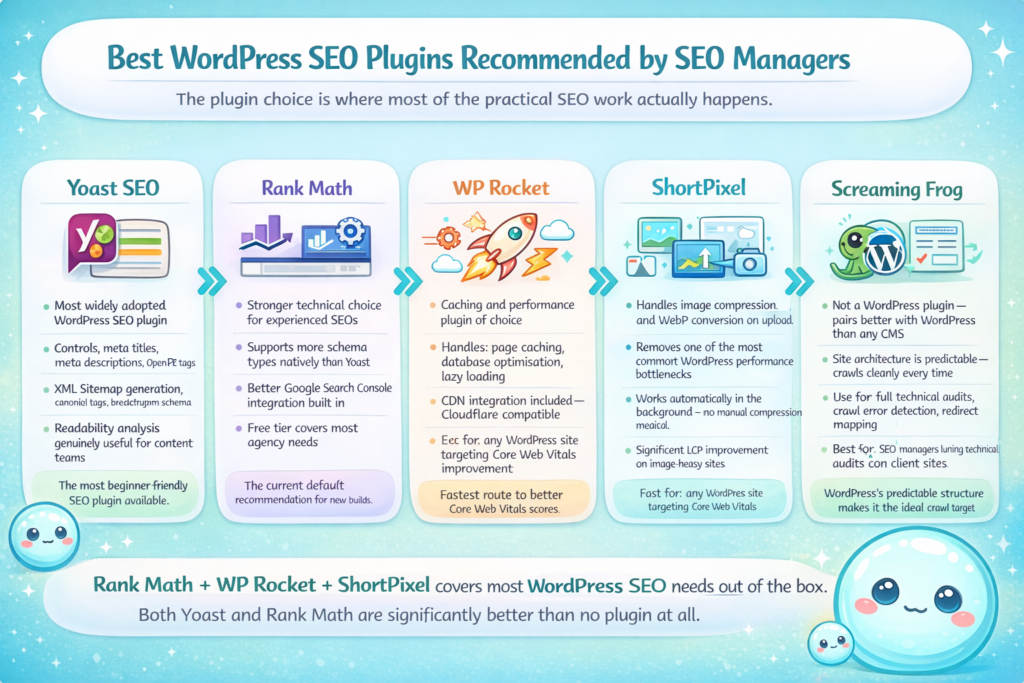
- Yoast SEO is the most widely adopted option. It handles meta titles, meta descriptions, Open Graph Protocol tags, XML Sitemap generation, canonical tags, and breadcrumb schema. The readability analysis is genuinely useful for content teams. Yoast, 2025
- Rank Math has emerged as the stronger technical choice for experienced SEOs. It supports more schema types natively, has better integration with Google Search Console, and its free tier covers most agency needs. I use Rank Math on new builds now as a default.
- WP Rocket is my caching and performance plugin of choice. It handles page caching, database optimisation, lazy loading, and CDN integration. The impact on Core Web Vitals scores is immediate and measurable.
- Screaming Frog isn’t a WordPress plugin, but it pairs with WordPress better than any other CMS because the site architecture is predictable and crawls cleanly.
- ShortPixel handles image compression and WebP conversion automatically on upload, removing one of the most common performance bottlenecks.
One tool that complements all of these: sneo.ai connects to your Google Search Console data and lets you ask plain-language questions about your site’s SEO performance, which pages need attention, and where traffic drops are coming from. For WordPress site owners who want clarity without digging through raw reports, it’s a significant time saver. You can also learn about what an SEO report should include to benchmark what good reporting looks like alongside your tools.
Conclusion
Is WordPress good for SEO? It remains the most capable CMS for search engine optimization when configured correctly. The ecosystem, flexibility, and technical SEO ceiling are unmatched.
Key takeaways:
- WordPress requires deliberate configuration; it is not optimised by default.
- Plugins like Rank Math and Yoast SEO close the on-page SEO gap quickly.
- For technical SEO at scale, WordPress outperforms Webflow, Squarespace, and Wix.
- Performance and Core Web Vitals need active management, but the tools to do so exist and are accessible.
Frequently Asked Questions
Q1: Is WordPress good for SEO compared to Squarespace?
Yes. WordPress offers far greater control over technical SEO elements including canonical tags, structured data, and crawl management. Squarespace is adequate for small sites but limits advanced configuration. For competitive niches, WordPress is the stronger platform.
Q2: Does WordPress help with SEO rankings directly?
WordPress doesn’t rank sites on its own, but its flexibility allows you to implement every ranking factor correctly. The combination of a good theme, quality plugins, and proper Google Search Console integration gives you the best possible foundation.
Q3: Is WordPress still relevant for SEO in 2025?
Absolutely. With 43% of the web running on WordPress as of 2025, Google’s crawlers are deeply familiar with its URL and sitemap patterns. The platform continues to evolve, and Core Web Vitals management has improved significantly with modern lightweight themes.
Q4: What is the best SEO plugin for WordPress?
Rank Math is my current recommendation for experienced SEOs due to its schema depth and Search Console integration. Yoast SEO remains the most beginner-friendly option. Both are significantly better than no plugin at all.
Q5: Is WordPress good for technical SEO at an enterprise level?
Yes, particularly in headless configurations using the REST API. Large publishers and e-commerce brands use WordPress at enterprise scale with strong technical SEO outcomes. The open-source nature means every technical requirement can be addressed.
Q6: Can WordPress handle local SEO effectively?
Yes. Plugins like Rank Math support Local Business schema natively, and Google Search Console integration is seamless. For a deeper understanding of targeting local audiences through content, see my guide on SEO localisation.