


Most clients never read their SEO reports. I’ve seen it firsthand, a 20-page PDF lands in someone’s inbox, and three months later they’re asking, “So is the SEO actually working?” The problem isn’t the data. It’s how it’s packaged. A well-built SEO report template transforms raw numbers into a story clients can follow and trust. In this guide, I’ll show you exactly how I build client SEO reporting that gets read, understood, and used to make decisions.
TL;DR
- A strong SEO report template leads with business outcomes, not technical metrics.
- Monthly SEO report structure matters as much as the data inside it.
- Automate data pulls from Google Search Console and GA4 so you focus on insight, not assembly.
- Non-technical clients need narrative and context, not raw numbers.
What Should Be Included in a Monthly SEO Report for Clients
The instinct is to include everything. Resist it. A bloated monthly SEO report loses clients before they reach the second page. Here’s what actually belongs.
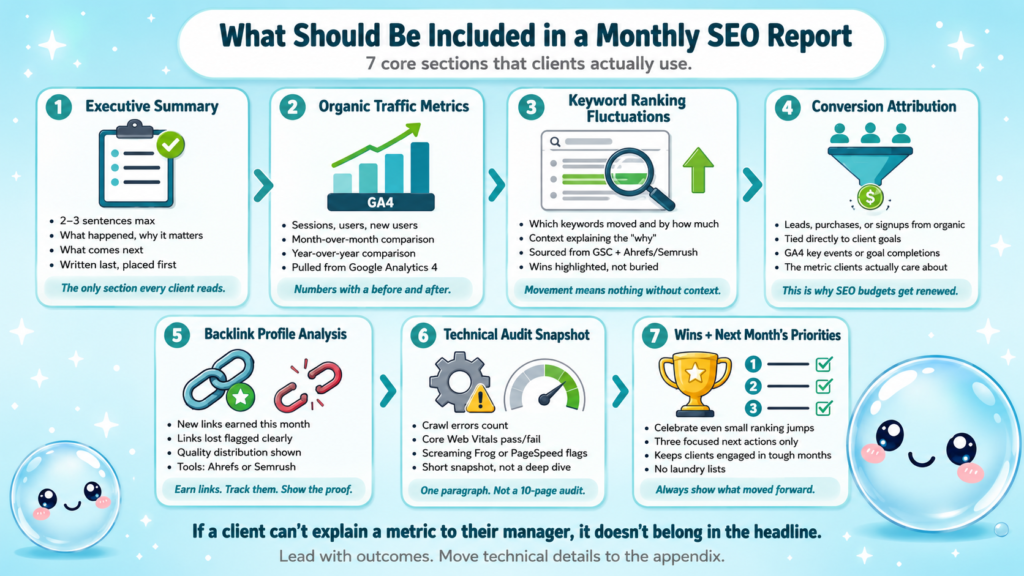
Core sections every report needs:
- Executive summary: Two to three sentences on what happened, why it matters, and what comes next. Write this last.
- Organic traffic metrics: Sessions, users, and new users from organic. Pulled from Google Analytics 4 with a month-over-month and year-over-year comparison.
- Keyword ranking fluctuations: Which tracked keywords moved, by how much, and why. Context is everything here.
- Conversion rate attribution: Did organic traffic produce leads, purchases, or signups? This is what your client actually cares about.
- Backlink profile analysis: New links earned, lost, and the quality distribution. Tools like Ahrefs or Semrush make this straightforward.
- Technical audit findings: A short snapshot of crawl errors, Core Web Vitals status, and any critical flags from Screaming Frog or PageSpeed Insights.
- Next month’s priorities: Three focused actions, not a laundry list.
One thing I always include that most people skip: a “wins” section. Even in a rough month, there are wins. A client who sees one page climb from position 18 to position 6 stays engaged. Without that framing, they only see what’s broken.
For a full breakdown of what should be in an SEO report, I’ve covered the structural logic in more detail on our blog.
Rule of thumb: If a client can’t explain a metric to their own manager, remove it from the top section. Move it to an appendix.
Schema markup implementation updates, crawl budget optimisation notes, and domain authority scoring from Moz all have a place, but that place is usually a supporting table, not the headline.
Best SEO Report Templates for Agencies and Freelancers
The SEO report template you use signals your professionalism before the client reads a word. I’ve tested a lot of formats over the years and landed on a few that consistently work.
Template formats by use case:
| Format | Best for | Tool |
| Slide deck (10–12 slides) | Exec-level clients, QBRs | Google Slides, Canva |
| Scrollable PDF | Monthly delivery, mid-size clients | Google Docs, Notion |
| Live dashboard | Retainer clients who check data weekly | Looker Studio (DataStudio), Databox |
| Automated email digest | High-volume agency accounts | DashThis, AgencyAnalytics |
For agencies managing 20+ clients, a live dashboard built in Looker Studio connected to Google Search Console and GA4 is the most scalable option. You build it once per client template, then refresh is automatic.
Freelancers working with smaller clients often get better results with a clean PDF or slide deck. It feels more premium and gives you a natural talking point for a monthly call.
Resources like DashThis’s SEO report template and Vidi Corp’s template roundup are solid starting points if you want pre-built structures to adapt.
The non-negotiable elements in any template: a cover page with client name, reporting period, and your branding; a one-page executive summary; and a consistent section order every month so the client builds familiarity. Consistency reduces the cognitive load on the reader and builds trust faster than any design element.
For freelancers specifically, a clean client SEO reporting template also protects you during scope conversations, when you can point to exactly what you promised to report on, there’s no ambiguity.
How to Make an SEO Dashboard That Non-Technical Clients Can Read
An SEO dashboard and an SEO report solve different problems. The dashboard is always-on visibility. The report is a curated narrative. Understanding the difference makes you a better consultant.
Dashboard vs. Report:
| SEO Dashboard | SEO Report | |
| Frequency | Real-time or daily | Monthly or quarterly |
| Audience | Client self-service | Delivered by you |
| Depth | Surface KPIs | Analysis and context |
| Format | Interactive (Looker Studio) | Static (PDF/slides) |
When I build dashboards for non-technical clients, I follow four rules:
- Show only five to seven metrics on page one. Organic sessions, average position (pulled from Google Search Console), click-through rate benchmarking versus prior period, conversions from organic, and top three ranking pages. That’s enough.
- Use trend lines, not just point-in-time numbers. A client who sees a line going up understands momentum even without knowing what “impressions” means.
- Label everything in plain English. “People who found you on Google” instead of “organic users.” “Your rank for this keyword” instead of “average position.”
- Add a text box with a one-paragraph monthly summary. Even a live dashboard benefits from human commentary.
What average position means in Google Search Console is one of those metrics clients always misread, that link explains it clearly if you want to share it directly with them.
For SERP visibility index and domain authority scoring, I move those to a secondary tab the client can explore, but they’re never the lead story.
SEO Reporting Tools That Automate Monthly Client Reports
Automation is where client SEO reporting stops being painful. The goal is to spend your time on insight and strategy, not copy-pasting numbers from five different tabs.
Tools I use and what they’re best for:
- Looker Studio (DataStudio): Free, highly customizable, connects natively to Google Search Console and GA4. Best for building templated dashboards across clients.
- AgencyAnalytics: Purpose-built for agencies. White-label reporting, drag-and-drop widgets, and automated email delivery. Strong for teams scaling past 15 clients.
- DashThis: Clean interface, good SEO-specific widgets, supports Ahrefs and Semrush integrations.
- Semrush’s reporting module: Solid if you’re already paying for Semrush. Pulls keyword ranking fluctuations and backlink profile analysis without leaving the platform.
- Screaming Frog + Google Sheets: For technical audit findings, I export crawl data from Screaming Frog and build a running issues log in Sheets that feeds a Looker Studio panel.
For AI-powered analysis on top of your GSC data, sneo.ai connects directly to Google Search Console so you can ask plain-English questions, “why did traffic drop last month?” or “which pages should I prioritise?”, and get answers grounded in your actual data, not generic advice.
Automated SEO reports only work if the underlying data connections are clean. Before you build any template, audit your GA4 property for spam filters, verify GSC is returning accurate coverage data, and confirm your conversion events are firing correctly.
Automation removes the assembly work. It never removes the thinking. Always review automated reports before they go to a client.
Content gap analysis data from Ahrefs or Semrush can be pulled into automated reports, but I treat this as a “strategy” section that I write fresh each month, automation handles the data, not the recommendations.
What Metrics Should I Show Clients in an SEO Report
The wrong metrics erode trust just as fast as bad results. Here’s how I decide what makes the cut.
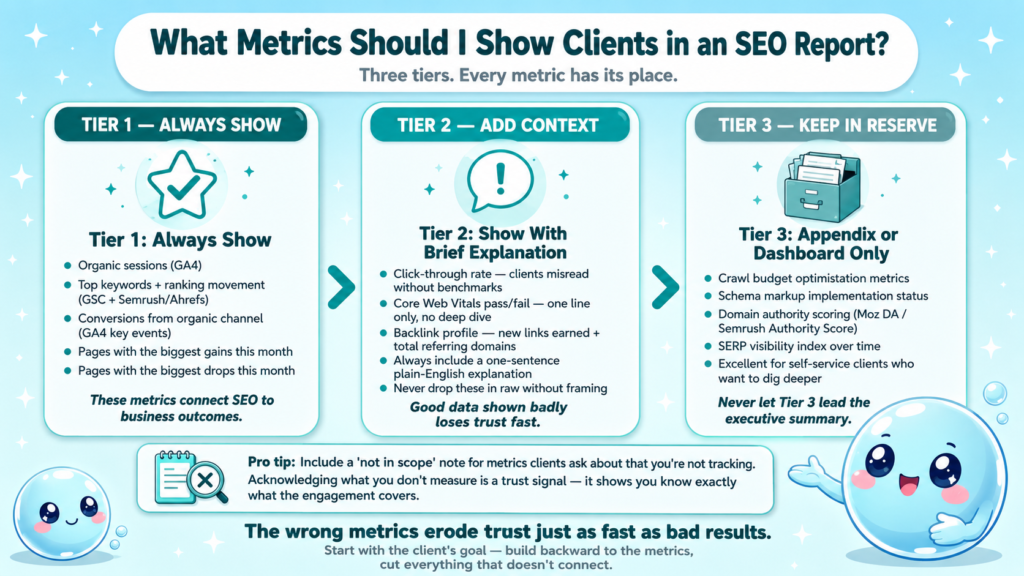
Tier 1 (always show):
- Organic sessions (GA4)
- Top keywords and their ranking movement (Google Search Console + Ahrefs/Semrush)
- Conversions from organic channel (GA4 goal completions or key events)
- Pages with the biggest gains and drops
Tier 2 (show with brief explanation):
- Click-through rate benchmarking, clients misread this without context
- Core Web Vitals pass/fail status, one line, not a deep dive
- Backlink profile analysis, new links earned this month, total referring domains
Tier 3 (appendix or dashboard only):
- Crawl budget optimisation metrics
- Schema markup implementation status
- Domain authority scoring (Moz DA or Semrush Authority Score)
- SERP visibility index over time
The distinction between dashboard and report matters here. Tier 3 metrics are excellent for clients who want to self-serve and dig deeper. They have no place in a one-page executive summary.
I also include a “not in scope” note if there are metrics the client asks about that I’m not tracking. Acknowledging what you’re not measuring is actually a trust signal, it shows you know exactly what the engagement covers.
Understanding what SEO reporting actually is helps anchor this conversation with newer clients who may have unrealistic expectations about what’s measurable month-to-month.
How to Present SEO Data to Clients Without Overwhelming Them
Delivering the monthly SEO report is as important as building it. The format of the meeting (or the email) shapes how the data lands.
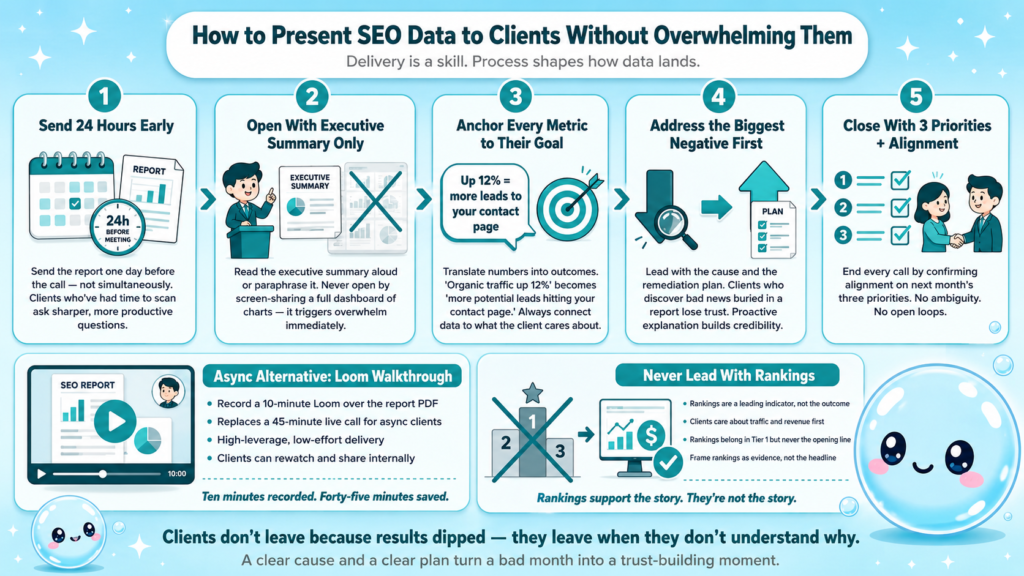
My standard delivery process:
- Send the report 24 hours before any scheduled call, not simultaneously. Clients who’ve had a chance to scan it ask better questions.
- Open the call with the executive summary only. Read it aloud or paraphrase it. Do not open by screen-sharing a dashboard full of charts.
- Anchor every metric to the client’s goal. “Organic traffic is up 12% this month, which means more potential leads hitting your contact page” lands better than “organic sessions increased from 3,400 to 3,800.”
- Address the biggest negative first, with a cause and a plan. Clients who discover bad news on their own, buried in a report, lose trust fast.
- Close with next month’s three priorities and confirm alignment before ending the call.
For clients who prefer async communication, a Loom walkthrough recorded over the report PDF is a high-leverage alternative. It takes 10 minutes to record and replaces a 45-minute call.
One mistake I see constantly in client SEO reporting: leading with rankings. Clients care about traffic and revenue. Rankings are a leading indicator, not the outcome. Why SEO takes as long as it does is a useful piece to share with clients early in a relationship to set expectations before the first report even lands.
Conclusion
- A great SEO report template leads with business impact and uses technical data as supporting evidence.
- Monthly SEO report delivery is a skill separate from building the report, process matters.
- Automate data collection, but never automate the analysis or recommendations.
- Start with your client’s goal, build backward to the metrics, and cut everything that doesn’t connect.
If you want to speed up the analysis layer, sneo.ai connects to your Google Search Console data and answers your SEO questions directly, so you spend less time pulling numbers and more time telling the story that keeps clients retained.
Frequently Asked Questions
Q1: How often should I send a client SEO report?
Monthly is the standard for most retainer engagements. Quarterly works for low-activity accounts or C-suite stakeholders who want the big picture. Weekly reporting usually creates noise, not insight, unless the client is running active campaigns or recovering from a penalty.
Q2: What is the difference between an SEO dashboard and an SEO report?
A dashboard is always-on, real-time visibility into KPIs, clients check it when they want. A report is a curated narrative delivered on a schedule. Dashboards show what is happening; reports explain why it happened and what to do next.
Q3: How do I create automated SEO reports for multiple clients at once?
Build a master Looker Studio template connected to Google Search Console and GA4, then clone it per client with their data sources swapped in. Tools like AgencyAnalytics and DashThis let you replicate a reporting structure across accounts with minimal manual effort.
Q4: What is the most important metric to include in a monthly SEO report?
Organic conversions, not rankings or traffic. Conversions connect SEO directly to business outcomes. If your client’s GA4 isn’t tracking conversions correctly, fix that before the first report goes out.
Q5: Can non-technical clients actually understand SEO reports?
Yes, if you write for them rather than for yourself. Replace jargon with plain language, lead with business impact, and use trend lines over point-in-time numbers. A client doesn’t need to understand crawl budget optimisation to see that more people are finding their website.
Q6: How do I handle a month where results are down?
Lead with the cause, not the number. Explain the reason (algorithm update, seasonality, technical issue), show the data that supports your explanation, and present the remediation plan. Clients don’t leave because results dipped, they leave when they don’t understand why and see no clear path forward.