


If you’ve ever wondered how to remove a sitemap from Google Search Console, you’re not alone. Outdated, duplicate, or broken sitemaps clutter your index coverage report and can waste crawl budget on pages you never wanted ranked. I’ve walked dozens of site owners through this exact process, and the steps are straightforward once you know what to expect before, during, and after deletion.
TL;DR
- You can remove a sitemap in Google Search Console in under two minutes via the Sitemaps report.
- Removing a sitemap does not immediately de-index your pages; Googlebot retains prior crawl data.
- Always audit what the sitemap contains before deleting it to avoid accidental ranking drops.
- Replace outdated sitemaps with a corrected version rather than leaving a gap when possible.
Can You Delete a Sitemap in Google Search Console?
Yes, you can delete a sitemap in Google Search Console, but there’s a nuance Google doesn’t advertise clearly: “removing” a sitemap in the interface changes its status to Removed without wiping it from Google’s memory entirely. Googlebot retains a record of every URL it discovered through that sitemap and continues to crawl and index those URLs independently of whether the sitemap still appears in your account.
What removal actually does:
- Stops Google from using that sitemap file as a future crawl signal.
- Sets the sitemap status to Removed in your Sitemaps report.
- Does not purge previously indexed pages from the Google index.
- Does not prevent Googlebot from recrawling URLs it already knows about.
This distinction matters enormously. I’ve seen site owners delete a sitemap thinking it would wipe a batch of thin pages from search results, only to find those pages still appearing weeks later. If your goal is de-indexing specific pages, sitemap removal alone won’t get you there. You’ll need noindex tags or robots.txt blocks in addition.
When removing a sitemap is genuinely useful:
- You submitted a sitemap for a subdomain or property you no longer manage.
- You have duplicate sitemaps (e.g., sitemap.xml and sitemap_index.xml both pointing to the same URLs).
- A legacy sitemap references URLs that returned 404s for months, accumulating crawl errors.
- You migrated platforms and the old sitemap format is incompatible with your new URL structure.
The Google Search Console help thread on sitemap deletion confirms that removed sitemaps change status but don’t erase indexability, which aligns with everything I’ve observed in practice.
Steps to Delete a Sitemap in Google Search Console
This is the exact process I use when cleaning up sitemap clutter for clients. It takes about two minutes once you’re in the interface.
- Open Google Search Console: Go to search.google.com/search-console and select the correct property. Confirm you’re in the right domain or URL-prefix property before proceeding.
- Navigate to the Sitemaps report: In the left sidebar, click Indexing, then Sitemaps. You’ll see a list of all submitted sitemaps with their status, last read date, and discovered URL count.
- Identify the sitemap to remove: Look for sitemaps marked with errors, old timestamps, or a URL count that seems wrong. If you see multiple sitemaps with overlapping URLs, flag them for review.
- Click the three-dot menu: Next to the sitemap URL you want to remove, click the vertical three-dot icon on the right side.
- Select “Remove sitemap”: A confirmation dialog will appear. Confirm the removal. The sitemap status will change to Removed immediately.
- Verify the status change: Refresh the Sitemaps report. The entry should now show a Removed badge rather than a success or error badge.
- Check index coverage after 48–72 hours: Open the Pages report (formerly Index Coverage) and filter for the URLs that were in the removed sitemap. Confirm no unexpected de-indexing is occurring.
Important: If you removed the wrong sitemap by mistake, resubmit it immediately via the “Add a new sitemap” field at the top of the Sitemaps report. Google will re-process it within a few days.
For a complete picture of your site’s indexability and crawl health, pair this step with a full site audit after any sitemap change.
What Happens to Indexed Pages When You Delete a Sitemap in Search Console
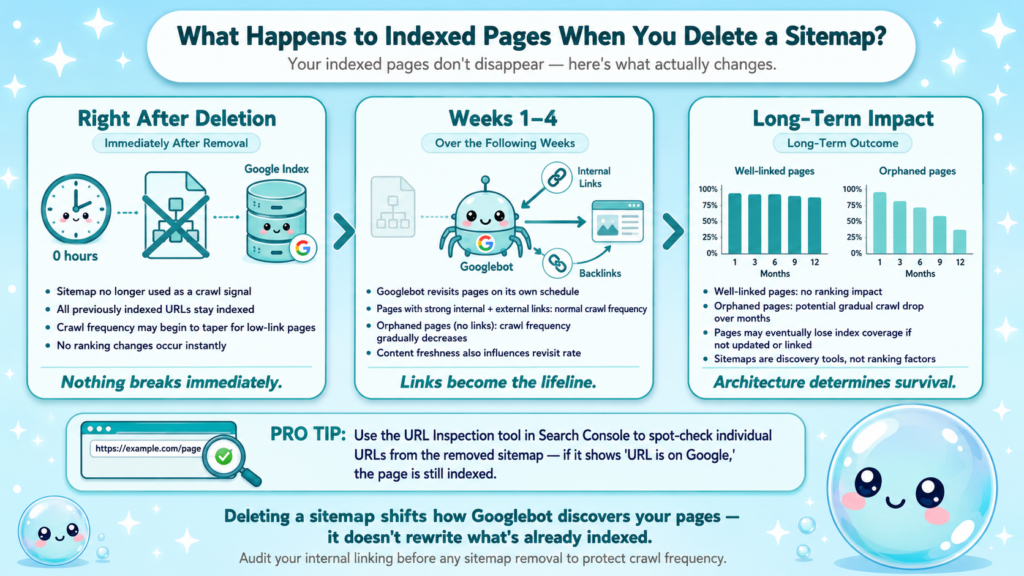
This is the question I get most often, and the answer reassures most people: deleting a sitemap does not remove pages from the Google index. Here’s what actually happens at each stage.
Immediately after removal:
- Google stops using the sitemap as a crawl signal.
- URLs already in the index remain indexed.
- Crawl frequency for those URLs may gradually decrease if they have few inbound links.
Over the following weeks:
- Googlebot continues revisiting pages it found through the sitemap based on its own crawl schedule.
- Pages with strong internal links and external backlinks will maintain crawl frequency.
- Pages that were only discoverable via the sitemap (no internal links, no external links) may eventually drop crawl frequency and, over time, could lose index coverage if content doesn’t update.
What this means for your rankings:
Well-linked pages: no ranking impact. Orphaned pages: potential gradual drop in crawl frequency over months, not days. This is why I always recommend auditing internal linking before removing any sitemap. If a page matters to your strategy, it should have internal links pointing to it regardless of sitemap status.
The sitechecker.pro guide on removing sitemaps puts it plainly: sitemaps are discovery tools, not ranking factors. Their removal shifts Googlebot’s path to your content but doesn’t rewrite what’s already indexed.
Use the URL Inspection tool inside Google Search Console to spot-check individual URLs from the removed sitemap. If a page shows URL is on Google in the inspection result, it’s still indexed regardless of sitemap status.
How to Remove an Old Sitemap From Google Search Console Without Affecting SEO
Removing an old sitemap safely requires preparation, not just clicking delete. I use this checklist before touching any sitemap in a live property.
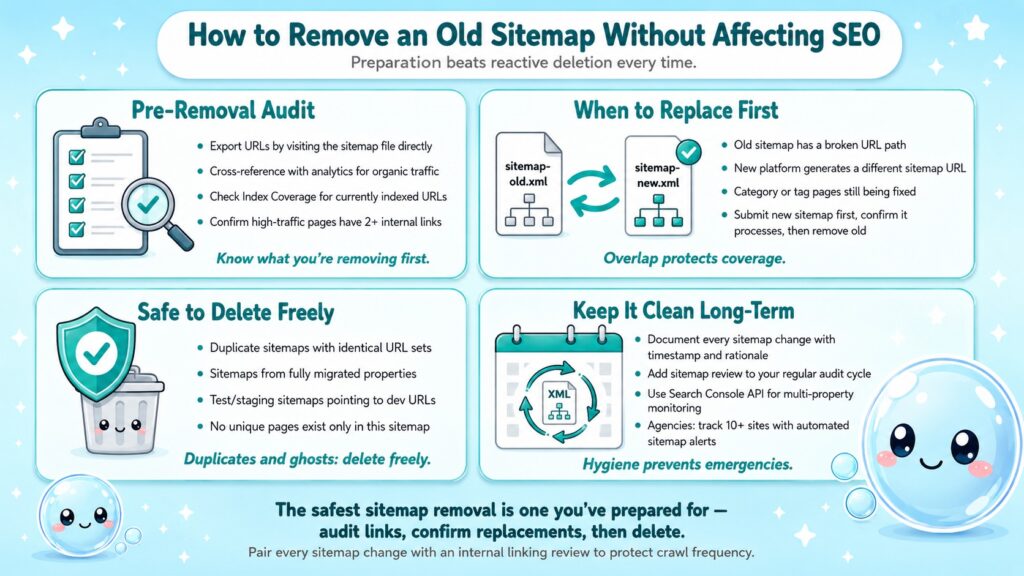
Pre-removal audit:
- Export the sitemap URLs by visiting the sitemap file directly (e.g., yoursite.com/sitemap.xml) and copying the URL list.
- Cross-reference with your analytics to identify which of those URLs drives organic traffic.
- Check the Index Coverage report for any URLs in that sitemap currently marked as Indexed, not submitted in sitemap or Submitted and indexed.
- Confirm all high-traffic pages from the sitemap have at least two internal links pointing to them.
Situations where you should replace, not just delete:
- The old sitemap has a broken URL path (e.g., /sitemap_old.xml) but your new platform generates /sitemap.xml. Submit the new one first, confirm it processes successfully, then remove the old one.
- The old sitemap contains category or tag pages you’re actively fixing. Fix them first, update the sitemap, then remove the legacy version.
Situations where deletion alone is fine:
- Duplicate sitemaps with identical URL sets.
- Sitemaps from a property you’ve fully migrated away from.
- Test sitemaps submitted during a development phase that now point to staging URLs.
Pairing this with a review of your ongoing SEO maintenance workflow ensures sitemap hygiene stays part of your regular audit cycle rather than becoming an emergency fix.
For SEO agencies managing multiple client properties, I’d also recommend documenting every sitemap change with a timestamp and rationale. The Google Search Console API can automate sitemap monitoring across properties if you’re managing ten or more sites.
Is It Safe to Remove a Sitemap From Google Search Console?
In most cases, yes. Safety depends on two factors: what the sitemap contains and whether those pages have alternative discovery paths.
| Scenario | Safe to Remove? | Action Needed |
| Duplicate sitemap (same URLs as another) | Yes | Delete freely |
| Old sitemap after platform migration | Yes | Submit new sitemap first |
| Sitemap with 404 URLs only | Yes | Fix 404s in parallel |
| Only sitemap for a traffic-driving section | Caution | Add internal links first |
| Sitemap with noindex pages accidentally included | Yes | Clean up and resubmit |
| Staging/test sitemap submitted in error | Yes | Delete immediately |
The biggest risk I’ve encountered is removing a sitemap that was the only crawl path for a set of important pages. Thin sites with poor internal linking are most vulnerable. On these sites, Googlebot relies heavily on the sitemap for page discovery, so removing it without reinforcing internal links can gradually reduce crawl frequency.
Rule of thumb: If a page would survive on internal links and backlinks alone, it’s safe to remove its sitemap. If the sitemap is its only lifeline, fix the site architecture first.
Canonical tags also play a role here. If your removed sitemap pointed to non-canonical versions of pages, removal may actually improve index coverage by eliminating signals that confused Googlebot about which URL to index. This is a common cleanup win after CMS migrations.
Understanding what your SEO audit should cover will help you identify these architecture issues before they become ranking problems.
How sneo AI Helps You Diagnose Sitemap and Crawl Issues Faster
When I built sneo AI, the goal was simple: give SEOs the ability to ask plain-language questions about their own site data and get answers grounded in actual Search Console signals, not generic advice.

Here’s how sneo handles sitemap-related diagnostics:
- Connect Google Search Console: Verify your property in sneo and your sitemap data, crawl errors, and index coverage feed directly into the analysis layer.
- Ask in plain language: Type “why are my sitemap URLs not indexed?” or “which pages are in my sitemap but have crawl errors?” and sneo returns a prioritised answer based on your live data, not a generic tutorial.
- Identify orphaned pages: sneo flags URLs present in your sitemap but absent from internal linking structures, so you catch discovery problems before removing anything.
- Track status changes: After you remove a sitemap, ask sneo to monitor whether previously submitted URLs are holding their index coverage over the following weeks.
This matters for the use case covered in this article because the most common mistake I see is reactive sitemap deletion: someone notices crawl errors, removes the sitemap, and hopes the problem resolves. sneo surfaces the root cause first, whether it’s 404 chains, canonicalization conflicts, or crawl budget drain from low-quality pages, so the fix is deliberate.
The average position report in Google Search Console is another signal sneo pulls into the conversation, letting you correlate sitemap changes with visibility shifts rather than guessing at causation.
Conclusion
Removing a sitemap from Google Search Console is safe, fast, and often beneficial when handled deliberately.
- Deletion changes sitemap status to Removed but does not de-index your pages.
- Audit the URLs in any sitemap before removing it, especially on sites with thin internal linking.
- Replace outdated sitemaps rather than simply deleting them when a valid replacement exists.
- Use the URL Inspection tool and Index Coverage report to verify page status after any sitemap change.
If you want answers grounded in your actual Search Console data rather than generic guidance, connect your property to sneo AI at sneo.ai and ask directly.
Frequently Asked Questions
Q1: Does removing a sitemap from Google Search Console delete my pages from Google?
No. Removing a sitemap stops Google from using it as a future crawl signal, but all pages already indexed remain in the Google index. Googlebot continues revisiting those URLs based on its own schedule, particularly pages with inbound links.
Q2: How long does it take for Google to process a removed sitemap?
The status change in Google Search Console is immediate. However, the downstream effect on crawl frequency and index coverage typically plays out over days to weeks, not hours. Monitor your Index Coverage report for 2–4 weeks after removal.
Q3: Can I resubmit a sitemap after removing it?
Yes. Use the “Add a new sitemap” field at the top of the Sitemaps report in Google Search Console and paste the sitemap URL. Google will re-process it within a few days and restore it to active status.
Q4: What is the difference between a sitemap showing “Removed” vs. “Error” in Search Console?
Removed means you manually deleted it via the interface. Error means Google attempted to fetch or parse the file and encountered a problem, such as a 404, invalid XML, or redirect loop. Errors require you to fix the sitemap file itself, not just remove the entry.
Q5: Should I remove a sitemap if all its URLs return 404 errors?
Yes, remove it and fix the underlying 404s simultaneously. A sitemap full of 404 URLs wastes crawl budget and generates unnecessary crawl errors. After fixing or redirecting the dead URLs, resubmit a clean sitemap.
Q6: How do I know how to remove a sitemap from Google Search Console without losing rankings?
Audit internal links to the sitemap’s URLs before deleting anything. Pages with strong internal and external links will hold rankings regardless of sitemap status. Pages with no links are at risk of losing crawl frequency over time, so strengthen their internal linking first.