

If you’ve ever had duplicate content, staging pages, or outdated URLs showing up in search results, you already know the frustration. I’ve helped dozens of site owners clean up their Google index, and the number one question I get is how to remove URLs from Google Search Console quickly and correctly. The process is simpler than most people think, but the wrong method can cause lasting damage. This guide walks you through every approach, when to use each one, and what actually happens to your URL after you pull the trigger.
TL;DR
- The URL Removal Tool in Google Search Console temporarily hides a URL for about six months, it does not permanently deindex it.
- For permanent removal, pair the tool with a noindex tag, robots.txt block, or 301 redirect.
- Removals typically take effect within hours but full deindexing can take days to weeks.
- Removing a URL does not delete it from the web, Google will recrawl and potentially reindex it without a permanent signal.
How to Remove URLs From Google Search Console: The Step-by-Step Process
Before touching anything, confirm you actually need removal. If the page has organic value, use canonical tags or consolidation instead. If it genuinely needs to come out of the index, here’s the exact process I walk clients through.
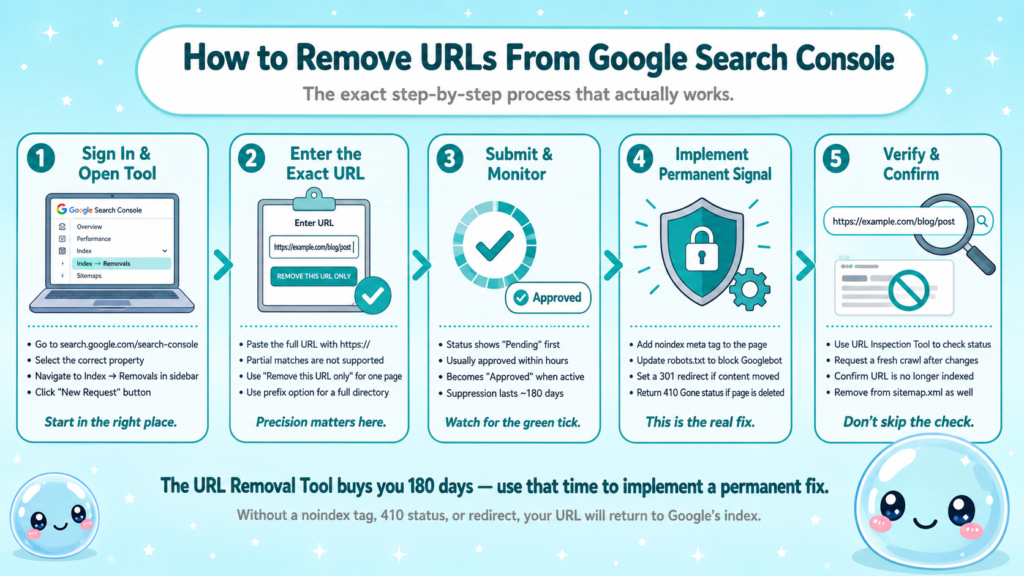
- Sign in to Google Search Console: Go to search.google.com/search-console and select the correct property.
- Open the Removals tool: In the left sidebar, navigate to Index → Removals.
- Click “New Request”: This opens the URL entry dialog.
- Enter the exact URL: Paste the full URL including protocol (https://). Partial matches are not supported here.
- Choose removal type: Select “Remove this URL only” for a single page, or “Remove all URLs with this prefix” to batch-clear a directory.
- Submit and confirm: Google will process the request. Status will show as “Pending” then “Approved.”
- Implement a permanent signal: Before the 180-day temporary block expires, add a noindex meta tag, update robots.txt, or set up a 301 redirect so Google does not reindex the page.
A few things I always double-check at this stage: the URL must return a 404, 410, or be blocked by robots.txt for permanent removal to stick. If the page still returns a 200 status with indexable content, Google will recrawl it and put it right back.
Important: The URL Removal Tool is a temporary suppression tool, not a deindexing tool. Without a permanent signal, the URL will reappear in search results once the 180-day window closes.
For understanding why certain URLs get crawled in the first place, it helps to know how Googlebot prioritizes crawl budget across your site.
How Does the Google Search Console URL Removal Tool Actually Work?
The URL Removal Tool tells Google to suppress a URL from appearing in search results. It does not instruct Googlebot to stop crawling, does not remove the page from the web, and does not communicate anything to Bing Webmaster Tools or other search engines.
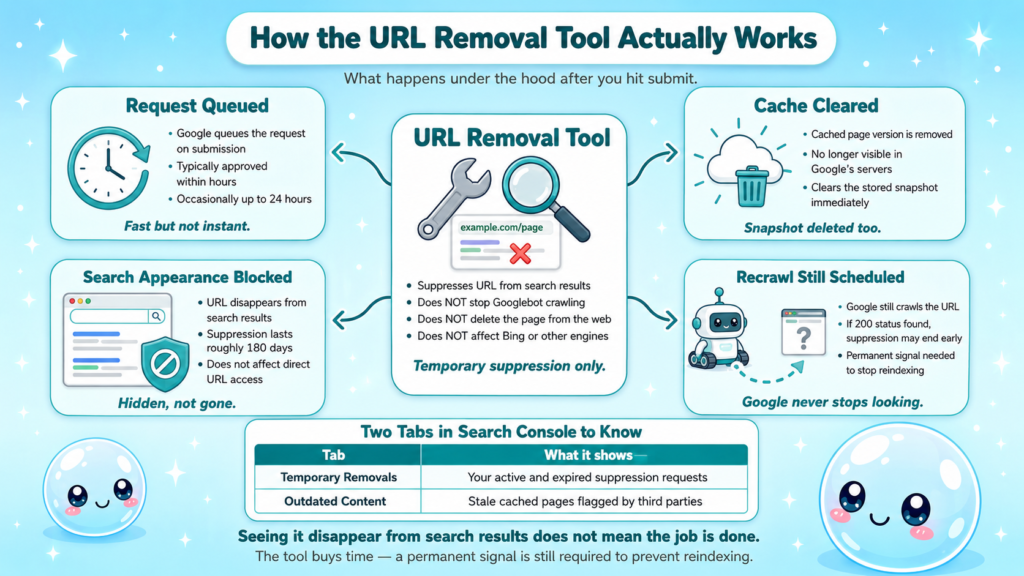
Here is what happens under the hood:
- Request submitted: Google queues the suppression request, typically approving it within hours.
- Cache cleared: The cached version of the page is also removed from Google’s servers.
- Search appearance blocked: The URL stops appearing in search results for roughly 180 days.
- Recrawl scheduled: Google will still crawl the URL. If it finds indexable content with a 200 status, the suppression ends early or the URL returns after the window expires.
The tool has two tabs in Search Console worth knowing:
| Tab | Purpose |
| Temporary Removals | Active and expired suppression requests you’ve submitted |
| Outdated Content | Reports of stale cached pages submitted by third parties |
The Google Search Console URL Removal Tool documentation confirms that requests are only valid for about six months and must be renewed if no permanent fix is in place.
One mistake I see constantly: people submit a removal request, see it disappear from search results, and consider the job done. Three months later the URL is back. The tool buys you time to implement the real fix, it is not the fix itself.
Temporary vs. Permanent URL Removal: What’s the Difference?
This distinction is the most misunderstood part of the entire process, and getting it wrong wastes hours of cleanup work.
Temporary removal uses the URL Removal Tool alone. It suppresses the URL for 180 days. After that window, if Google crawls the URL and finds indexable content, it will reindex the page without any warning.
Permanent removal requires one or more of these signals:
- Noindex meta tag: Add <meta name=”robots” content=”noindex”> to the page’s head element. Google will drop the URL from the index on the next crawl.
- Robots.txt disallow: Blocks Googlebot from crawling the URL. Note that this does not guarantee deindexing, Google can still index a URL it cannot crawl if external links point to it.
- 410 Gone status: Returning an HTTP 410 tells Google the page is permanently gone. This is more decisive than a 404 and typically leads to faster deindexing.
- 301 Redirect: Consolidates the old URL’s equity into a new destination, removing the original from the index over time.
- Canonical tag: Points duplicate pages to a preferred version, signaling which URL should be indexed.
| Method | Removes from Index | Permanent | Preserves Link Equity |
| URL Removal Tool only | Yes (temp) | No | No |
| Noindex tag | Yes | Yes | No |
| 410 Status | Yes | Yes | No |
| 301 Redirect | Yes | Yes | Yes |
| Robots.txt block | Partial | Yes | No |
For sites doing ongoing SEO maintenance, I recommend auditing removal requests quarterly so no temporary blocks expire unnoticed.
How Long Does URL Removal Take in Google Search Console?
In my experience, the timeline breaks into three phases:
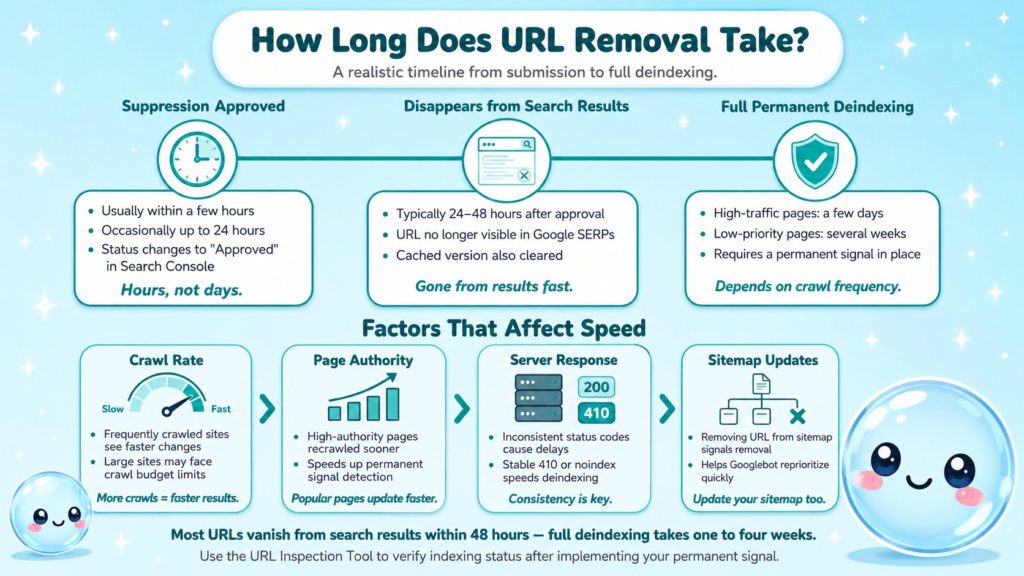
- Suppression approval: Usually within a few hours of submitting the request, occasionally up to 24 hours.
- Disappearance from search results: Typically within 24–48 hours of approval.
- Full deindexing (with permanent signal): Depends on crawl frequency. High-traffic pages: days. Low-priority pages: several weeks.
Several factors affect speed:
- Crawl rate: Frequently crawled sites see changes reflected faster. Crawl budget is a real constraint for large sites.
- Page authority: Pages with many inbound links tend to be recrawled sooner, which actually helps permanent signals take effect faster.
- Server response: If the page returns inconsistent HTTP status codes, Google may delay its decision.
- Sitemap.xml updates: Removing a URL from your sitemap signals to Googlebot that it no longer needs to be indexed, which can speed up deindexing.
Realistic expectation: For most sites, a URL submitted through the removal tool disappears from search results within 48 hours. Permanent deindexing after implementing a noindex tag or 410 response typically takes one to four weeks depending on crawl frequency.
Use the URL Inspection Tool in Search Console to check indexing status and request a fresh crawl once you’ve implemented your permanent signal.
How to Remove Multiple URLs and Old URLs That No Longer Exist
Batch removals for multiple URLs:
The “Remove all URLs with this prefix” option in the Removals tool is the fastest method for directories. Enter a prefix like https://example.com/old-blog/ and it will suppress all URLs under that path. Use this carefully, it is easy to accidentally suppress URLs you still want indexed.
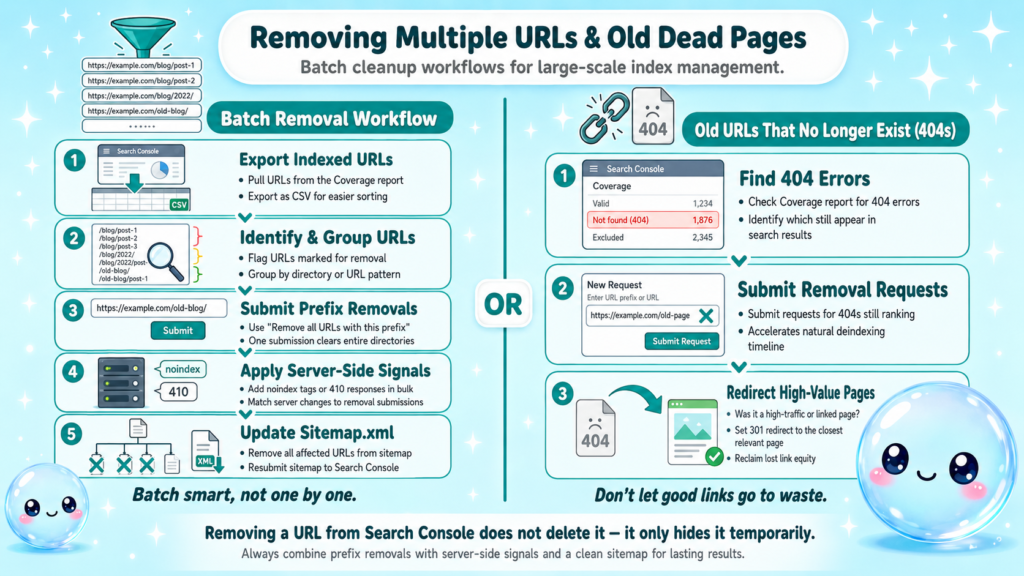
For larger-scale cleanup, I recommend this workflow:
- Export your indexed URLs from the Coverage report in Search Console.
- Identify the URLs marked for removal using your crawl tool.
- Group them by directory or URL pattern.
- Submit prefix removals for logical groups rather than individual URLs.
- Implement noindex tags or 410 responses server-side in the same batch.
- Update your sitemap.xml to exclude removed URLs.
For old URLs that no longer exist (404/410 pages):
If the page is already returning a 404 or 410, Google will eventually drop it from the index on its own, but “eventually” can mean months. Submitting a removal request accelerates this.
- Check the Coverage report for “Not found (404)” errors.
- Submit removal requests for any 404 URLs still appearing in search results.
- If the 404 was previously a high-value page, set up a 301 redirect to the closest relevant page rather than letting it lapse.
For 404 pages accumulating in bulk, a proper SEO audit will identify whether those URLs are linked internally (wasting crawl budget) or externally (losing link equity you could reclaim via redirects).
Does removing a URL in Search Console permanently delete it from Google? No. It temporarily hides it. Without a permanent technical signal, the URL will return to the index after the suppression expires.
The Right Permanent Signals: Noindex, Robots.txt, and Redirects
Choosing the wrong permanent method is as costly as using no method at all. Here is how I decide which signal to use for each scenario.
Use a noindex tag when:
- The page exists and serves a purpose (user-facing) but should not be indexed (e.g., thank-you pages, internal search results, login pages).
- You want the page accessible but invisible to search engines.
Use robots.txt disallow when:
- You want to save crawl budget by preventing Googlebot from crawling the URL at all.
- The page is truly internal or technical (e.g., admin panels, pagination parameters).
- Remember: disallowing a URL in robots.txt does not remove it from the index if it is already indexed and has external links.
Use a 410 HTTP status when:
- The content is permanently gone and has no replacement.
- You want the fastest possible deindexing signal.
Use a 301 redirect when:
- The content has moved to a new URL.
- You want to preserve link equity and rankings.
- Old blog posts, product pages, or category pages that have been restructured.
Use canonical tags when:
- Duplicate versions of the same page exist (HTTP vs. HTTPS, www vs. non-www, parameter variants).
- You want to consolidate ranking signals to one preferred URL without removing the others.
Understanding which technical lever to pull is core to holistic SEO, every signal you send affects crawlability, indexability, and ultimately how search engines evaluate your entire domain.
Conclusion
- The URL Removal Tool suppresses URLs for 180 days, it does not permanently remove them from Google’s index.
- Always pair a removal request with a permanent signal: noindex tag, 410 status, 301 redirect, or robots.txt block.
- Batch removals by prefix for efficiency; update your sitemap.xml to match.
- Use the URL Inspection Tool to verify deindexing status after implementing changes.
At sneo.ai, we built our Google Search Console alternative so you can ask plain-language questions about your index health and get specific answers for your site, not generic advice.
Frequently Asked Questions
Q1: Does submitting a URL removal request in Google Search Console delete the page from the internet?
No. It only suppresses the URL from appearing in Google search results for approximately 180 days. The page still exists on your server and can be accessed directly. Without a noindex tag, 410 status, or other permanent signal, Google will reindex it after the window expires.
Q2: How do I know if my URL removal request was approved?
Check the Removals tool in Search Console under Index → Removals. Approved requests show a green “Approved” status. You can also use the URL Inspection Tool to confirm the URL is no longer indexed by requesting a live URL check.
Q3: Can I remove a URL from Google Search Console if I don’t own the site?
No. You must be a verified owner of the property in Search Console. If you need to remove outdated content from a site you do not own, use the “Outdated Content” report under the Removals tool, which flags stale cached pages to Google for review.
Q4: What happens to my ranking after I remove a URL?
The URL drops from search results entirely while the suppression is active. If the page had organic traffic, that traffic is lost for the duration. After implementing a permanent noindex or 410, the rankings do not recover because the page is intentionally removed.
Q5: Should I remove URLs from Bing Webmaster Tools separately?
Yes. The Google Search Console Removal Tool only affects Google’s index. Submit removal requests directly in Bing Webmaster Tools using their URL Removal feature to ensure the URL is cleared from Bing search results as well.
Q6: How to remove URLs from Google Search Console in bulk without submitting them one by one?
Use the “Remove all URLs with this prefix” option in the Removals tool and enter the directory path (e.g., https://example.com/old-category/). This suppresses all URLs under that prefix simultaneously. For complete cleanup, combine this with a server-side noindex or 410 response across the affected directory.